Connect Trello with an API key and token. Read boards, lists, cards, checklists and comments, and create, move or comment on cards from your AI.
Status: Available. Connect Trello with two values: an API key from an app you make in Trello, and a token for that key. The token reaches every board your Trello account can see. You pick its access and how long it lasts.Explore the Trello connector.
An API key from your own app at trello.com/power-ups/admin, and a token made for that key.
1
Get an API key from Trello
Open trello.com/power-ups/admin and choose New. Choose My app doesn’t use Power-Up capabilities, then fill in the name, your Workspace, the two emails and the author, and choose Create. Open the Trello Auth tab and choose Generate a new API Key. Copy the API key. Trello may ask you to accept its developer agreement on your first visit.
2
Open Trello in Connections
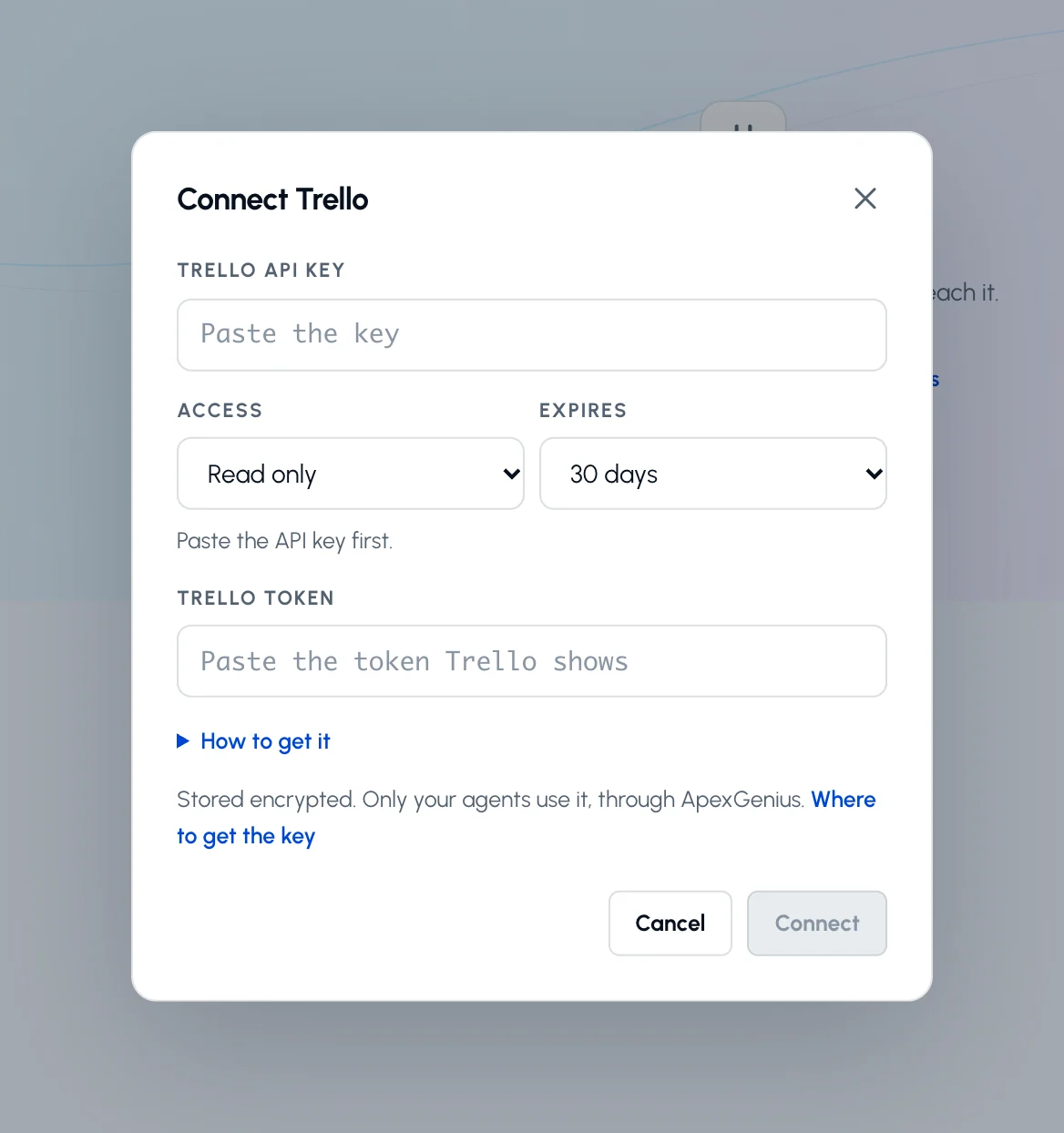
Choose Connect or Add connection, and paste the API key.
Paste your Trello API key, pick the access and how long the token lasts, then paste the token Trello shows. How to get it walks through both.
3
Make a token for that key
Pick Read only or Read and write, and how long the token lasts. Choose Make a token on Trello, check the access Trello lists, and choose Allow. Copy the token Trello shows and paste it under the key.
4
Check the saved connection
Save after the check succeeds. ApexGenius checks the key and token with Trello before saving. Review the Tools tab. A Read only token makes Trello refuse every change.
Try a first question with your AI agent
List my open Trello boards with their names and links. Do not create, move or change anything.
Compare the boards with your Trello home page. Listing boards changes nothing in Trello.
Trello sets what the token can do when you make it. ApexGenius offers two choices:
Read only (scope=read): your AI can read boards, lists, cards, checklists and comments. Trello refuses every change.
Read and write (scope=read,write): your AI can also create, change, move, archive and comment on cards.
You also pick when the token expires: 1 day, 30 days or never. When it expires, Trello stops accepting it. Make a new token for the same key and reconnect.To make a token by hand, open this address with your own API key in place of YOUR_API_KEY, then choose Allow:
The API key is meant to be public. The token is secret: paste it only into ApexGenius. To revoke a token, open your Trello account settings and remove the app under Applications.
Read the lists, cards, labels and checklists on a board.
Search cards and boards by text.
Read a card’s comments and history, and recent board activity.
Create, change, move and archive cards, and add comments, with a Read and write token.
Three ApexGenius tools reach these operations: one to search them, one to read and one to write. Reads use the read route, so an AI agent set to Read only can use them. Card changes use the write route. Enabled writes run immediately. Turn a tool off to block calls.
An archived card can be brought back with archive_card. Move a card back with move_card, or put old values back with update_card.
A comment cannot be removed through ApexGenius, and a Trello notification cannot be recalled. Permanent deletes are not offered.
Trello allows 100 requests every 10 seconds for each token, and 300 for each API key. Requests to member routes, such as listing your boards, have a lower limit of 100 every 15 minutes.
Disconnecting stops future access. It does not undo a change that already ran.
If a layer fails (the connection, the tools, or the skill), Trello is partially ready. A saved key by itself does not make the connector usable.
{"docsConfig":{"theme":"maple","$schema":"https://mintlify.com/docs.json","name":"ApexGenius","description":"Connect one app to a supported AI client, then keep the account, available operations, and observed Activity clear.","colors":{"primary":"#0055FF","light":"#4C7FE5","dark":"#4C7FE5"},"logo":{"light":"https://mintcdn.com/apexgenius/PL1VOuYeZtypECmH/logo/apexgenius.svg?fit=max\u0026auto=format\u0026n=PL1VOuYeZtypECmH\u0026q=85\u0026s=ef6a088897a39f3ddbf23122743577fe","dark":"https://mintcdn.com/apexgenius/PL1VOuYeZtypECmH/logo/apexgenius-dark.svg?fit=max\u0026auto=format\u0026n=PL1VOuYeZtypECmH\u0026q=85\u0026s=90a72ff0da22baa182d13aa1ab8398d9","href":"https://www.apexgenius.ai"},"favicon":{"light":"https://mintcdn.com/apexgenius/PL1VOuYeZtypECmH/logo/apexgenius.svg?fit=max\u0026auto=format\u0026n=PL1VOuYeZtypECmH\u0026q=85\u0026s=ef6a088897a39f3ddbf23122743577fe","dark":"https://mintcdn.com/apexgenius/PL1VOuYeZtypECmH/logo/apexgenius-dark.svg?fit=max\u0026auto=format\u0026n=PL1VOuYeZtypECmH\u0026q=85\u0026s=90a72ff0da22baa182d13aa1ab8398d9"},"appearance":{"default":"system","strict":false},"background":{"color":{"light":"#FAF9F6","dark":"#15171B"}},"navbar":{"links":[{"icon":"blocks","href":"https://www.apexgenius.ai/connectors","label":"Connectors"},{"icon":"workflow","href":"https://www.gatechsolutionsllc.com/services/agentforce-consulting","label":"Implementation help"}],"primary":{"type":"button","label":"Connect it free","href":"https://www.apexgenius.ai/auth"}},"footer":{"socials":{"x":"https://x.com/ApexGeniusAI","linkedin":"https://www.linkedin.com/company/apexgenius","youtube":"https://www.youtube.com/@ApexGeniusAI"},"links":[{"header":"ApexGenius","items":[{"label":"Product","href":"https://www.apexgenius.ai/mcp"},{"label":"Connector catalog","href":"https://www.apexgenius.ai/connectors"},{"label":"Security","href":"https://www.apexgenius.ai/security"}]},{"header":"Implementation","items":[{"label":"GAT Solutions services","href":"https://www.gatechsolutionsllc.com/services"},{"label":"AI and Agentforce consulting","href":"https://www.gatechsolutionsllc.com/services/agentforce-consulting"},{"label":"Salesforce integrations","href":"https://www.gatechsolutionsllc.com/services/salesforce-integrations"}]},{"header":"Legal","items":[{"label":"Privacy","href":"https://www.apexgenius.ai/privacy"},{"label":"Terms","href":"https://www.apexgenius.ai/terms"}]}]},"fonts":{"family":"Urbanist"},"icons":{"library":"lucide"},"styling":{"eyebrows":"breadcrumbs","codeblocks":"system","latex":false},"integrations":{"ga4":{"measurementId":"G-7RKJ5X02QV"}},"errors":{"404":{"redirect":false,"title":"This route is not in the gateway docs","description":"Check the address or return to the [ApexGenius introduction](/getting-started/introduction)."}},"contextual":{"options":["copy","view","chatgpt","claude"],"display":"header"},"metadata":{"timestamp":true},"navigation":{"pages":[]}},"deployment":{"deploymentMetadataValue":{"subdomain":"apexgenius","hasAudioNarration":false,"actualSubdomain":"apexgenius","customDomains":["docs.apexgenius.ai"],"gitSource":{"type":"github","owner":"ezscore","repo":"apexai","deployBranch":"main","contentDirectory":"content/docs","isPrivate":true,"mountPath":"","label":""},"chroma":{"latestBuiltDeploymentHistoryId":"6adf8dda83c1646dca34052e","collectionId":"e0816f0f-0792-45be-b62b-e511c2f006d7","liveDeploymentHistoryId":"6adf8dda83c1646dca34052e","schemaVersion":"v3"},"entitlements":{},"buildId":"6adf8dda83c1646dca34052e","clientVersion":"0.0.3969","searchFilterCounts":[{"language":"default","tag":"Connect apps","count":43},{"language":"default","tag":"Additional connector guides","count":33},{"language":"default","tag":"Connect an AI client","count":6},{"language":"default","tag":"Salesforce","count":5},{"language":"default","tag":"Start here","count":5},{"language":"default","tag":"Reference and support","count":4},{"language":"default","tag":"Governance and concepts","count":3}]},"assistantConfig":{"enableAskAiButton":false,"enableStarterQuestions":false,"enableContextualStarterQuestions":false,"enableAskAiSearchBar":true},"basePath":"","hasChatPermissions":false,"hasWebMcpPermissions":false,"toggles":[{"name":"kill-isr","enabled":true,"variant":{"name":"disabled","enabled":false,"feature_enabled":true},"impressionData":false},{"name":"agent-mintlify-slack","enabled":true,"variant":{"name":"disabled","enabled":false,"feature_enabled":true},"impressionData":false},{"name":"editor-v7-file-tree","enabled":true,"variant":{"name":"disabled","enabled":false,"feature_enabled":true},"impressionData":false},{"name":"agent-integrations-settings","enabled":true,"variant":{"name":"disabled","enabled":false,"feature_enabled":true},"impressionData":false},{"name":"automations-pr-grouping","enabled":true,"variant":{"name":"disabled","enabled":false,"feature_enabled":true},"impressionData":false},{"name":"custom-prefix","enabled":true,"variant":{"name":"disabled","enabled":false,"feature_enabled":true},"impressionData":false},{"name":"analytics-v7","enabled":true,"variant":{"name":"disabled","enabled":false,"feature_enabled":true},"impressionData":false},{"name":"user-flows-analytics","enabled":true,"variant":{"name":"disabled","enabled":false,"feature_enabled":true},"impressionData":false},{"name":"no-publish-flow","enabled":true,"variant":{"name":"disabled","enabled":false,"feature_enabled":true},"impressionData":false},{"name":"workos-onboarding","enabled":true,"variant":{"name":"disabled","enabled":false,"feature_enabled":true},"impressionData":false},{"name":"llms-txt-v2","enabled":true,"variant":{"name":"disabled","enabled":false,"feature_enabled":true},"impressionData":false},{"name":"pause-universal-search-reconcile","enabled":true,"variant":{"name":"disabled","enabled":false,"feature_enabled":true},"impressionData":false},{"name":"snapshot-serving-live","enabled":true,"variant":{"name":"disabled","enabled":false,"feature_enabled":true},"impressionData":false},{"name":"stripTemperatureMiddleware","enabled":true,"variant":{"name":"disabled","enabled":false,"feature_enabled":true},"impressionData":false},{"name":"per-site-search-delta","enabled":true,"variant":{"name":"disabled","enabled":false,"feature_enabled":true},"impressionData":false},{"name":"support-platform-pylon-zendesk","enabled":true,"variant":{"name":"disabled","enabled":false,"feature_enabled":true},"impressionData":false},{"name":"snapshot-serving","enabled":true,"variant":{"name":"disabled","enabled":false,"feature_enabled":true},"impressionData":false},{"name":"instant-rollback","enabled":true,"variant":{"name":"disabled","enabled":false,"feature_enabled":true},"impressionData":false},{"name":"granular-notifications-server","enabled":true,"variant":{"name":"disabled","enabled":false,"feature_enabled":true},"impressionData":false},{"name":"granular-notifications","enabled":true,"variant":{"name":"disabled","enabled":false,"feature_enabled":true},"impressionData":false},{"name":"editor-private-page-search","enabled":true,"variant":{"name":"disabled","enabled":false,"feature_enabled":true},"impressionData":false},{"name":"automations-fable","enabled":true,"variant":{"name":"disabled","enabled":false,"feature_enabled":true},"impressionData":false},{"name":"fixed-ai-action-pricing","enabled":true,"variant":{"name":"disabled","enabled":false,"feature_enabled":true},"impressionData":false},{"name":"automation-resolve-merge-conflict","enabled":true,"variant":{"name":"disabled","enabled":false,"feature_enabled":true},"impressionData":false},{"name":"scoped-publishing","enabled":true,"variant":{"name":"disabled","enabled":false,"feature_enabled":true},"impressionData":false},{"name":"mintql","enabled":true,"variant":{"name":"disabled","enabled":false,"feature_enabled":true},"impressionData":false},{"name":"page-level-analytics","enabled":true,"variant":{"name":"disabled","enabled":false,"feature_enabled":true},"impressionData":false},{"name":"editor-version-history-v2","enabled":true,"variant":{"name":"disabled","enabled":false,"feature_enabled":true},"impressionData":false},{"name":"editor-nav-generations","enabled":true,"variant":{"name":"disabled","enabled":false,"feature_enabled":true},"impressionData":false},{"name":"billing-page-v2","enabled":true,"variant":{"name":"disabled","enabled":false,"feature_enabled":true},"impressionData":false},{"name":"workspace-projects","enabled":true,"variant":{"name":"disabled","enabled":false,"feature_enabled":true},"impressionData":false},{"name":"assistant-v5","enabled":true,"variant":{"name":"disabled","enabled":false,"feature_enabled":true},"impressionData":false},{"name":"byok-sep-25","enabled":true,"variant":{"name":"disabled","enabled":false,"feature_enabled":true},"impressionData":false},{"name":"fork-pr-previews","enabled":true,"variant":{"name":"disabled","enabled":false,"feature_enabled":true},"impressionData":false},{"name":"revalidation-jwt","enabled":true,"variant":{"name":"disabled","enabled":false,"feature_enabled":true},"impressionData":false},{"name":"vite-origin","enabled":true,"variant":{"name":"disabled","enabled":false,"feature_enabled":true},"impressionData":false},{"name":"editor-agent-model-picker","enabled":true,"variant":{"name":"disabled","enabled":false,"feature_enabled":true},"impressionData":false},{"name":"billing-updated-9-15","enabled":true,"variant":{"name":"disabled","enabled":false,"feature_enabled":true},"impressionData":false},{"name":"hobby-abuse-scan","enabled":true,"variant":{"name":"disabled","enabled":false,"feature_enabled":true},"impressionData":false},{"name":"dashboard-inbox","enabled":true,"variant":{"name":"disabled","enabled":false,"feature_enabled":true},"impressionData":false}],"isAtlas":false,"googleFontsInlined":true},"customCss":[{"filePath":"style.css","content":":root{--ag-canvas:#FAF9F6;--ag-surface:#FFFFFF;--ag-ink:#1A1A18;--ag-muted:#6B6B66;--ag-border:#E8E5DF;--ag-blue:#0055FF;--ag-blue-frame:rgb(0 85 255 / 18%);--ag-clay:#D97757}.dark{--ag-blue-frame:rgb(51 119 255 / 28%)}#navbar{border-bottom:1px solid var(--ag-blue-frame)}nav[aria-label=Pages]{border-right-color:var(--ag-blue-frame)}card,code-block{border-radius:14px}callout{border-radius:12px}@media (prefers-reduced-motion:reduce){*,::after,::before{scroll-behavior:auto!important;animation-duration:.01ms!important;animation-iteration-count:1!important;transition-duration:.01ms!important}}"}],"page":{"pagePath":"integrations/trello","slug":"/integrations/trello","pageMetadata":{"title":"Trello MCP Setup","description":"Connect Trello with an API key and token. Read boards, lists, cards, checklists and comments, and create, move or comment on cards from your AI.","href":"/integrations/trello"},"description":{"compiledSource":"\"use strict\";\nconst {jsx: _jsx} = arguments[0];\nconst {useMDXComponents: _provideComponents} = arguments[0];\nfunction _createMdxContent(props) {\n const _components = {\n p: \"p\",\n ..._provideComponents(),\n ...props.components\n };\n return _jsx(_components.p, {\n children: \"Connect Trello with an API key and token. Read boards, lists, cards, checklists and comments, and create, move or comment on cards from your AI.\"\n });\n}\nfunction MDXContent(props = {}) {\n const {wrapper: MDXLayout} = {\n ..._provideComponents(),\n ...props.components\n };\n return MDXLayout ? _jsx(MDXLayout, {\n ...props,\n children: _jsx(_createMdxContent, {\n ...props\n })\n }) : _createMdxContent(props);\n}\nreturn {\n default: MDXContent\n};\n","frontmatter":{},"scope":{}},"pageType":"default","mdx":{"mdxSource":{"compiledSource":"\"use strict\";const{Fragment:_Fragment,jsx:_jsx,jsxs:_jsxs}=arguments[0];const{useMDXComponents:_provideComponents}=arguments[0];function _createMdxContent(props){const _components={a:`a`,code:`code`,li:`li`,p:`p`,pre:`pre`,span:`span`,strong:`strong`,tbody:`tbody`,td:`td`,th:`th`,thead:`thead`,tr:`tr`,ul:`ul`,..._provideComponents(),...props.components},{CodeBlock,Frame,Heading,OptimizedImage,Step,Steps,Table}=_components;if(!CodeBlock)_missingMdxReference(`CodeBlock`,true);if(!Frame)_missingMdxReference(`Frame`,true);if(!Heading)_missingMdxReference(`Heading`,true);if(!OptimizedImage)_missingMdxReference(`OptimizedImage`,true);if(!Step)_missingMdxReference(`Step`,true);if(!Steps)_missingMdxReference(`Steps`,true);if(!Table)_missingMdxReference(`Table`,true);return _jsxs(_Fragment,{children:[_jsxs(_components.p,{children:[_jsx(_components.strong,{children:`Status: Available.`}),` Connect Trello with two values: an API key from an app you make in Trello, and a token for that key. The token reaches every board your Trello account can see. You pick its access and how long it lasts.`]}),`\n`,_jsxs(_components.p,{children:[_jsx(_components.a,{href:`https://www.apexgenius.ai/connectors/trello`,children:`Explore the Trello connector`}),`.`]}),`\n`,_jsx(Heading,{level:`2`,id:`connect-and-read-your-boards`,children:`Connect and read your boards`}),`\n`,_jsx(_components.p,{children:_jsx(_components.strong,{children:`Before you start`})}),`\n`,_jsxs(_components.ul,{children:[`\n`,_jsx(_components.li,{children:`A Trello account that admins a Workspace.`}),`\n`,_jsx(_components.li,{children:`An API key from your own app at trello.com/power-ups/admin, and a token made for that key.`}),`\n`]}),`\n`,_jsxs(Steps,{children:[_jsx(Step,{title:`Get an API key from Trello`,children:_jsx(_components.p,{children:`Open trello.com/power-ups/admin and choose New. Choose My app doesn’t use Power-Up capabilities, then fill in the name, your Workspace, the two emails and the author, and choose Create. Open the Trello Auth tab and choose Generate a new API Key. Copy the API key. Trello may ask you to accept its developer agreement on your first visit.`})}),_jsxs(Step,{title:`Open Trello in Connections`,children:[_jsx(_components.p,{children:`Choose Connect or Add connection, and paste the API key.`}),_jsxs(Frame,{caption:`Paste your Trello API key, pick the access and how long the token lasts, then paste the token Trello shows. How to get it walks through both.`,children:[_jsx(OptimizedImage,{src:`https://www.apexgenius.ai/images/integration-guides/trello/20261026-open.webp`,alt:`The Connect Trello dialog in ApexGenius with the empty Trello API key field, the Access and Expires choices, the empty Trello token field and the Connect button.`,className:`mint-hidden sm:mint-block`,width:`1168`,height:`1244`,style:{width:`100%`,height:`auto`}}),_jsx(OptimizedImage,{src:`https://www.apexgenius.ai/images/integration-guides/trello/20261026-open-mobile.webp`,alt:`The Connect Trello dialog in ApexGenius with the empty Trello API key field, the Access and Expires choices, the empty Trello token field and the Connect button.`,className:`mint-block sm:mint-hidden`,width:`780`,height:`1092`,style:{width:`100%`,height:`auto`}})]})]}),_jsx(Step,{title:`Make a token for that key`,children:_jsx(_components.p,{children:`Pick Read only or Read and write, and how long the token lasts. Choose Make a token on Trello, check the access Trello lists, and choose Allow. Copy the token Trello shows and paste it under the key.`})}),_jsx(Step,{title:`Check the saved connection`,children:_jsx(_components.p,{children:`Save after the check succeeds. ApexGenius checks the key and token with Trello before saving. Review the Tools tab. A Read only token makes Trello refuse every change.`})})]}),`\n`,_jsx(_components.p,{children:_jsx(_components.strong,{children:`Try a first question with your AI agent`})}),`\n`,_jsx(CodeBlock,{filename:``,numberOfLines:`2`,language:`text`,children:_jsx(_components.pre,{className:`shiki shiki-themes github-light-default dark-plus`,style:{backgroundColor:`#ffffff`,\"--shiki-dark-bg\":`#0B0C0E`,color:`#1f2328`,\"--shiki-dark\":`#D4D4D4`},language:`text`,children:_jsxs(_components.code,{language:`text`,numberOfLines:`2`,children:[_jsx(_components.span,{className:`line`,children:_jsx(_components.span,{children:`List my open Trello boards with their names and links. Do not create, move or change anything.`})}),`\n`,_jsx(_components.span,{className:`line`,children:_jsx(_components.span,{})})]})})}),`\n`,_jsx(_components.p,{children:`Compare the boards with your Trello home page. Listing boards changes nothing in Trello.`}),`\n`,_jsx(Heading,{level:`2`,id:`choose-the-token’s-access`,children:`Choose the token’s access`}),`\n`,_jsx(_components.p,{children:`Trello sets what the token can do when you make it. ApexGenius offers two choices:`}),`\n`,_jsxs(_components.ul,{children:[`\n`,_jsxs(_components.li,{children:[_jsx(_components.strong,{children:`Read only`}),` (`,_jsx(_components.code,{children:`scope=read`}),`): your AI can read boards, lists, cards, checklists and comments. Trello refuses every change.`]}),`\n`,_jsxs(_components.li,{children:[_jsx(_components.strong,{children:`Read and write`}),` (`,_jsx(_components.code,{children:`scope=read,write`}),`): your AI can also create, change, move, archive and comment on cards.`]}),`\n`]}),`\n`,_jsx(_components.p,{children:`You also pick when the token expires: 1 day, 30 days or never. When it expires, Trello stops accepting it. Make a new token for the same key and reconnect.`}),`\n`,_jsxs(_components.p,{children:[`To make a token by hand, open this address with your own API key in place of `,_jsx(_components.code,{children:`YOUR_API_KEY`}),`, then choose Allow:`]}),`\n`,_jsx(CodeBlock,{filename:``,numberOfLines:`2`,language:`text`,children:_jsx(_components.pre,{className:`shiki shiki-themes github-light-default dark-plus`,style:{backgroundColor:`#ffffff`,\"--shiki-dark-bg\":`#0B0C0E`,color:`#1f2328`,\"--shiki-dark\":`#D4D4D4`},language:`text`,children:_jsxs(_components.code,{language:`text`,numberOfLines:`2`,children:[_jsx(_components.span,{className:`line`,children:_jsx(_components.span,{children:`https://trello.com/1/authorize?expiration=30days\u0026scope=read\u0026response_type=token\u0026key=YOUR_API_KEY`})}),`\n`,_jsx(_components.span,{className:`line`,children:_jsx(_components.span,{})})]})})}),`\n`,_jsx(_components.p,{children:`The API key is meant to be public. The token is secret: paste it only into ApexGenius. To revoke a token, open your Trello account settings and remove the app under Applications.`}),`\n`,_jsx(Heading,{level:`2`,id:`what-your-ai-can-do`,children:`What your AI can do`}),`\n`,_jsxs(_components.ul,{children:[`\n`,_jsx(_components.li,{children:`Find boards, workspaces and members.`}),`\n`,_jsx(_components.li,{children:`Read the lists, cards, labels and checklists on a board.`}),`\n`,_jsx(_components.li,{children:`Search cards and boards by text.`}),`\n`,_jsx(_components.li,{children:`Read a card’s comments and history, and recent board activity.`}),`\n`,_jsx(_components.li,{children:`Create, change, move and archive cards, and add comments, with a Read and write token.`}),`\n`]}),`\n`,_jsx(_components.p,{children:`Three ApexGenius tools reach these operations: one to search them, one to read and one to write. Reads use the read route, so an AI agent set to Read only can use them. Card changes use the write route. Enabled writes run immediately. Turn a tool off to block calls.`}),`\n`,_jsxs(Table,{children:[_jsx(_components.thead,{children:_jsxs(_components.tr,{children:[_jsx(_components.th,{children:`Job`}),_jsx(_components.th,{children:`Reads`}),_jsx(_components.th,{children:`Writes`})]})}),_jsxs(_components.tbody,{children:[_jsxs(_components.tr,{children:[_jsx(_components.td,{children:`Account and workspaces`}),_jsxs(_components.td,{children:[_jsx(_components.code,{children:`get_me`}),`, `,_jsx(_components.code,{children:`list_member_workspaces`}),`, `,_jsx(_components.code,{children:`get_workspace`}),`, `,_jsx(_components.code,{children:`list_workspace_boards`}),`, `,_jsx(_components.code,{children:`list_workspace_members`})]}),_jsx(_components.td,{})]}),_jsxs(_components.tr,{children:[_jsx(_components.td,{children:`Boards`}),_jsxs(_components.td,{children:[_jsx(_components.code,{children:`list_member_boards`}),`, `,_jsx(_components.code,{children:`get_board`}),`, `,_jsx(_components.code,{children:`list_board_lists`}),`, `,_jsx(_components.code,{children:`list_board_members`}),`, `,_jsx(_components.code,{children:`list_board_labels`}),`, `,_jsx(_components.code,{children:`list_board_actions`})]}),_jsx(_components.td,{})]}),_jsxs(_components.tr,{children:[_jsx(_components.td,{children:`Lists and cards`}),_jsxs(_components.td,{children:[_jsx(_components.code,{children:`search`}),`, `,_jsx(_components.code,{children:`list_board_cards`}),`, `,_jsx(_components.code,{children:`get_list`}),`, `,_jsx(_components.code,{children:`list_list_cards`}),`, `,_jsx(_components.code,{children:`get_card`})]}),_jsxs(_components.td,{children:[_jsx(_components.code,{children:`create_card`}),`, `,_jsx(_components.code,{children:`update_card`}),`, `,_jsx(_components.code,{children:`move_card`}),`, `,_jsx(_components.code,{children:`archive_card`})]})]}),_jsxs(_components.tr,{children:[_jsx(_components.td,{children:`Checklists and comments`}),_jsxs(_components.td,{children:[_jsx(_components.code,{children:`list_board_checklists`}),`, `,_jsx(_components.code,{children:`list_card_checklists`}),`, `,_jsx(_components.code,{children:`get_checklist`}),`, `,_jsx(_components.code,{children:`list_card_actions`})]}),_jsx(_components.td,{children:_jsx(_components.code,{children:`add_comment`})})]})]})]}),`\n`,_jsxs(_components.p,{children:[`Open `,_jsx(_components.strong,{children:`Skills`}),` on the connection to read `,_jsx(_components.strong,{children:`Trello`}),`. It names each operation, the first safe read, and what cannot be undone.`]}),`\n`,_jsx(Heading,{level:`2`,id:`undo-and-limits`,children:`Undo and limits`}),`\n`,_jsxs(_components.ul,{children:[`\n`,_jsxs(_components.li,{children:[`An archived card can be brought back with `,_jsx(_components.code,{children:`archive_card`}),`. Move a card back with `,_jsx(_components.code,{children:`move_card`}),`, or put old values back with `,_jsx(_components.code,{children:`update_card`}),`.`]}),`\n`,_jsx(_components.li,{children:`A comment cannot be removed through ApexGenius, and a Trello notification cannot be recalled. Permanent deletes are not offered.`}),`\n`,_jsx(_components.li,{children:`Trello allows 100 requests every 10 seconds for each token, and 300 for each API key. Requests to member routes, such as listing your boards, have a lower limit of 100 every 15 minutes.`}),`\n`,_jsx(_components.li,{children:`Disconnecting stops future access. It does not undo a change that already ran.`}),`\n`]}),`\n`,_jsxs(_components.p,{children:[`If a layer fails (the connection, the tools, or the skill), Trello is `,_jsx(_components.strong,{children:`partially ready`}),`. A saved key by itself does not make the connector usable.`]}),`\n`,_jsx(Heading,{level:`2`,id:`troubleshooting`,children:`Troubleshooting`}),`\n`,_jsxs(_components.ul,{children:[`\n`,_jsxs(_components.li,{children:[_jsx(_components.strong,{children:`Trello did not accept the key and token:`}),` the token must be made for the same API key. Make a new token from the key you pasted.`]}),`\n`,_jsxs(_components.li,{children:[_jsx(_components.strong,{children:`Reconnect required:`}),` the token expired or was revoked. Make a new token and reconnect.`]}),`\n`,_jsxs(_components.li,{children:[_jsx(_components.strong,{children:`A change is refused:`}),` the token was made with Read only. Make a Read and write token and reconnect.`]}),`\n`,_jsxs(_components.li,{children:[_jsx(_components.strong,{children:`Too many requests:`}),` wait a minute, then ask for fewer boards or cards at once.`]}),`\n`]}),`\n`,_jsxs(_components.p,{children:[_jsx(_components.a,{href:`https://www.apexgenius.ai/connectors/trello`,children:`Explore the Trello connector`}),` · `,_jsx(_components.a,{href:`https://www.apexgenius.ai/connections/trello`,children:`Open Trello Connections`})]}),`\n`,_jsx(Heading,{level:`2`,id:`official-trello-documentation`,children:`Official Trello documentation`}),`\n`,_jsxs(_components.ul,{children:[`\n`,_jsxs(_components.li,{children:[`\n`,_jsx(`a`,{href:`https://developer.atlassian.com/cloud/trello/guides/rest-api/api-introduction/`,target:`_blank`,rel:`noreferrer`,children:`Trello API introduction`}),`\n`]}),`\n`,_jsxs(_components.li,{children:[`\n`,_jsx(`a`,{href:`https://developer.atlassian.com/cloud/trello/guides/rest-api/authorization/`,target:`_blank`,rel:`noreferrer`,children:`Trello API authorization`}),`\n`]}),`\n`,_jsxs(_components.li,{children:[`\n`,_jsx(`a`,{href:`https://developer.atlassian.com/cloud/trello/guides/rest-api/rate-limits/`,target:`_blank`,rel:`noreferrer`,children:`Trello API rate limits`}),`\n`]}),`\n`]})]})}function MDXContent(props={}){const{wrapper:MDXLayout}={..._provideComponents(),...props.components};return MDXLayout?_jsx(MDXLayout,{...props,children:_jsx(_createMdxContent,{...props})}):_createMdxContent(props)}return{default:MDXContent};function _missingMdxReference(id,component){throw new Error(`Expected `+(component?`component`:`object`)+\" `\"+id+\"` to be defined: you likely forgot to import, pass, or provide it.\")}","frontmatter":{},"scope":{"codeStyling":"system","config":{},"pageMetadata":{"title":"Trello MCP Setup","description":"Connect Trello with an API key and token. Read boards, lists, cards, checklists and comments, and create, move or comment on cards from your AI.","href":"/integrations/trello"}}},"mdxSourceWithNoJs":null},"mdxExtracts":{"tableOfContents":[{"title":"Connect and read your boards","slug":"connect-and-read-your-boards","depth":2,"children":[]},{"title":"Choose the token’s access","slug":"choose-the-token’s-access","depth":2,"children":[]},{"title":"What your AI can do","slug":"what-your-ai-can-do","depth":2,"children":[]},{"title":"Undo and limits","slug":"undo-and-limits","depth":2,"children":[]},{"title":"Troubleshooting","slug":"troubleshooting","depth":2,"children":[]},{"title":"Official Trello documentation","slug":"official-trello-documentation","depth":2,"children":[]}],"codeExamples":{}},"jsLinks":[],"dynamicCss":".mint-block {\n display: block\n}\n.mint-hidden {\n display: none\n}\n@media (min-width: 640px) {\n .sm\\:mint-block {\n display: block\n }\n .sm\\:mint-hidden {\n display: none\n }\n}","subdomain":"apexgenius","siteName":"ApexGenius","title":"Trello MCP Setup - ApexGenius","navMaps":{"firstHrefInVersion":{},"firstHrefInLanguage":{}},"lastModified":"2026-10-26T17:29:04.896Z","gitLastModified":"2026-10-26T17:00:33.000Z","originalFileLocation":"integrations/trello.mdx"},"headHtml":"\u003cscript data-mint-head>(function(){var d=document.documentElement,p=null;if(!p){try{p=localStorage.getItem(\"isDarkMode\")}catch(e){}if(p==='true')p='dark';else if(p==='false')p='light';if(p!=='light'\u0026\u0026p!=='dark'\u0026\u0026p!=='system')p=\"system\"}var r=p==='system'?(matchMedia(\"(prefers-color-scheme: dark)\").matches?'dark':'light'):p;d.classList.remove(r==='dark'?'light':'dark');d.classList.add(r);d.setAttribute(\"data-theme-preference\",p)})();\u003c/script>\u003cmeta data-mint-head name=\"description\" content=\"Connect Trello with an API key and token. Read boards, lists, cards, checklists and comments, and create, move or comment on cards from your AI.\">\u003cmeta data-mint-head name=\"application-name\" content=\"ApexGenius\">\u003cmeta data-mint-head name=\"generator\" content=\"Mintlify\">\u003clink data-mint-head rel=\"icon\" type=\"image/png\" sizes=\"192x192\" href=\"/mintlify-assets/_mintlify/favicons/apexgenius/of2iO4EQJQd_LzS2/_generated/favicon/android-chrome-192x192.png\" media=\"(prefers-color-scheme: light)\">\u003clink data-mint-head rel=\"apple-touch-icon\" type=\"image/png\" sizes=\"180x180\" href=\"/mintlify-assets/_mintlify/favicons/apexgenius/of2iO4EQJQd_LzS2/_generated/favicon/apple-touch-icon.png\">\u003clink data-mint-head rel=\"icon\" type=\"image/png\" sizes=\"16x16\" href=\"/mintlify-assets/_mintlify/favicons/apexgenius/of2iO4EQJQd_LzS2/_generated/favicon/favicon-16x16.png\" media=\"(prefers-color-scheme: light)\">\u003clink data-mint-head rel=\"icon\" type=\"image/png\" sizes=\"32x32\" href=\"/mintlify-assets/_mintlify/favicons/apexgenius/of2iO4EQJQd_LzS2/_generated/favicon/favicon-32x32.png\" media=\"(prefers-color-scheme: light)\">\u003clink data-mint-head rel=\"shortcut icon\" type=\"image/x-icon\" href=\"/mintlify-assets/_mintlify/favicons/apexgenius/of2iO4EQJQd_LzS2/_generated/favicon/favicon.ico\" media=\"(prefers-color-scheme: light)\">\u003clink data-mint-head rel=\"icon\" type=\"image/png\" sizes=\"192x192\" href=\"/mintlify-assets/_mintlify/favicons/apexgenius/of2iO4EQJQd_LzS2/_generated/favicon-dark/android-chrome-192x192.png\" media=\"(prefers-color-scheme: dark)\">\u003clink data-mint-head rel=\"icon\" type=\"image/png\" sizes=\"16x16\" href=\"/mintlify-assets/_mintlify/favicons/apexgenius/of2iO4EQJQd_LzS2/_generated/favicon-dark/favicon-16x16.png\" media=\"(prefers-color-scheme: dark)\">\u003clink data-mint-head rel=\"icon\" type=\"image/png\" sizes=\"32x32\" href=\"/mintlify-assets/_mintlify/favicons/apexgenius/of2iO4EQJQd_LzS2/_generated/favicon-dark/favicon-32x32.png\" media=\"(prefers-color-scheme: dark)\">\u003clink data-mint-head rel=\"shortcut icon\" type=\"image/x-icon\" href=\"/mintlify-assets/_mintlify/favicons/apexgenius/of2iO4EQJQd_LzS2/_generated/favicon-dark/favicon.ico\" media=\"(prefers-color-scheme: dark)\">\u003cmeta data-mint-head property=\"og:title\" content=\"Trello MCP Setup - ApexGenius\">\u003cmeta data-mint-head property=\"og:description\" content=\"Connect Trello with an API key and token. Read boards, lists, cards, checklists and comments, and create, move or comment on cards from your AI.\">\u003cmeta data-mint-head property=\"og:site_name\" content=\"ApexGenius\">\u003cmeta data-mint-head property=\"og:url\" content=\"https://docs.apexgenius.ai/integrations/trello\">\u003cmeta data-mint-head property=\"og:type\" content=\"website\">\u003cmeta data-mint-head property=\"og:image\" content=\"https://apexgenius.mintlify.app/_mintlify/api/og/v2?division=Additional+connector+guides\u0026amp;title=Trello+MCP+Setup\u0026amp;description=Connect+Trello+with+an+API+key+and+token.+Read+boards%2C+lists%2C+cards%2C+checklists+and+comments%2C+and+create%2C+move+or+comment+on+cards+from+your+AI.\u0026amp;theme=19ac6d0290a1eaf9945bbd0f\u0026amp;signature=916eb8743af6f2e0dcfaff6c7418a0d3608337ccb67fa2de886e46cfdadad3b1\">\u003cmeta data-mint-head property=\"og:image:width\" content=\"1200\">\u003cmeta data-mint-head property=\"og:image:height\" content=\"630\">\u003cmeta data-mint-head name=\"twitter:card\" content=\"summary_large_image\">\u003cmeta data-mint-head name=\"twitter:title\" content=\"Trello MCP Setup - ApexGenius\">\u003cmeta data-mint-head name=\"twitter:description\" content=\"Connect Trello with an API key and token. Read boards, lists, cards, checklists and comments, and create, move or comment on cards from your AI.\">\u003cmeta data-mint-head name=\"twitter:image\" content=\"https://apexgenius.mintlify.app/_mintlify/api/og/v2?division=Additional+connector+guides\u0026amp;title=Trello+MCP+Setup\u0026amp;description=Connect+Trello+with+an+API+key+and+token.+Read+boards%2C+lists%2C+cards%2C+checklists+and+comments%2C+and+create%2C+move+or+comment+on+cards+from+your+AI.\u0026amp;theme=19ac6d0290a1eaf9945bbd0f\u0026amp;signature=916eb8743af6f2e0dcfaff6c7418a0d3608337ccb67fa2de886e46cfdadad3b1\">\u003cmeta data-mint-head name=\"twitter:image:width\" content=\"1200\">\u003cmeta data-mint-head name=\"twitter:image:height\" content=\"630\">\u003cmeta data-mint-head name=\"msapplication-config\" content=\"/mintlify-assets/_mintlify/favicons/apexgenius/of2iO4EQJQd_LzS2/_generated/favicon/browserconfig.xml\">\u003cmeta data-mint-head name=\"apple-mobile-web-app-title\" content=\"ApexGenius\">\u003cmeta data-mint-head name=\"msapplication-TileColor\" content=\"#0055FF\">\u003clink data-mint-head rel=\"canonical\" href=\"https://docs.apexgenius.ai/integrations/trello\">\u003clink data-mint-head rel=\"alternate\" type=\"application/xml\" href=\"/sitemap.xml\">\u003clink data-mint-head rel=\"alternate\" type=\"text/markdown\" href=\"/integrations/trello.md\">\u003cscript data-mint-head type=\"application/ld+json\">{\"@context\":\"https://schema.org\",\"@graph\":[{\"@type\":\"Organization\",\"@id\":\"https://docs.apexgenius.ai/#organization\",\"name\":\"ApexGenius\",\"url\":\"https://docs.apexgenius.ai\",\"logo\":{\"@type\":\"ImageObject\",\"url\":\"https://mintcdn.com/apexgenius/PL1VOuYeZtypECmH/logo/apexgenius.svg?fit=max\u0026auto=format\u0026n=PL1VOuYeZtypECmH\u0026q=85\u0026s=ef6a088897a39f3ddbf23122743577fe\"}},{\"@type\":\"WebSite\",\"@id\":\"https://docs.apexgenius.ai#website\",\"name\":\"ApexGenius\",\"url\":\"https://docs.apexgenius.ai\",\"publisher\":{\"@id\":\"https://docs.apexgenius.ai/#organization\"}},{\"@type\":\"WebPage\",\"@id\":\"https://docs.apexgenius.ai/integrations/trello#webpage\",\"url\":\"https://docs.apexgenius.ai/integrations/trello\",\"name\":\"Trello MCP Setup\",\"description\":\"Connect Trello with an API key and token. Read boards, lists, cards, checklists and comments, and create, move or comment on cards from your AI.\",\"dateModified\":\"2026-10-26T17:00:33.000Z\",\"isPartOf\":{\"@id\":\"https://docs.apexgenius.ai#website\"},\"breadcrumb\":{\"@id\":\"https://docs.apexgenius.ai/integrations/trello#breadcrumb\"}},{\"@type\":\"BreadcrumbList\",\"@id\":\"https://docs.apexgenius.ai/integrations/trello#breadcrumb\",\"itemListElement\":[{\"@type\":\"ListItem\",\"position\":1,\"name\":\"Connect apps\",\"item\":\"https://docs.apexgenius.ai/integrations/provider-connections\"},{\"@type\":\"ListItem\",\"position\":2,\"name\":\"Additional connector guides\",\"item\":\"https://docs.apexgenius.ai/integrations/hq-rental\"},{\"@type\":\"ListItem\",\"position\":3,\"name\":\"Trello MCP Setup\",\"item\":\"https://docs.apexgenius.ai/integrations/trello\"}]},{\"@type\":[\"Article\",\"TechArticle\"],\"@id\":\"https://docs.apexgenius.ai/integrations/trello#article\",\"headline\":\"Trello MCP Setup\",\"name\":\"Trello MCP Setup\",\"description\":\"Connect Trello with an API key and token. Read boards, lists, cards, checklists and comments, and create, move or comment on cards from your AI.\",\"url\":\"https://docs.apexgenius.ai/integrations/trello\",\"mainEntityOfPage\":{\"@id\":\"https://docs.apexgenius.ai/integrations/trello#webpage\"},\"dateModified\":\"2026-10-26T17:00:33.000Z\",\"publisher\":{\"@id\":\"https://docs.apexgenius.ai/#organization\"},\"isPartOf\":{\"@id\":\"https://docs.apexgenius.ai#website\"}}]}\u003c/script>\u003cscript data-mint-head type=\"application/ld+json\">{\"@context\":\"https://schema.org\",\"@type\":\"WebSite\",\"name\":\"ApexGenius\",\"creator\":{\"@type\":\"Organization\",\"name\":\"Mintlify\",\"url\":\"https://mintlify.com\"}}\u003c/script>","siteName":"ApexGenius","nav":{"global":null,"groups":[{"group":"Start here","icon":"route","pages":[{"title":"Connect one app to the AI you already use","href":"/getting-started/introduction"},{"title":"Connect an AI client","href":"/guides/mcp-setup"},{"title":"Send the first safe request","href":"/guides/first-safe-request"},{"title":"Skills","href":"/guides/skills"},{"title":"Memory","href":"/guides/memory"}]},{"group":"Connect an AI client","icon":"message-square-code","pages":[{"title":"Connect Claude","href":"/guides/connect-claude"},{"title":"Connect ChatGPT","href":"/guides/connect-chatgpt"},{"title":"Connect Codex","href":"/guides/connect-codex"},{"title":"Connect Cursor","href":"/guides/connect-cursor"},{"title":"Connect VS Code","href":"/guides/connect-vscode"},{"title":"Connect Claude Code","href":"/guides/connect-claude-code"}]},{"group":"Salesforce","icon":"cloud","pages":[{"title":"Connect Salesforce","href":"/getting-started/connect-salesforce"},{"title":"Loading Metadata","href":"/getting-started/load-metadata"},{"title":"Using the Account App","href":"/getting-started/using-chat"},{"title":"Reports and Dashboards: Current Availability","href":"/guides/reports-and-dashboards"},{"title":"Salesforce connection model","href":"/integrations/salesforce-connection"}]},{"group":"Connect apps","icon":"plug-zap","pages":[{"title":"App connection guides","href":"/integrations/provider-connections"},{"title":"YouTube MCP Setup","href":"/integrations/youtube"},{"title":"YouTube Analytics MCP Setup","href":"/integrations/youtube-analytics"},{"title":"n8n MCP Setup","href":"/integrations/n8n"},{"title":"Confluence MCP Setup","href":"/integrations/confluence"},{"title":"Discord MCP Setup","href":"/integrations/discord"},{"title":"Jira MCP Setup","href":"/integrations/jira"},{"group":"Additional connector guides","icon":"flask-conical","pages":[{"title":"HQ Rental MCP Setup","href":"/integrations/hq-rental"},{"title":"Google Ads MCP Setup","href":"/integrations/google-ads"},{"title":"Google Search Console MCP Setup","href":"/integrations/google-search-console"},{"title":"Google Analytics MCP Setup","href":"/integrations/google-analytics"},{"title":"Google Workspace MCP Setup","href":"/integrations/google-workspace"},{"title":"Upwork MCP Setup","href":"/integrations/upwork"},{"title":"Apollo MCP Setup","href":"/integrations/apollo"},{"title":"Notion MCP Setup","href":"/integrations/notion"},{"title":"Connect Slack accounts","href":"/integrations/slack"},{"title":"ClickUp MCP Setup","href":"/integrations/clickup"},{"title":"Connect Blotato","href":"/integrations/blotato"},{"title":"Connect HighLevel","href":"/integrations/gohighlevel"},{"title":"ChatGPT Ads MCP Setup","href":"/integrations/chatgpt-ads"},{"title":"Semrush MCP Setup","href":"/integrations/semrush"},{"title":"Bing Webmaster MCP Setup","href":"/integrations/bing-webmaster"},{"title":"Apify MCP Setup","href":"/integrations/apify"},{"title":"Linear MCP Setup","href":"/integrations/linear"},{"title":"Attio MCP Setup","href":"/integrations/attio"},{"title":"Calendly MCP Setup","href":"/integrations/calendly"},{"title":"Connect Cal.com to your AI","href":"/integrations/cal-com"},{"title":"Mobbin MCP Setup","href":"/integrations/mobbin"},{"title":"Supabase MCP Setup","href":"/integrations/supabase"},{"title":"Context.dev MCP Setup","href":"/integrations/context-dev"},{"title":"Stripe MCP Setup","href":"/integrations/stripe"},{"title":"GitHub MCP Setup","href":"/integrations/github"},{"title":"monday.com MCP Setup","href":"/integrations/monday"},{"title":"Atlassian Rovo MCP Setup","href":"/integrations/atlassian-rovo"},{"title":"ElevenLabs MCP Setup","href":"/integrations/elevenlabs"},{"title":"FreshBooks MCP Setup","description":"Set up FreshBooks MCP in ApexGenius: sign in on FreshBooks' page, turn on one business, review the 21 operations, and test with a first read.","href":"/integrations/freshbooks"},{"title":"Trello MCP Setup","href":"/integrations/trello"},{"title":"GitLab MCP Setup","description":"Connect GitLab.com to ApexGenius with a read-only personal access token. Read projects, issues, merge requests, files and pipelines from your AI.","href":"/integrations/gitlab"},{"title":"TypeSafe MCP Setup","href":"/integrations/typesafe"},{"title":"HubSpot MCP Setup","href":"/integrations/hubspot"}]},{"title":"Connect Speedrun Alpha","href":"/integrations/speedrun"},{"title":"Connect OP.GG to your AI","href":"/integrations/opgg"},{"title":"Read Polymarket information with your AI","href":"/integrations/polymarket"}]},{"group":"Governance and concepts","icon":"shield-check","pages":[{"title":"How the MCP Connection Works","href":"/concepts/how-mcp-works"},{"title":"Orgs, Projects \u0026 Workspaces","href":"/concepts/orgs-and-projects"},{"title":"The Soul Doc","href":"/concepts/soul-doc"}]},{"group":"Reference and support","icon":"book-open-check","pages":[{"title":"MCP Tool Reference","href":"/reference/mcp-tools"},{"title":"Pricing and Account Limits","href":"/reference/plans-and-limits"},{"title":"Common Issues","href":"/troubleshooting/common-issues"},{"title":"How we record your signup source","href":"/reference/signup-source"}]}]},"title":"Trello MCP Setup - ApexGenius","buildId":"dpl_G8u2B2Ji9qJYF9umedjv293TxycS","deploymentId":"dpl_G8u2B2Ji9qJYF9umedjv293TxycS","dynamics":["07c022d89b","a74be98ba7"],"chunks":["Frame-CKfAdMi0.js","DynamicMarkdown-DpsHMHVL.js","zoom-image-lightbox-Io6GMTYV.js","lightbox-handle-r17bVUz3.js"]}