Connect Polymarket’s public data to your AI through ApexGenius: events, market rules, status and current prices, with no wallet, key or trading.
This public data service needs no wallet, key or Polymarket sign-in.
ApexGenius saves the connection only after a successful public read, and setup
stops if the provider denies access.Explore the Polymarket app.
No wallet, private key or Polymarket sign-in is needed for these public reads.
1
Open Polymarket in Connections
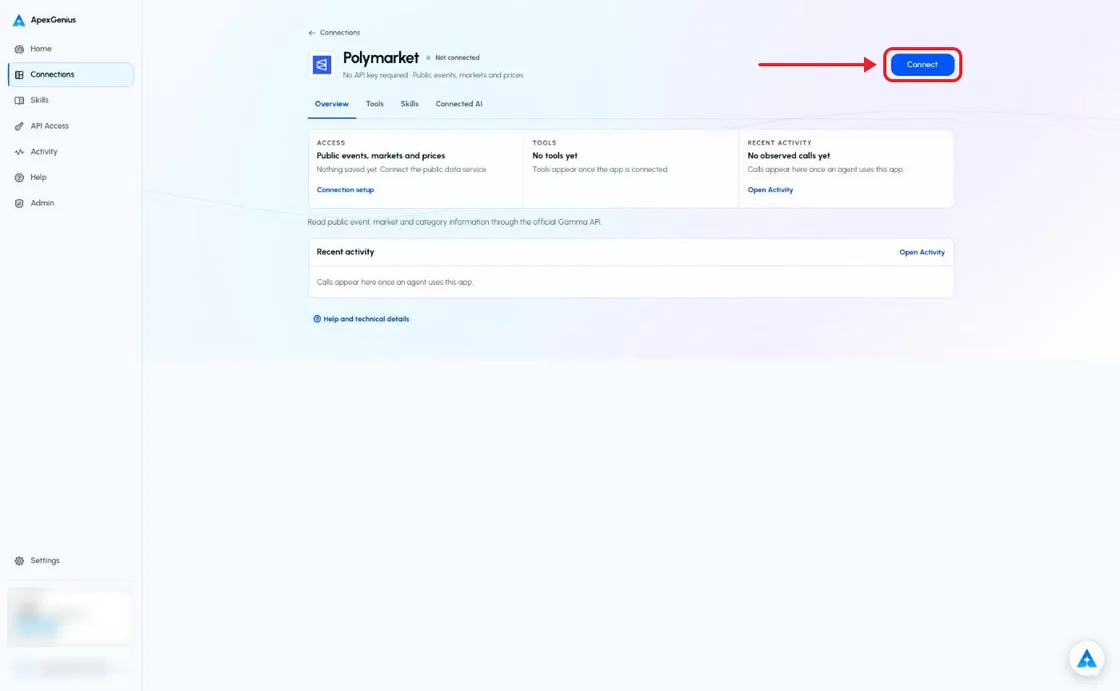
Sign in to ApexGenius, open Connections and choose Polymarket.
The Polymarket connection page before you connect. Choose Connect; there is no wallet, sign-in or key to enter. The account email and credits are blurred in this capture.
2
Check the public data service
Choose Connect. ApexGenius must complete a public data read before it saves a healthy connection. If the service denies access, setup stops.
3
Review the read tools
Keep the public data service and the reads you need on. Set up a compatible AI agent with ApexGenius.
4
Read one category
Load the PolymarketPublic skill and try the question below. Check the returned source and Tool Activity.
Try a first question with your AI agent
Read one public topic tag from Polymarket. Show its ID, label, source and the time checked.
A returned tag verifies this public read only. A saved setting or a denied request is not proof the connector works. Prices are public market data, not advice; there are no wallet, order or trading tools.Set up your AI agent: Claude · ChatGPT · Codex · Cursor · Any MCP client
The ApexGenius MCP gateway exposes reviewed reads from Polymarket’s official
Gamma API. This is not a vendor-hosted Polymarket MCP or a partnership claim.
Tool
Public information
polymarket_search_public
Text search for events and topic tags
polymarket_list_events
A bounded page of events, their markets and current prices
polymarket_get_event
One event, its markets and their current prices by ID
polymarket_list_markets
A bounded page of market questions, status and current prices
polymarket_get_market
One market’s question, rules, status and current prices by ID
polymarket_list_tags
Topic IDs and labels
polymarket_list_sports
Sports category metadata
These reads need no wallet, private key, API key or password. They include the
public prices Polymarket shows, and omit order books, wallet activity, token IDs,
funding and trading. The connector cannot place bets, sign transactions, make
payments or send messages.
Each market lists its outcomes and their outcomePrices in the same order. A
price runs from 0 to 1, so 0.62 means traders price that outcome at about a 62%
chance. Markets also carry the best bid and ask, the last trade price, volume and
liquidity in US dollars. In an event with many outcomes, each market is one
outcome and groupItemTitle names it.Prices change all the time. Give the time checked with every price, and treat it
as the market’s view, not a fact, a forecast or advice. A closed market’s last
price is not its official resolution.
Load the PolymarketPublic skill from the connection’s Skills tab, or ask
a compatible agent to read it. The skill explains source attribution, event
identity, status and missing data. It grants no additional access.Use IDs returned by the source. A team name, sports category or OP.GG schedule
does not prove a Polymarket market exists. Worlds and LCS are separate
competitions. Read the exact market question and rules; a closed flag alone
does not prove a final outcome.Results include the source, fetch time and a truncation indicator. Do not
invent missing fields or treat an empty page as a complete search. List pages
are limited to 25 rows; search requests are limited to 20 results per type.
Provider terms and rate limits still apply. Do not automate bulk extraction.
Check that the public metadata service, tool and AI access are on.
Use Test connection only after the provider’s access issue is resolved.
No connection is reported healthy from a denied or malformed read.An access denial is not a reason to enter a wallet key or switch hosts,
identities or proxies. Keep the result unavailable until an allowed read works.Disconnecting stops future ApexGenius calls. It does not change public source
records. Each compatible AI agent needs its own ApexGenius setup; skill loading
depends on the agent.
{"docsConfig":{"theme":"maple","$schema":"https://mintlify.com/docs.json","name":"ApexGenius","description":"Connect one app to a supported AI client, then keep the account, available operations, and observed Activity clear.","colors":{"primary":"#0055FF","light":"#4C7FE5","dark":"#4C7FE5"},"logo":{"light":"https://mintcdn.com/apexgenius/PL1VOuYeZtypECmH/logo/apexgenius.svg?fit=max\u0026auto=format\u0026n=PL1VOuYeZtypECmH\u0026q=85\u0026s=ef6a088897a39f3ddbf23122743577fe","dark":"https://mintcdn.com/apexgenius/PL1VOuYeZtypECmH/logo/apexgenius-dark.svg?fit=max\u0026auto=format\u0026n=PL1VOuYeZtypECmH\u0026q=85\u0026s=90a72ff0da22baa182d13aa1ab8398d9","href":"https://www.apexgenius.ai"},"favicon":{"light":"https://mintcdn.com/apexgenius/PL1VOuYeZtypECmH/logo/apexgenius.svg?fit=max\u0026auto=format\u0026n=PL1VOuYeZtypECmH\u0026q=85\u0026s=ef6a088897a39f3ddbf23122743577fe","dark":"https://mintcdn.com/apexgenius/PL1VOuYeZtypECmH/logo/apexgenius-dark.svg?fit=max\u0026auto=format\u0026n=PL1VOuYeZtypECmH\u0026q=85\u0026s=90a72ff0da22baa182d13aa1ab8398d9"},"appearance":{"default":"system","strict":false},"background":{"color":{"light":"#FAF9F6","dark":"#15171B"}},"navbar":{"links":[{"icon":"blocks","href":"https://www.apexgenius.ai/connectors","label":"Connectors"},{"icon":"workflow","href":"https://www.gatechsolutionsllc.com/services/agentforce-consulting","label":"Implementation help"}],"primary":{"type":"button","label":"Connect it free","href":"https://www.apexgenius.ai/auth"}},"footer":{"socials":{"x":"https://x.com/ApexGeniusAI","linkedin":"https://www.linkedin.com/company/apexgenius","youtube":"https://www.youtube.com/@ApexGeniusAI"},"links":[{"header":"ApexGenius","items":[{"label":"Product","href":"https://www.apexgenius.ai/mcp"},{"label":"Connector catalog","href":"https://www.apexgenius.ai/connectors"},{"label":"Security","href":"https://www.apexgenius.ai/security"}]},{"header":"Implementation","items":[{"label":"GAT Solutions services","href":"https://www.gatechsolutionsllc.com/services"},{"label":"AI and Agentforce consulting","href":"https://www.gatechsolutionsllc.com/services/agentforce-consulting"},{"label":"Salesforce integrations","href":"https://www.gatechsolutionsllc.com/services/salesforce-integrations"}]},{"header":"Legal","items":[{"label":"Privacy","href":"https://www.apexgenius.ai/privacy"},{"label":"Terms","href":"https://www.apexgenius.ai/terms"}]}]},"fonts":{"family":"Urbanist"},"icons":{"library":"lucide"},"styling":{"eyebrows":"breadcrumbs","codeblocks":"system","latex":false},"errors":{"404":{"redirect":false,"title":"This route is not in the gateway docs","description":"Check the address or return to the [ApexGenius introduction](/getting-started/introduction)."}},"contextual":{"options":["copy","view","chatgpt","claude"],"display":"header"},"metadata":{"timestamp":true},"navigation":{"pages":[]}},"deployment":{"deploymentMetadataValue":{"subdomain":"apexgenius","hasAudioNarration":false,"actualSubdomain":"apexgenius","customDomains":["docs.apexgenius.ai"],"gitSource":{"type":"github","owner":"ezscore","repo":"apexai","deployBranch":"main","contentDirectory":"content/docs","isPrivate":true,"mountPath":"","label":""},"chroma":{"latestBuiltDeploymentHistoryId":"6ad5632a5ec9dc5442ec36aa","collectionId":"cddf8494-7e99-4fe1-9e26-f132edb18298","liveDeploymentHistoryId":"6ad5632a5ec9dc5442ec36aa","schemaVersion":"v3"},"entitlements":{},"buildId":"6ad566445c7ed1fc8e179c6d","clientVersion":"0.0.3883","searchFilterCounts":[{"language":"default","tag":"Connect apps","count":37},{"language":"default","tag":"Additional connector guides","count":27},{"language":"default","tag":"Salesforce","count":5},{"language":"default","tag":"Connect an AI client","count":5},{"language":"default","tag":"Reference and support","count":4},{"language":"default","tag":"Governance and concepts","count":3},{"language":"default","tag":"Start here","count":3}]},"assistantConfig":{"enableAskAiButton":false,"enableStarterQuestions":false,"enableContextualStarterQuestions":false,"enableAskAiSearchBar":true},"hasChatPermissions":false,"hasWebMcpPermissions":false,"toggles":[{"name":"kill-isr","enabled":true,"variant":{"name":"disabled","enabled":false,"feature_enabled":true},"impressionData":false},{"name":"agent-mintlify-slack","enabled":true,"variant":{"name":"disabled","enabled":false,"feature_enabled":true},"impressionData":false},{"name":"editor-v7-file-tree","enabled":true,"variant":{"name":"disabled","enabled":false,"feature_enabled":true},"impressionData":false},{"name":"agent-integrations-settings","enabled":true,"variant":{"name":"disabled","enabled":false,"feature_enabled":true},"impressionData":false},{"name":"automations-pr-grouping","enabled":true,"variant":{"name":"disabled","enabled":false,"feature_enabled":true},"impressionData":false},{"name":"custom-prefix","enabled":true,"variant":{"name":"disabled","enabled":false,"feature_enabled":true},"impressionData":false},{"name":"analytics-v7","enabled":true,"variant":{"name":"disabled","enabled":false,"feature_enabled":true},"impressionData":false},{"name":"user-flows-analytics","enabled":true,"variant":{"name":"disabled","enabled":false,"feature_enabled":true},"impressionData":false},{"name":"no-publish-flow","enabled":true,"variant":{"name":"disabled","enabled":false,"feature_enabled":true},"impressionData":false},{"name":"llms-txt-v2","enabled":true,"variant":{"name":"disabled","enabled":false,"feature_enabled":true},"impressionData":false},{"name":"pause-universal-search-reconcile","enabled":true,"variant":{"name":"disabled","enabled":false,"feature_enabled":true},"impressionData":false},{"name":"snapshot-serving-live","enabled":true,"variant":{"name":"disabled","enabled":false,"feature_enabled":true},"impressionData":false},{"name":"stripTemperatureMiddleware","enabled":true,"variant":{"name":"disabled","enabled":false,"feature_enabled":true},"impressionData":false},{"name":"per-site-search-delta","enabled":true,"variant":{"name":"disabled","enabled":false,"feature_enabled":true},"impressionData":false},{"name":"support-platform-pylon-zendesk","enabled":true,"variant":{"name":"disabled","enabled":false,"feature_enabled":true},"impressionData":false},{"name":"editor-branches-v2-autocommit","enabled":true,"variant":{"name":"disabled","enabled":false,"feature_enabled":true},"impressionData":false},{"name":"editor-branches-v2","enabled":true,"variant":{"name":"disabled","enabled":false,"feature_enabled":true},"impressionData":false},{"name":"snapshot-serving","enabled":true,"variant":{"name":"disabled","enabled":false,"feature_enabled":true},"impressionData":false},{"name":"instant-rollback","enabled":true,"variant":{"name":"disabled","enabled":false,"feature_enabled":true},"impressionData":false},{"name":"granular-notifications-server","enabled":true,"variant":{"name":"disabled","enabled":false,"feature_enabled":true},"impressionData":false},{"name":"granular-notifications","enabled":true,"variant":{"name":"disabled","enabled":false,"feature_enabled":true},"impressionData":false},{"name":"editor-private-page-search","enabled":true,"variant":{"name":"disabled","enabled":false,"feature_enabled":true},"impressionData":false},{"name":"automations-fable","enabled":true,"variant":{"name":"disabled","enabled":false,"feature_enabled":true},"impressionData":false},{"name":"fixed-ai-action-pricing","enabled":true,"variant":{"name":"disabled","enabled":false,"feature_enabled":true},"impressionData":false},{"name":"automation-resolve-merge-conflict","enabled":true,"variant":{"name":"disabled","enabled":false,"feature_enabled":true},"impressionData":false},{"name":"scoped-publishing","enabled":true,"variant":{"name":"disabled","enabled":false,"feature_enabled":true},"impressionData":false},{"name":"mintql","enabled":true,"variant":{"name":"disabled","enabled":false,"feature_enabled":true},"impressionData":false},{"name":"page-level-analytics","enabled":true,"variant":{"name":"disabled","enabled":false,"feature_enabled":true},"impressionData":false},{"name":"teamspace","enabled":true,"variant":{"name":"disabled","enabled":false,"feature_enabled":true},"impressionData":false},{"name":"editor-version-history-v2","enabled":true,"variant":{"name":"disabled","enabled":false,"feature_enabled":true},"impressionData":false},{"name":"vite-origin","enabled":true,"variant":{"name":"disabled","enabled":false,"feature_enabled":true},"impressionData":false},{"name":"editor-nav-generations","enabled":true,"variant":{"name":"disabled","enabled":false,"feature_enabled":true},"impressionData":false},{"name":"workspace-projects","enabled":true,"variant":{"name":"disabled","enabled":false,"feature_enabled":true},"impressionData":false},{"name":"assistant-v5","enabled":true,"variant":{"name":"disabled","enabled":false,"feature_enabled":true},"impressionData":false},{"name":"byok-sep-25","enabled":true,"variant":{"name":"disabled","enabled":false,"feature_enabled":true},"impressionData":false},{"name":"revalidation-jwt","enabled":true,"variant":{"name":"disabled","enabled":false,"feature_enabled":true},"impressionData":false},{"name":"editor-agent-model-picker","enabled":true,"variant":{"name":"disabled","enabled":false,"feature_enabled":true},"impressionData":false},{"name":"client-snapshot-docs-config","enabled":true,"variant":{"name":"disabled","enabled":false,"feature_enabled":true},"impressionData":false},{"name":"hobby-abuse-scan","enabled":true,"variant":{"name":"disabled","enabled":false,"feature_enabled":true},"impressionData":false}],"isAtlas":false,"googleFontsInlined":true},"customCss":[{"filePath":"style.css","content":":root{--ag-canvas:#FAF9F6;--ag-surface:#FFFFFF;--ag-ink:#1A1A18;--ag-muted:#6B6B66;--ag-border:#E8E5DF;--ag-blue:#0055FF;--ag-blue-frame:rgb(0 85 255 / 18%);--ag-clay:#D97757}.dark{--ag-blue-frame:rgb(51 119 255 / 28%)}#navbar{border-bottom:1px solid var(--ag-blue-frame)}nav[aria-label=Pages]{border-right-color:var(--ag-blue-frame)}card,code-block{border-radius:14px}callout{border-radius:12px}@media (prefers-reduced-motion:reduce){*,::after,::before{scroll-behavior:auto!important;animation-duration:.01ms!important;animation-iteration-count:1!important;transition-duration:.01ms!important}}"}],"page":{"pagePath":"integrations/polymarket","slug":"/integrations/polymarket","pageMetadata":{"title":"Read Polymarket information with your AI","description":"Connect Polymarket's public data to your AI through ApexGenius: events, market rules, status and current prices, with no wallet, key or trading.","href":"/integrations/polymarket"},"description":{"compiledSource":"\"use strict\";\nconst {jsx: _jsx} = arguments[0];\nconst {useMDXComponents: _provideComponents} = arguments[0];\nfunction _createMdxContent(props) {\n const _components = {\n p: \"p\",\n ..._provideComponents(),\n ...props.components\n };\n return _jsx(_components.p, {\n children: \"Connect Polymarket’s public data to your AI through ApexGenius: events, market rules, status and current prices, with no wallet, key or trading.\"\n });\n}\nfunction MDXContent(props = {}) {\n const {wrapper: MDXLayout} = {\n ..._provideComponents(),\n ...props.components\n };\n return MDXLayout ? _jsx(MDXLayout, {\n ...props,\n children: _jsx(_createMdxContent, {\n ...props\n })\n }) : _createMdxContent(props);\n}\nreturn {\n default: MDXContent\n};\n","frontmatter":{},"scope":{}},"pageType":"default","mdx":{"mdxSource":{"compiledSource":"\"use strict\";const{Fragment:_Fragment,jsx:_jsx,jsxs:_jsxs}=arguments[0];const{useMDXComponents:_provideComponents}=arguments[0];function _createMdxContent(props){const _components={a:`a`,code:`code`,li:`li`,p:`p`,pre:`pre`,span:`span`,strong:`strong`,tbody:`tbody`,td:`td`,th:`th`,thead:`thead`,tr:`tr`,ul:`ul`,..._provideComponents(),...props.components},{CodeBlock,Frame,Heading,OptimizedImage,Step,Steps,Table}=_components;if(!CodeBlock)_missingMdxReference(`CodeBlock`,true);if(!Frame)_missingMdxReference(`Frame`,true);if(!Heading)_missingMdxReference(`Heading`,true);if(!OptimizedImage)_missingMdxReference(`OptimizedImage`,true);if(!Step)_missingMdxReference(`Step`,true);if(!Steps)_missingMdxReference(`Steps`,true);if(!Table)_missingMdxReference(`Table`,true);return _jsxs(_Fragment,{children:[_jsx(_components.p,{children:`This public data service needs no wallet, key or Polymarket sign-in.\nApexGenius saves the connection only after a successful public read, and setup\nstops if the provider denies access.`}),`\n`,_jsxs(_components.p,{children:[_jsx(_components.a,{href:`https://www.apexgenius.ai/connectors/polymarket`,children:`Explore the Polymarket app`}),`.`]}),`\n`,_jsx(Heading,{level:`2`,id:`connect-the-public-information-service`,children:`Connect the public information service`}),`\n`,_jsx(_components.p,{children:_jsx(_components.strong,{children:`Before you start`})}),`\n`,_jsxs(_components.ul,{children:[`\n`,_jsx(_components.li,{children:`An ApexGenius account.`}),`\n`,_jsx(_components.li,{children:`No wallet, private key or Polymarket sign-in is needed for these public reads.`}),`\n`]}),`\n`,_jsxs(Steps,{children:[_jsxs(Step,{title:`Open Polymarket in Connections`,children:[_jsx(_components.p,{children:`Sign in to ApexGenius, open Connections and choose Polymarket.`}),_jsx(Frame,{caption:`The Polymarket connection page before you connect. Choose Connect; there is no wallet, sign-in or key to enter. The account email and credits are blurred in this capture.`,children:_jsx(OptimizedImage,{src:`https://www.apexgenius.ai/images/integration-guides/polymarket/20261018-connect.webp`,alt:`The full ApexGenius connection page for Polymarket, marked Not connected, with a red box and arrow on the Connect button and the account email and credits blurred.`,width:`1120`,height:`691`,style:{width:`100%`,height:`auto`}})})]}),_jsx(Step,{title:`Check the public data service`,children:_jsx(_components.p,{children:`Choose Connect. ApexGenius must complete a public data read before it saves a healthy connection. If the service denies access, setup stops.`})}),_jsx(Step,{title:`Review the read tools`,children:_jsx(_components.p,{children:`Keep the public data service and the reads you need on. Set up a compatible AI agent with ApexGenius.`})}),_jsx(Step,{title:`Read one category`,children:_jsx(_components.p,{children:`Load the PolymarketPublic skill and try the question below. Check the returned source and Tool Activity.`})})]}),`\n`,_jsx(_components.p,{children:_jsx(_components.strong,{children:`Try a first question with your AI agent`})}),`\n`,_jsx(CodeBlock,{filename:``,numberOfLines:`2`,language:`text`,children:_jsx(_components.pre,{className:`shiki shiki-themes github-light-default dark-plus`,style:{backgroundColor:`#ffffff`,\"--shiki-dark-bg\":`#0B0C0E`,color:`#1f2328`,\"--shiki-dark\":`#D4D4D4`},language:`text`,children:_jsxs(_components.code,{language:`text`,numberOfLines:`2`,children:[_jsx(_components.span,{className:`line`,children:_jsx(_components.span,{children:`Read one public topic tag from Polymarket. Show its ID, label, source and the time checked.`})}),`\n`,_jsx(_components.span,{className:`line`,children:_jsx(_components.span,{})})]})})}),`\n`,_jsx(_components.p,{children:`A returned tag verifies this public read only. A saved setting or a denied request is not proof the connector works. Prices are public market data, not advice; there are no wallet, order or trading tools.`}),`\n`,_jsxs(_components.p,{children:[`Set up your AI agent: `,_jsx(_components.a,{href:`/guides/connect-claude`,children:`Claude`}),` · `,_jsx(_components.a,{href:`/guides/connect-chatgpt`,children:`ChatGPT`}),` · `,_jsx(_components.a,{href:`/guides/connect-codex`,children:`Codex`}),` · `,_jsx(_components.a,{href:`/guides/connect-cursor`,children:`Cursor`}),` · `,_jsx(_components.a,{href:`/guides/mcp-setup`,children:`Any MCP client`})]}),`\n`,_jsx(Heading,{level:`2`,id:`what-the-connection-reads`,children:`What the connection reads`}),`\n`,_jsx(_components.p,{children:`The ApexGenius MCP gateway exposes reviewed reads from Polymarket’s official\nGamma API. This is not a vendor-hosted Polymarket MCP or a partnership claim.`}),`\n`,_jsxs(Table,{children:[_jsx(_components.thead,{children:_jsxs(_components.tr,{children:[_jsx(_components.th,{children:`Tool`}),_jsx(_components.th,{children:`Public information`})]})}),_jsxs(_components.tbody,{children:[_jsxs(_components.tr,{children:[_jsx(_components.td,{children:_jsx(_components.code,{children:`polymarket_search_public`})}),_jsx(_components.td,{children:`Text search for events and topic tags`})]}),_jsxs(_components.tr,{children:[_jsx(_components.td,{children:_jsx(_components.code,{children:`polymarket_list_events`})}),_jsx(_components.td,{children:`A bounded page of events, their markets and current prices`})]}),_jsxs(_components.tr,{children:[_jsx(_components.td,{children:_jsx(_components.code,{children:`polymarket_get_event`})}),_jsx(_components.td,{children:`One event, its markets and their current prices by ID`})]}),_jsxs(_components.tr,{children:[_jsx(_components.td,{children:_jsx(_components.code,{children:`polymarket_list_markets`})}),_jsx(_components.td,{children:`A bounded page of market questions, status and current prices`})]}),_jsxs(_components.tr,{children:[_jsx(_components.td,{children:_jsx(_components.code,{children:`polymarket_get_market`})}),_jsx(_components.td,{children:`One market’s question, rules, status and current prices by ID`})]}),_jsxs(_components.tr,{children:[_jsx(_components.td,{children:_jsx(_components.code,{children:`polymarket_list_tags`})}),_jsx(_components.td,{children:`Topic IDs and labels`})]}),_jsxs(_components.tr,{children:[_jsx(_components.td,{children:_jsx(_components.code,{children:`polymarket_list_sports`})}),_jsx(_components.td,{children:`Sports category metadata`})]})]})]}),`\n`,_jsx(_components.p,{children:`These reads need no wallet, private key, API key or password. They include the\npublic prices Polymarket shows, and omit order books, wallet activity, token IDs,\nfunding and trading. The connector cannot place bets, sign transactions, make\npayments or send messages.`}),`\n`,_jsx(Heading,{level:`2`,id:`reading-prices`,children:`Reading prices`}),`\n`,_jsxs(_components.p,{children:[`Each market lists its `,_jsx(_components.code,{children:`outcomes`}),` and their `,_jsx(_components.code,{children:`outcomePrices`}),` in the same order. A\nprice runs from 0 to 1, so 0.62 means traders price that outcome at about a 62%\nchance. Markets also carry the best bid and ask, the last trade price, volume and\nliquidity in US dollars. In an event with many outcomes, each market is one\noutcome and `,_jsx(_components.code,{children:`groupItemTitle`}),` names it.`]}),`\n`,_jsx(_components.p,{children:`Prices change all the time. Give the time checked with every price, and treat it\nas the market’s view, not a fact, a forecast or advice. A closed market’s last\nprice is not its official resolution.`}),`\n`,_jsx(Heading,{level:`2`,id:`keep-source-facts-and-limits-clear`,children:`Keep source facts and limits clear`}),`\n`,_jsxs(_components.p,{children:[`Load the `,_jsx(_components.strong,{children:`PolymarketPublic`}),` skill from the connection’s Skills tab, or ask\na compatible agent to read it. The skill explains source attribution, event\nidentity, status and missing data. It grants no additional access.`]}),`\n`,_jsx(_components.p,{children:`Use IDs returned by the source. A team name, sports category or OP.GG schedule\ndoes not prove a Polymarket market exists. Worlds and LCS are separate\ncompetitions. Read the exact market question and rules; a closed flag alone\ndoes not prove a final outcome.`}),`\n`,_jsx(_components.p,{children:`Results include the source, fetch time and a truncation indicator. Do not\ninvent missing fields or treat an empty page as a complete search. List pages\nare limited to 25 rows; search requests are limited to 20 results per type.\nProvider terms and rate limits still apply. Do not automate bulk extraction.`}),`\n`,_jsx(Heading,{level:`2`,id:`if-a-read-fails`,children:`If a read fails`}),`\n`,_jsxs(_components.p,{children:[`Check that the public metadata service, tool and AI access are on.\nUse `,_jsx(_components.strong,{children:`Test connection`}),` only after the provider’s access issue is resolved.\nNo connection is reported healthy from a denied or malformed read.`]}),`\n`,_jsx(_components.p,{children:`An access denial is not a reason to enter a wallet key or switch hosts,\nidentities or proxies. Keep the result unavailable until an allowed read works.`}),`\n`,_jsx(_components.p,{children:`Disconnecting stops future ApexGenius calls. It does not change public source\nrecords. Each compatible AI agent needs its own ApexGenius setup; skill loading\ndepends on the agent.`}),`\n`,_jsx(Heading,{level:`2`,id:`official-references`,children:`Official references`}),`\n`,_jsxs(_components.ul,{children:[`\n`,_jsx(_components.li,{children:_jsx(_components.a,{href:`https://docs.polymarket.com/market-data/discover-markets`,children:`Polymarket public data documentation`})}),`\n`,_jsx(_components.li,{children:_jsx(_components.a,{href:`https://docs.polymarket.com/getting-started/sdks-apis`,children:`Polymarket SDKs and APIs`})}),`\n`]})]})}function MDXContent(props={}){const{wrapper:MDXLayout}={..._provideComponents(),...props.components};return MDXLayout?_jsx(MDXLayout,{...props,children:_jsx(_createMdxContent,{...props})}):_createMdxContent(props)}return{default:MDXContent};function _missingMdxReference(id,component){throw new Error(`Expected `+(component?`component`:`object`)+\" `\"+id+\"` to be defined: you likely forgot to import, pass, or provide it.\")}","frontmatter":{},"scope":{"codeStyling":"system","config":{},"pageMetadata":{"title":"Read Polymarket information with your AI","description":"Connect Polymarket's public data to your AI through ApexGenius: events, market rules, status and current prices, with no wallet, key or trading.","href":"/integrations/polymarket"}}},"mdxSourceWithNoJs":null},"mdxExtracts":{"tableOfContents":[{"title":"Connect the public information service","slug":"connect-the-public-information-service","depth":2,"children":[]},{"title":"What the connection reads","slug":"what-the-connection-reads","depth":2,"children":[]},{"title":"Reading prices","slug":"reading-prices","depth":2,"children":[]},{"title":"Keep source facts and limits clear","slug":"keep-source-facts-and-limits-clear","depth":2,"children":[]},{"title":"If a read fails","slug":"if-a-read-fails","depth":2,"children":[]},{"title":"Official references","slug":"official-references","depth":2,"children":[]}],"codeExamples":{}},"jsLinks":[],"subdomain":"apexgenius","siteName":"ApexGenius","title":"Read Polymarket information with your AI - ApexGenius","navMaps":{"firstHrefInVersion":{},"firstHrefInLanguage":{}},"lastModified":"2026-10-19T00:37:27.564Z","gitLastModified":"2026-10-19T00:28:39.000Z","originalFileLocation":"integrations/polymarket.mdx"},"headHtml":"\u003cmeta data-mint-head name=\"description\" content=\"Connect Polymarket\u0026#x27;s public data to your AI through ApexGenius: events, market rules, status and current prices, with no wallet, key or trading.\">\u003cmeta data-mint-head name=\"application-name\" content=\"ApexGenius\">\u003cmeta data-mint-head name=\"generator\" content=\"Mintlify\">\u003clink data-mint-head rel=\"icon\" type=\"image/png\" sizes=\"192x192\" href=\"/mintlify-assets/_mintlify/favicons/apexgenius/of2iO4EQJQd_LzS2/_generated/favicon/android-chrome-192x192.png\" media=\"(prefers-color-scheme: light)\">\u003clink data-mint-head rel=\"apple-touch-icon\" type=\"image/png\" sizes=\"180x180\" href=\"/mintlify-assets/_mintlify/favicons/apexgenius/of2iO4EQJQd_LzS2/_generated/favicon/apple-touch-icon.png\">\u003clink data-mint-head rel=\"icon\" type=\"image/png\" sizes=\"16x16\" href=\"/mintlify-assets/_mintlify/favicons/apexgenius/of2iO4EQJQd_LzS2/_generated/favicon/favicon-16x16.png\" media=\"(prefers-color-scheme: light)\">\u003clink data-mint-head rel=\"icon\" type=\"image/png\" sizes=\"32x32\" href=\"/mintlify-assets/_mintlify/favicons/apexgenius/of2iO4EQJQd_LzS2/_generated/favicon/favicon-32x32.png\" media=\"(prefers-color-scheme: light)\">\u003clink data-mint-head rel=\"shortcut icon\" type=\"image/x-icon\" href=\"/mintlify-assets/_mintlify/favicons/apexgenius/of2iO4EQJQd_LzS2/_generated/favicon/favicon.ico\" media=\"(prefers-color-scheme: light)\">\u003clink data-mint-head rel=\"icon\" type=\"image/png\" sizes=\"192x192\" href=\"/mintlify-assets/_mintlify/favicons/apexgenius/of2iO4EQJQd_LzS2/_generated/favicon-dark/android-chrome-192x192.png\" media=\"(prefers-color-scheme: dark)\">\u003clink data-mint-head rel=\"icon\" type=\"image/png\" sizes=\"16x16\" href=\"/mintlify-assets/_mintlify/favicons/apexgenius/of2iO4EQJQd_LzS2/_generated/favicon-dark/favicon-16x16.png\" media=\"(prefers-color-scheme: dark)\">\u003clink data-mint-head rel=\"icon\" type=\"image/png\" sizes=\"32x32\" href=\"/mintlify-assets/_mintlify/favicons/apexgenius/of2iO4EQJQd_LzS2/_generated/favicon-dark/favicon-32x32.png\" media=\"(prefers-color-scheme: dark)\">\u003clink data-mint-head rel=\"shortcut icon\" type=\"image/x-icon\" href=\"/mintlify-assets/_mintlify/favicons/apexgenius/of2iO4EQJQd_LzS2/_generated/favicon-dark/favicon.ico\" media=\"(prefers-color-scheme: dark)\">\u003cmeta data-mint-head property=\"og:title\" content=\"Read Polymarket information with your AI - ApexGenius\">\u003cmeta data-mint-head property=\"og:description\" content=\"Connect Polymarket\u0026#x27;s public data to your AI through ApexGenius: events, market rules, status and current prices, with no wallet, key or trading.\">\u003cmeta data-mint-head property=\"og:site_name\" content=\"ApexGenius\">\u003cmeta data-mint-head property=\"og:url\" content=\"https://docs.apexgenius.ai/integrations/polymarket\">\u003cmeta data-mint-head property=\"og:type\" content=\"website\">\u003cmeta data-mint-head name=\"twitter:card\" content=\"summary_large_image\">\u003cmeta data-mint-head name=\"twitter:title\" content=\"Read Polymarket information with your AI - ApexGenius\">\u003cmeta data-mint-head name=\"twitter:description\" content=\"Connect Polymarket\u0026#x27;s public data to your AI through ApexGenius: events, market rules, status and current prices, with no wallet, key or trading.\">\u003cmeta data-mint-head name=\"msapplication-config\" content=\"/mintlify-assets/_mintlify/favicons/apexgenius/of2iO4EQJQd_LzS2/_generated/favicon/browserconfig.xml\">\u003cmeta data-mint-head name=\"apple-mobile-web-app-title\" content=\"ApexGenius\">\u003cmeta data-mint-head name=\"msapplication-TileColor\" content=\"#0055FF\">\u003clink data-mint-head rel=\"canonical\" href=\"https://docs.apexgenius.ai/integrations/polymarket\">\u003clink data-mint-head rel=\"alternate\" type=\"application/xml\" href=\"/sitemap.xml\">\u003clink data-mint-head rel=\"alternate\" type=\"text/markdown\" href=\"/integrations/polymarket.md\">\u003cscript data-mint-head type=\"application/ld+json\">{\"@context\":\"https://schema.org\",\"@graph\":[{\"@type\":\"Organization\",\"@id\":\"https://docs.apexgenius.ai/#organization\",\"name\":\"ApexGenius\",\"url\":\"https://docs.apexgenius.ai\",\"logo\":{\"@type\":\"ImageObject\",\"url\":\"https://mintcdn.com/apexgenius/PL1VOuYeZtypECmH/logo/apexgenius.svg?fit=max\u0026auto=format\u0026n=PL1VOuYeZtypECmH\u0026q=85\u0026s=ef6a088897a39f3ddbf23122743577fe\"}},{\"@type\":\"WebSite\",\"@id\":\"https://docs.apexgenius.ai#website\",\"name\":\"ApexGenius\",\"url\":\"https://docs.apexgenius.ai\",\"publisher\":{\"@id\":\"https://docs.apexgenius.ai/#organization\"}},{\"@type\":\"WebPage\",\"@id\":\"https://docs.apexgenius.ai/integrations/polymarket#webpage\",\"url\":\"https://docs.apexgenius.ai/integrations/polymarket\",\"name\":\"Read Polymarket information with your AI\",\"description\":\"Connect Polymarket's public data to your AI through ApexGenius: events, market rules, status and current prices, with no wallet, key or trading.\",\"dateModified\":\"2026-10-19T00:28:39.000Z\",\"isPartOf\":{\"@id\":\"https://docs.apexgenius.ai#website\"},\"breadcrumb\":{\"@id\":\"https://docs.apexgenius.ai/integrations/polymarket#breadcrumb\"}},{\"@type\":\"BreadcrumbList\",\"@id\":\"https://docs.apexgenius.ai/integrations/polymarket#breadcrumb\",\"itemListElement\":[{\"@type\":\"ListItem\",\"position\":1,\"name\":\"Connect apps\",\"item\":\"https://docs.apexgenius.ai/integrations/provider-connections\"},{\"@type\":\"ListItem\",\"position\":2,\"name\":\"Read Polymarket information with your AI\",\"item\":\"https://docs.apexgenius.ai/integrations/polymarket\"}]},{\"@type\":[\"Article\",\"TechArticle\"],\"@id\":\"https://docs.apexgenius.ai/integrations/polymarket#article\",\"headline\":\"Read Polymarket information with your AI\",\"name\":\"Read Polymarket information with your AI\",\"description\":\"Connect Polymarket's public data to your AI through ApexGenius: events, market rules, status and current prices, with no wallet, key or trading.\",\"url\":\"https://docs.apexgenius.ai/integrations/polymarket\",\"mainEntityOfPage\":{\"@id\":\"https://docs.apexgenius.ai/integrations/polymarket#webpage\"},\"dateModified\":\"2026-10-19T00:28:39.000Z\",\"publisher\":{\"@id\":\"https://docs.apexgenius.ai/#organization\"},\"isPartOf\":{\"@id\":\"https://docs.apexgenius.ai#website\"}}]}\u003c/script>\u003cscript data-mint-head type=\"application/ld+json\">{\"@context\":\"https://schema.org\",\"@type\":\"WebSite\",\"name\":\"ApexGenius\",\"creator\":{\"@type\":\"Organization\",\"name\":\"Mintlify\",\"url\":\"https://mintlify.com\"}}\u003c/script>","siteName":"ApexGenius","nav":{"global":null,"groups":[{"group":"Start here","icon":"route","pages":[{"title":"Connect one app to the AI you already use","href":"/getting-started/introduction"},{"title":"Connect an AI client","href":"/guides/mcp-setup"},{"title":"Send the first safe request","href":"/guides/first-safe-request"}]},{"group":"Connect an AI client","icon":"message-square-code","pages":[{"title":"Connect Claude","href":"/guides/connect-claude"},{"title":"Connect ChatGPT","href":"/guides/connect-chatgpt"},{"title":"Connect Codex","href":"/guides/connect-codex"},{"title":"Connect Cursor","href":"/guides/connect-cursor"},{"title":"Connect VS Code","href":"/guides/connect-vscode"}]},{"group":"Salesforce","icon":"cloud","pages":[{"title":"Connect Salesforce","href":"/getting-started/connect-salesforce"},{"title":"Loading Metadata","href":"/getting-started/load-metadata"},{"title":"Using the Account App","href":"/getting-started/using-chat"},{"title":"Reports and Dashboards: Current Availability","href":"/guides/reports-and-dashboards"},{"title":"Salesforce connection model","href":"/integrations/salesforce-connection"}]},{"group":"Connect apps","icon":"plug-zap","pages":[{"title":"App connection guides","href":"/integrations/provider-connections"},{"title":"YouTube MCP Setup","href":"/integrations/youtube"},{"title":"YouTube Analytics MCP Setup","href":"/integrations/youtube-analytics"},{"title":"n8n MCP Setup","href":"/integrations/n8n"},{"title":"Confluence MCP Setup","href":"/integrations/confluence"},{"title":"Discord MCP Setup","href":"/integrations/discord"},{"title":"Jira MCP Setup","href":"/integrations/jira"},{"group":"Additional connector guides","icon":"flask-conical","pages":[{"title":"HQ Rental MCP Setup","href":"/integrations/hq-rental"},{"title":"Google Ads MCP Setup","href":"/integrations/google-ads"},{"title":"Google Search Console MCP Setup","href":"/integrations/google-search-console"},{"title":"Google Analytics MCP Setup","href":"/integrations/google-analytics"},{"title":"Google Workspace MCP Setup","href":"/integrations/google-workspace"},{"title":"Upwork MCP Setup","href":"/integrations/upwork"},{"title":"Apollo MCP Setup","href":"/integrations/apollo"},{"title":"Notion MCP Setup","href":"/integrations/notion"},{"title":"Connect Slack accounts","href":"/integrations/slack"},{"title":"ClickUp MCP Setup","href":"/integrations/clickup"},{"title":"Connect Blotato","href":"/integrations/blotato"},{"title":"Connect HighLevel","href":"/integrations/gohighlevel"},{"title":"ChatGPT Ads MCP Setup","href":"/integrations/chatgpt-ads"},{"title":"Semrush MCP Setup","href":"/integrations/semrush"},{"title":"Bing Webmaster MCP Setup","href":"/integrations/bing-webmaster"},{"title":"Apify MCP Setup","href":"/integrations/apify"},{"title":"Linear MCP Setup","href":"/integrations/linear"},{"title":"Attio MCP Setup","href":"/integrations/attio"},{"title":"Calendly MCP Setup","href":"/integrations/calendly"},{"title":"Connect Cal.com to your AI","href":"/integrations/cal-com"},{"title":"Mobbin MCP Setup","href":"/integrations/mobbin"},{"title":"Supabase MCP Setup","href":"/integrations/supabase"},{"title":"Context.dev MCP Setup","href":"/integrations/context-dev"},{"title":"Stripe MCP Setup","href":"/integrations/stripe"},{"title":"GitHub MCP Setup","href":"/integrations/github"},{"title":"monday.com MCP Setup","href":"/integrations/monday"},{"title":"Atlassian Rovo MCP Setup","href":"/integrations/atlassian-rovo"}]},{"title":"Connect Speedrun Alpha","href":"/integrations/speedrun"},{"title":"Connect OP.GG to your AI","description":"Connect OP.GG to your AI through ApexGenius: read Worlds schedules, results, player stats and champion data. No OP.GG login or API key needed.","href":"/integrations/opgg"},{"title":"Read Polymarket information with your AI","href":"/integrations/polymarket"}]},{"group":"Governance and concepts","icon":"shield-check","pages":[{"title":"How the MCP Connection Works","description":"What happens when your AI agent calls ApexGenius over MCP: the request path, what the agent can access, provider permissions, and what the gateway stores.","href":"/concepts/how-mcp-works"},{"title":"Orgs, Projects \u0026 Workspaces","href":"/concepts/orgs-and-projects"},{"title":"The Soul Doc","href":"/concepts/soul-doc"}]},{"group":"Reference and support","icon":"book-open-check","pages":[{"title":"MCP Tool Reference","href":"/reference/mcp-tools"},{"title":"Pricing and Account Limits","href":"/reference/plans-and-limits"},{"title":"Common Issues","href":"/troubleshooting/common-issues"},{"title":"How we record your signup source","href":"/reference/signup-source"}]}]},"title":"Read Polymarket information with your AI - ApexGenius","buildId":"dpl_37ZDLJcyt8yhrTVF6LiYvX7LvmXB","deploymentId":"dpl_37ZDLJcyt8yhrTVF6LiYvX7LvmXB","dynamics":["07c022d89b","a74be98ba7"],"chunks":["Frame-4Xk_13JM.js","DynamicMarkdown-CfHSxJMP.js","zoom-image-lightbox-BwiTMkfx.js","PlusIcon-DJ4_zRc8.js","lightbox-handle-r17bVUz3.js"]}