Connect OP.GG to your AI through ApexGenius: read Worlds schedules, results, player stats and champion data. No OP.GG login or API key needed.
This public data service needs no OP.GG login, Riot password or API key.
ApexGenius checks OP.GG’s official service when you connect.Explore the OP.GG app.
No OP.GG login, Riot password or API key is needed.
1
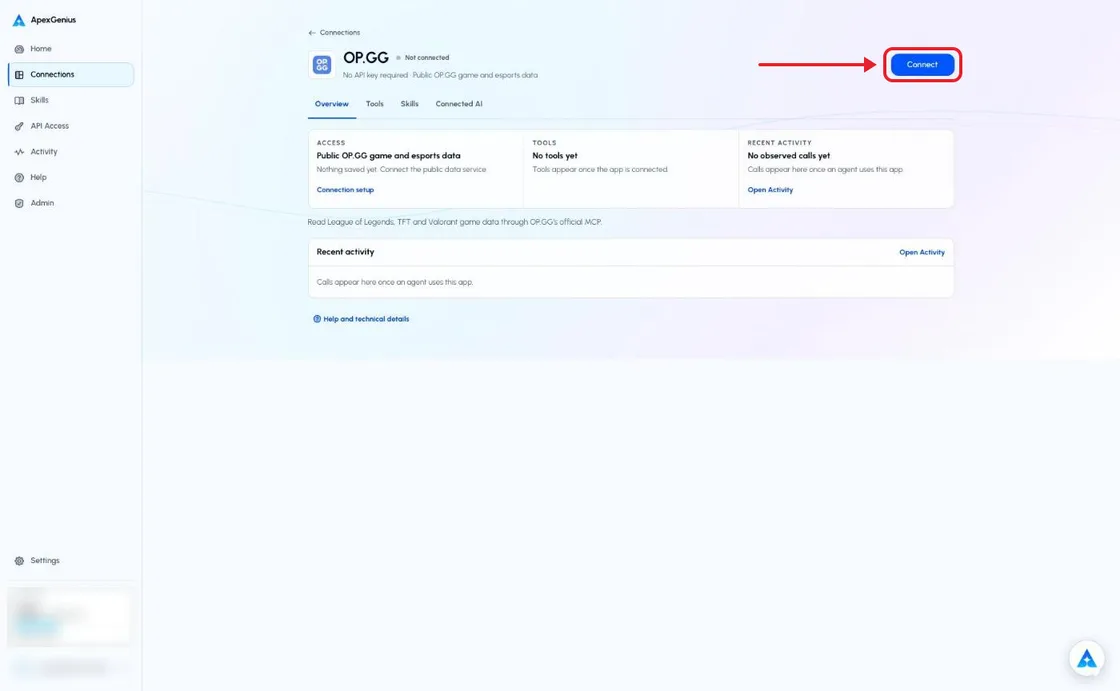
Open OP.GG in Connections
Sign in to ApexGenius, open Connections and choose OP.GG.
The OP.GG connection page before you connect. Choose Connect; there is no sign-in or key to enter. The account email and credits are blurred in this capture.
2
Connect public game data
Choose Connect. ApexGenius checks OP.GG’s official service and saves the connection. There are no keys to enter.
3
Review tools and AI access
Keep the public data service and the read tools on. Add ApexGenius to a compatible AI agent and choose its access.
4
Try a Worlds question
Read the OPGG skill, ask the question below and check the source links and Tool Activity.
Try a first question with your AI agent
Show the current Worlds match schedule from OP.GG. Include teams or TBD, match times with timezone, status and source links. Say when the data was checked.
Compare the competition and match times with the linked OP.GG pages. A returned schedule proves that read, not every game or historical season. Empty results and missing teams must stay explicit.Set up your AI agent: Claude · ChatGPT · Codex · Cursor · Any MCP client
League esports: Worlds and other league schedules, recent results and
current team standings. Each match links to its esports.op.gg match page.
League players: public profiles, ranks, recent match history, match
details and pro player Riot IDs.
League game data: champion statistics, builds, matchups, items, skins
and ARAM augments. Reading skin prices makes no purchase.
Teamfight Tactics: compositions, augments, items and public play-style
data.
Valorant: agents, maps, regional leaderboards and public match history.
The tool index lists the
reviewed operations. Your AI discovers their current input fields through
opgg_search_tools and calls them through opgg_call_read_tool. There is no
write tool. The public data service, tool and AI access must all be enabled.
Open Skills on the connection and read OPGG, or ask a compatible agent
to load it through ApexGenius. The skill explains competition names, source
links, timezones, and the difference between solo queue and professional
matches. Each agent needs its own ApexGenius setup. Reading a skill does not
grant app access.
Worlds and LCS are separate competitions. A public player’s solo-queue history
is not a professional Worlds match record. Keep the patch, region, rank and
sample size with statistics when the source supplies them.The esports schedule tool accepts a league, schedule or result mode, and a
team filter. Its result limit is at most 50. It has no year or season filter,
and its limit does not limit upcoming schedules. Keep unknown teams as TBD.
Do not treat an empty result as proof that a match did not happen.OP.GG owns its service, data and access terms. Public access does not mean
unlimited requests or permission to redistribute data in bulk. Cite OP.GG
and keep the source links supplied with results.
Check that the public data service and read tools are on and that your AI
has access. Use Test connection to check
the service. A service outage does not require an OP.GG password.For a player lookup, check the Riot ID and region. For a missing event, check
the league and supported filters. If OP.GG changes a tool, that one read
answers “OP.GG changed this tool. Its access needs review.” and the other reads
keep working until it is reviewed. Do not replace a missing read with an
invented result.Disconnecting stops future ApexGenius calls. It does not erase public OP.GG
data. This app cannot place bets, make payments, buy skins or change accounts.
Compatibility does not imply a partnership with OP.GG or Riot Games.
Last modified on October 19, 2026
⌘I
{"docsConfig":{"theme":"maple","$schema":"https://mintlify.com/docs.json","name":"ApexGenius","description":"Connect one app to a supported AI client, then keep the account, available operations, and observed Activity clear.","colors":{"primary":"#0055FF","light":"#4C7FE5","dark":"#4C7FE5"},"logo":{"light":"https://mintcdn.com/apexgenius/PL1VOuYeZtypECmH/logo/apexgenius.svg?fit=max\u0026auto=format\u0026n=PL1VOuYeZtypECmH\u0026q=85\u0026s=ef6a088897a39f3ddbf23122743577fe","dark":"https://mintcdn.com/apexgenius/PL1VOuYeZtypECmH/logo/apexgenius-dark.svg?fit=max\u0026auto=format\u0026n=PL1VOuYeZtypECmH\u0026q=85\u0026s=90a72ff0da22baa182d13aa1ab8398d9","href":"https://www.apexgenius.ai"},"favicon":{"light":"https://mintcdn.com/apexgenius/PL1VOuYeZtypECmH/logo/apexgenius.svg?fit=max\u0026auto=format\u0026n=PL1VOuYeZtypECmH\u0026q=85\u0026s=ef6a088897a39f3ddbf23122743577fe","dark":"https://mintcdn.com/apexgenius/PL1VOuYeZtypECmH/logo/apexgenius-dark.svg?fit=max\u0026auto=format\u0026n=PL1VOuYeZtypECmH\u0026q=85\u0026s=90a72ff0da22baa182d13aa1ab8398d9"},"appearance":{"default":"system","strict":false},"background":{"color":{"light":"#FAF9F6","dark":"#15171B"}},"navbar":{"links":[{"icon":"blocks","href":"https://www.apexgenius.ai/connectors","label":"Connectors"},{"icon":"workflow","href":"https://www.gatechsolutionsllc.com/services/agentforce-consulting","label":"Implementation help"}],"primary":{"type":"button","label":"Connect it free","href":"https://www.apexgenius.ai/auth"}},"footer":{"socials":{"x":"https://x.com/ApexGeniusAI","linkedin":"https://www.linkedin.com/company/apexgenius","youtube":"https://www.youtube.com/@ApexGeniusAI"},"links":[{"header":"ApexGenius","items":[{"label":"Product","href":"https://www.apexgenius.ai/mcp"},{"label":"Connector catalog","href":"https://www.apexgenius.ai/connectors"},{"label":"Security","href":"https://www.apexgenius.ai/security"}]},{"header":"Implementation","items":[{"label":"GAT Solutions services","href":"https://www.gatechsolutionsllc.com/services"},{"label":"AI and Agentforce consulting","href":"https://www.gatechsolutionsllc.com/services/agentforce-consulting"},{"label":"Salesforce integrations","href":"https://www.gatechsolutionsllc.com/services/salesforce-integrations"}]},{"header":"Legal","items":[{"label":"Privacy","href":"https://www.apexgenius.ai/privacy"},{"label":"Terms","href":"https://www.apexgenius.ai/terms"}]}]},"fonts":{"family":"Urbanist"},"icons":{"library":"lucide"},"styling":{"eyebrows":"breadcrumbs","codeblocks":"system","latex":false},"errors":{"404":{"redirect":false,"title":"This route is not in the gateway docs","description":"Check the address or return to the [ApexGenius introduction](/getting-started/introduction)."}},"contextual":{"options":["copy","view","chatgpt","claude"],"display":"header"},"metadata":{"timestamp":true},"navigation":{"pages":[]}},"deployment":{"deploymentMetadataValue":{"subdomain":"apexgenius","hasAudioNarration":false,"actualSubdomain":"apexgenius","customDomains":["docs.apexgenius.ai"],"gitSource":{"type":"github","owner":"ezscore","repo":"apexai","deployBranch":"main","contentDirectory":"content/docs","isPrivate":true,"mountPath":"","label":""},"chroma":{"latestBuiltDeploymentHistoryId":"6ad5632a5ec9dc5442ec36aa","collectionId":"cddf8494-7e99-4fe1-9e26-f132edb18298","liveDeploymentHistoryId":"6ad5632a5ec9dc5442ec36aa","schemaVersion":"v3"},"entitlements":{},"buildId":"6ad566445c7ed1fc8e179c6d","clientVersion":"0.0.3883","searchFilterCounts":[{"language":"default","tag":"Connect apps","count":37},{"language":"default","tag":"Additional connector guides","count":27},{"language":"default","tag":"Salesforce","count":5},{"language":"default","tag":"Connect an AI client","count":5},{"language":"default","tag":"Reference and support","count":4},{"language":"default","tag":"Governance and concepts","count":3},{"language":"default","tag":"Start here","count":3}]},"assistantConfig":{"enableAskAiButton":false,"enableStarterQuestions":false,"enableContextualStarterQuestions":false,"enableAskAiSearchBar":true},"hasChatPermissions":false,"hasWebMcpPermissions":false,"toggles":[{"name":"kill-isr","enabled":true,"variant":{"name":"disabled","enabled":false,"feature_enabled":true},"impressionData":false},{"name":"agent-mintlify-slack","enabled":true,"variant":{"name":"disabled","enabled":false,"feature_enabled":true},"impressionData":false},{"name":"editor-v7-file-tree","enabled":true,"variant":{"name":"disabled","enabled":false,"feature_enabled":true},"impressionData":false},{"name":"agent-integrations-settings","enabled":true,"variant":{"name":"disabled","enabled":false,"feature_enabled":true},"impressionData":false},{"name":"automations-pr-grouping","enabled":true,"variant":{"name":"disabled","enabled":false,"feature_enabled":true},"impressionData":false},{"name":"custom-prefix","enabled":true,"variant":{"name":"disabled","enabled":false,"feature_enabled":true},"impressionData":false},{"name":"analytics-v7","enabled":true,"variant":{"name":"disabled","enabled":false,"feature_enabled":true},"impressionData":false},{"name":"user-flows-analytics","enabled":true,"variant":{"name":"disabled","enabled":false,"feature_enabled":true},"impressionData":false},{"name":"no-publish-flow","enabled":true,"variant":{"name":"disabled","enabled":false,"feature_enabled":true},"impressionData":false},{"name":"llms-txt-v2","enabled":true,"variant":{"name":"disabled","enabled":false,"feature_enabled":true},"impressionData":false},{"name":"pause-universal-search-reconcile","enabled":true,"variant":{"name":"disabled","enabled":false,"feature_enabled":true},"impressionData":false},{"name":"snapshot-serving-live","enabled":true,"variant":{"name":"disabled","enabled":false,"feature_enabled":true},"impressionData":false},{"name":"stripTemperatureMiddleware","enabled":true,"variant":{"name":"disabled","enabled":false,"feature_enabled":true},"impressionData":false},{"name":"per-site-search-delta","enabled":true,"variant":{"name":"disabled","enabled":false,"feature_enabled":true},"impressionData":false},{"name":"support-platform-pylon-zendesk","enabled":true,"variant":{"name":"disabled","enabled":false,"feature_enabled":true},"impressionData":false},{"name":"editor-branches-v2-autocommit","enabled":true,"variant":{"name":"disabled","enabled":false,"feature_enabled":true},"impressionData":false},{"name":"editor-branches-v2","enabled":true,"variant":{"name":"disabled","enabled":false,"feature_enabled":true},"impressionData":false},{"name":"snapshot-serving","enabled":true,"variant":{"name":"disabled","enabled":false,"feature_enabled":true},"impressionData":false},{"name":"instant-rollback","enabled":true,"variant":{"name":"disabled","enabled":false,"feature_enabled":true},"impressionData":false},{"name":"granular-notifications-server","enabled":true,"variant":{"name":"disabled","enabled":false,"feature_enabled":true},"impressionData":false},{"name":"granular-notifications","enabled":true,"variant":{"name":"disabled","enabled":false,"feature_enabled":true},"impressionData":false},{"name":"editor-private-page-search","enabled":true,"variant":{"name":"disabled","enabled":false,"feature_enabled":true},"impressionData":false},{"name":"automations-fable","enabled":true,"variant":{"name":"disabled","enabled":false,"feature_enabled":true},"impressionData":false},{"name":"fixed-ai-action-pricing","enabled":true,"variant":{"name":"disabled","enabled":false,"feature_enabled":true},"impressionData":false},{"name":"automation-resolve-merge-conflict","enabled":true,"variant":{"name":"disabled","enabled":false,"feature_enabled":true},"impressionData":false},{"name":"scoped-publishing","enabled":true,"variant":{"name":"disabled","enabled":false,"feature_enabled":true},"impressionData":false},{"name":"mintql","enabled":true,"variant":{"name":"disabled","enabled":false,"feature_enabled":true},"impressionData":false},{"name":"page-level-analytics","enabled":true,"variant":{"name":"disabled","enabled":false,"feature_enabled":true},"impressionData":false},{"name":"teamspace","enabled":true,"variant":{"name":"disabled","enabled":false,"feature_enabled":true},"impressionData":false},{"name":"editor-version-history-v2","enabled":true,"variant":{"name":"disabled","enabled":false,"feature_enabled":true},"impressionData":false},{"name":"vite-origin","enabled":true,"variant":{"name":"disabled","enabled":false,"feature_enabled":true},"impressionData":false},{"name":"editor-nav-generations","enabled":true,"variant":{"name":"disabled","enabled":false,"feature_enabled":true},"impressionData":false},{"name":"workspace-projects","enabled":true,"variant":{"name":"disabled","enabled":false,"feature_enabled":true},"impressionData":false},{"name":"assistant-v5","enabled":true,"variant":{"name":"disabled","enabled":false,"feature_enabled":true},"impressionData":false},{"name":"byok-sep-25","enabled":true,"variant":{"name":"disabled","enabled":false,"feature_enabled":true},"impressionData":false},{"name":"revalidation-jwt","enabled":true,"variant":{"name":"disabled","enabled":false,"feature_enabled":true},"impressionData":false},{"name":"editor-agent-model-picker","enabled":true,"variant":{"name":"disabled","enabled":false,"feature_enabled":true},"impressionData":false},{"name":"client-snapshot-docs-config","enabled":true,"variant":{"name":"disabled","enabled":false,"feature_enabled":true},"impressionData":false},{"name":"hobby-abuse-scan","enabled":true,"variant":{"name":"disabled","enabled":false,"feature_enabled":true},"impressionData":false}],"isAtlas":false,"googleFontsInlined":true},"customCss":[{"filePath":"style.css","content":":root{--ag-canvas:#FAF9F6;--ag-surface:#FFFFFF;--ag-ink:#1A1A18;--ag-muted:#6B6B66;--ag-border:#E8E5DF;--ag-blue:#0055FF;--ag-blue-frame:rgb(0 85 255 / 18%);--ag-clay:#D97757}.dark{--ag-blue-frame:rgb(51 119 255 / 28%)}#navbar{border-bottom:1px solid var(--ag-blue-frame)}nav[aria-label=Pages]{border-right-color:var(--ag-blue-frame)}card,code-block{border-radius:14px}callout{border-radius:12px}@media (prefers-reduced-motion:reduce){*,::after,::before{scroll-behavior:auto!important;animation-duration:.01ms!important;animation-iteration-count:1!important;transition-duration:.01ms!important}}"}],"page":{"pagePath":"integrations/opgg","slug":"/integrations/opgg","pageMetadata":{"title":"Connect OP.GG to your AI","description":"Connect OP.GG to your AI through ApexGenius: read Worlds schedules, results, player stats and champion data. No OP.GG login or API key needed.","href":"/integrations/opgg"},"description":{"compiledSource":"\"use strict\";\nconst {jsx: _jsx} = arguments[0];\nconst {useMDXComponents: _provideComponents} = arguments[0];\nfunction _createMdxContent(props) {\n const _components = {\n p: \"p\",\n ..._provideComponents(),\n ...props.components\n };\n return _jsx(_components.p, {\n children: \"Connect OP.GG to your AI through ApexGenius: read Worlds schedules, results, player stats and champion data. No OP.GG login or API key needed.\"\n });\n}\nfunction MDXContent(props = {}) {\n const {wrapper: MDXLayout} = {\n ..._provideComponents(),\n ...props.components\n };\n return MDXLayout ? _jsx(MDXLayout, {\n ...props,\n children: _jsx(_createMdxContent, {\n ...props\n })\n }) : _createMdxContent(props);\n}\nreturn {\n default: MDXContent\n};\n","frontmatter":{},"scope":{}},"pageType":"default","mdx":{"mdxSource":{"compiledSource":"\"use strict\";const{Fragment:_Fragment,jsx:_jsx,jsxs:_jsxs}=arguments[0];const{useMDXComponents:_provideComponents}=arguments[0];function _createMdxContent(props){const _components={a:`a`,code:`code`,li:`li`,p:`p`,pre:`pre`,span:`span`,strong:`strong`,ul:`ul`,..._provideComponents(),...props.components},{CodeBlock,Frame,Heading,OptimizedImage,Step,Steps}=_components;if(!CodeBlock)_missingMdxReference(`CodeBlock`,true);if(!Frame)_missingMdxReference(`Frame`,true);if(!Heading)_missingMdxReference(`Heading`,true);if(!OptimizedImage)_missingMdxReference(`OptimizedImage`,true);if(!Step)_missingMdxReference(`Step`,true);if(!Steps)_missingMdxReference(`Steps`,true);return _jsxs(_Fragment,{children:[_jsx(_components.p,{children:`This public data service needs no OP.GG login, Riot password or API key.\nApexGenius checks OP.GG’s official service when you connect.`}),`\n`,_jsxs(_components.p,{children:[_jsx(_components.a,{href:`https://www.apexgenius.ai/connectors/opgg`,children:`Explore the OP.GG app`}),`.`]}),`\n`,_jsx(Heading,{level:`2`,id:`connect-and-read-game-data`,children:`Connect and read game data`}),`\n`,_jsx(_components.p,{children:_jsx(_components.strong,{children:`Before you start`})}),`\n`,_jsxs(_components.ul,{children:[`\n`,_jsx(_components.li,{children:`An ApexGenius account.`}),`\n`,_jsx(_components.li,{children:`No OP.GG login, Riot password or API key is needed.`}),`\n`]}),`\n`,_jsxs(Steps,{children:[_jsxs(Step,{title:`Open OP.GG in Connections`,children:[_jsx(_components.p,{children:`Sign in to ApexGenius, open Connections and choose OP.GG.`}),_jsx(Frame,{caption:`The OP.GG connection page before you connect. Choose Connect; there is no sign-in or key to enter. The account email and credits are blurred in this capture.`,children:_jsx(OptimizedImage,{src:`https://www.apexgenius.ai/images/integration-guides/opgg/20261018-connect.webp`,alt:`The full ApexGenius connection page for OP.GG, marked Not connected, with a red box and arrow on the Connect button and the account email and credits blurred.`,width:`1120`,height:`691`,style:{width:`100%`,height:`auto`}})})]}),_jsx(Step,{title:`Connect public game data`,children:_jsx(_components.p,{children:`Choose Connect. ApexGenius checks OP.GG’s official service and saves the connection. There are no keys to enter.`})}),_jsx(Step,{title:`Review tools and AI access`,children:_jsx(_components.p,{children:`Keep the public data service and the read tools on. Add ApexGenius to a compatible AI agent and choose its access.`})}),_jsx(Step,{title:`Try a Worlds question`,children:_jsx(_components.p,{children:`Read the OPGG skill, ask the question below and check the source links and Tool Activity.`})})]}),`\n`,_jsx(_components.p,{children:_jsx(_components.strong,{children:`Try a first question with your AI agent`})}),`\n`,_jsx(CodeBlock,{filename:``,numberOfLines:`2`,language:`text`,children:_jsx(_components.pre,{className:`shiki shiki-themes github-light-default dark-plus`,style:{backgroundColor:`#ffffff`,\"--shiki-dark-bg\":`#0B0C0E`,color:`#1f2328`,\"--shiki-dark\":`#D4D4D4`},language:`text`,children:_jsxs(_components.code,{language:`text`,numberOfLines:`2`,children:[_jsx(_components.span,{className:`line`,children:_jsx(_components.span,{children:`Show the current Worlds match schedule from OP.GG. Include teams or TBD, match times with timezone, status and source links. Say when the data was checked.`})}),`\n`,_jsx(_components.span,{className:`line`,children:_jsx(_components.span,{})})]})})}),`\n`,_jsx(_components.p,{children:`Compare the competition and match times with the linked OP.GG pages. A returned schedule proves that read, not every game or historical season. Empty results and missing teams must stay explicit.`}),`\n`,_jsxs(_components.p,{children:[`Set up your AI agent: `,_jsx(_components.a,{href:`/guides/connect-claude`,children:`Claude`}),` · `,_jsx(_components.a,{href:`/guides/connect-chatgpt`,children:`ChatGPT`}),` · `,_jsx(_components.a,{href:`/guides/connect-codex`,children:`Codex`}),` · `,_jsx(_components.a,{href:`/guides/connect-cursor`,children:`Cursor`}),` · `,_jsx(_components.a,{href:`/guides/mcp-setup`,children:`Any MCP client`})]}),`\n`,_jsx(Heading,{level:`2`,id:`what-your-ai-can-read`,children:`What your AI can read`}),`\n`,_jsxs(_components.ul,{children:[`\n`,_jsxs(_components.li,{children:[_jsx(_components.strong,{children:`League esports:`}),` Worlds and other league schedules, recent results and\ncurrent team standings. Each match links to its esports.op.gg match page.`]}),`\n`,_jsxs(_components.li,{children:[_jsx(_components.strong,{children:`League players:`}),` public profiles, ranks, recent match history, match\ndetails and pro player Riot IDs.`]}),`\n`,_jsxs(_components.li,{children:[_jsx(_components.strong,{children:`League game data:`}),` champion statistics, builds, matchups, items, skins\nand ARAM augments. Reading skin prices makes no purchase.`]}),`\n`,_jsxs(_components.li,{children:[_jsx(_components.strong,{children:`Teamfight Tactics:`}),` compositions, augments, items and public play-style\ndata.`]}),`\n`,_jsxs(_components.li,{children:[_jsx(_components.strong,{children:`Valorant:`}),` agents, maps, regional leaderboards and public match history.`]}),`\n`]}),`\n`,_jsxs(_components.p,{children:[`The `,_jsx(_components.a,{href:`https://www.apexgenius.ai/connectors/opgg#tools`,children:`tool index`}),` lists the\nreviewed operations. Your AI discovers their current input fields through\n`,_jsx(_components.code,{children:`opgg_search_tools`}),` and calls them through `,_jsx(_components.code,{children:`opgg_call_read_tool`}),`. There is no\nwrite tool. The public data service, tool and AI access must all be enabled.`]}),`\n`,_jsx(Heading,{level:`2`,id:`reuse-the-league-and-worlds-skill`,children:`Reuse the League and Worlds skill`}),`\n`,_jsxs(_components.p,{children:[`Open `,_jsx(_components.strong,{children:`Skills`}),` on the connection and read `,_jsx(_components.strong,{children:`OPGG`}),`, or ask a compatible agent\nto load it through ApexGenius. The skill explains competition names, source\nlinks, timezones, and the difference between solo queue and professional\nmatches. Each agent needs its own ApexGenius setup. Reading a skill does not\ngrant app access.`]}),`\n`,_jsx(Heading,{level:`2`,id:`read-the-limits-correctly`,children:`Read the limits correctly`}),`\n`,_jsx(_components.p,{children:`Worlds and LCS are separate competitions. A public player’s solo-queue history\nis not a professional Worlds match record. Keep the patch, region, rank and\nsample size with statistics when the source supplies them.`}),`\n`,_jsx(_components.p,{children:`The esports schedule tool accepts a league, schedule or result mode, and a\nteam filter. Its result limit is at most 50. It has no year or season filter,\nand its limit does not limit upcoming schedules. Keep unknown teams as TBD.\nDo not treat an empty result as proof that a match did not happen.`}),`\n`,_jsx(_components.p,{children:`OP.GG owns its service, data and access terms. Public access does not mean\nunlimited requests or permission to redistribute data in bulk. Cite OP.GG\nand keep the source links supplied with results.`}),`\n`,_jsx(Heading,{level:`2`,id:`if-data-is-unavailable`,children:`If data is unavailable`}),`\n`,_jsxs(_components.p,{children:[`Check that the public data service and read tools are on and that your AI\nhas access. Use `,_jsx(_components.strong,{children:`Test connection`}),` to check\nthe service. A service outage does not require an OP.GG password.`]}),`\n`,_jsx(_components.p,{children:`For a player lookup, check the Riot ID and region. For a missing event, check\nthe league and supported filters. If OP.GG changes a tool, that one read\nanswers “OP.GG changed this tool. Its access needs review.” and the other reads\nkeep working until it is reviewed. Do not replace a missing read with an\ninvented result.`}),`\n`,_jsx(_components.p,{children:`Disconnecting stops future ApexGenius calls. It does not erase public OP.GG\ndata. This app cannot place bets, make payments, buy skins or change accounts.`}),`\n`,_jsx(Heading,{level:`2`,id:`official-references`,children:`Official references`}),`\n`,_jsxs(_components.ul,{children:[`\n`,_jsx(_components.li,{children:_jsx(_components.a,{href:`https://github.com/opgginc/opgg-mcp`,children:`OP.GG MCP tools`})}),`\n`,_jsx(_components.li,{children:_jsx(_components.a,{href:`https://help.op.gg/hc/en-us/articles/31091405109401-Can-I-use-OP-GG-data`,children:`OP.GG data-use guidance`})}),`\n`]}),`\n`,_jsx(_components.p,{children:`Compatibility does not imply a partnership with OP.GG or Riot Games.`})]})}function MDXContent(props={}){const{wrapper:MDXLayout}={..._provideComponents(),...props.components};return MDXLayout?_jsx(MDXLayout,{...props,children:_jsx(_createMdxContent,{...props})}):_createMdxContent(props)}return{default:MDXContent};function _missingMdxReference(id,component){throw new Error(`Expected `+(component?`component`:`object`)+\" `\"+id+\"` to be defined: you likely forgot to import, pass, or provide it.\")}","frontmatter":{},"scope":{"codeStyling":"system","config":{},"pageMetadata":{"title":"Connect OP.GG to your AI","description":"Connect OP.GG to your AI through ApexGenius: read Worlds schedules, results, player stats and champion data. No OP.GG login or API key needed.","href":"/integrations/opgg"}}},"mdxSourceWithNoJs":null},"mdxExtracts":{"tableOfContents":[{"title":"Connect and read game data","slug":"connect-and-read-game-data","depth":2,"children":[]},{"title":"What your AI can read","slug":"what-your-ai-can-read","depth":2,"children":[]},{"title":"Reuse the League and Worlds skill","slug":"reuse-the-league-and-worlds-skill","depth":2,"children":[]},{"title":"Read the limits correctly","slug":"read-the-limits-correctly","depth":2,"children":[]},{"title":"If data is unavailable","slug":"if-data-is-unavailable","depth":2,"children":[]},{"title":"Official references","slug":"official-references","depth":2,"children":[]}],"codeExamples":{}},"jsLinks":[],"subdomain":"apexgenius","siteName":"ApexGenius","title":"Connect OP.GG to your AI - ApexGenius","navMaps":{"firstHrefInVersion":{},"firstHrefInLanguage":{}},"lastModified":"2026-10-19T00:37:27.564Z","gitLastModified":"2026-10-19T00:28:39.000Z","originalFileLocation":"integrations/opgg.mdx"},"headHtml":"\u003cmeta data-mint-head name=\"description\" content=\"Connect OP.GG to your AI through ApexGenius: read Worlds schedules, results, player stats and champion data. No OP.GG login or API key needed.\">\u003cmeta data-mint-head name=\"application-name\" content=\"ApexGenius\">\u003cmeta data-mint-head name=\"generator\" content=\"Mintlify\">\u003clink data-mint-head rel=\"icon\" type=\"image/png\" sizes=\"192x192\" href=\"/mintlify-assets/_mintlify/favicons/apexgenius/of2iO4EQJQd_LzS2/_generated/favicon/android-chrome-192x192.png\" media=\"(prefers-color-scheme: light)\">\u003clink data-mint-head rel=\"apple-touch-icon\" type=\"image/png\" sizes=\"180x180\" href=\"/mintlify-assets/_mintlify/favicons/apexgenius/of2iO4EQJQd_LzS2/_generated/favicon/apple-touch-icon.png\">\u003clink data-mint-head rel=\"icon\" type=\"image/png\" sizes=\"16x16\" href=\"/mintlify-assets/_mintlify/favicons/apexgenius/of2iO4EQJQd_LzS2/_generated/favicon/favicon-16x16.png\" media=\"(prefers-color-scheme: light)\">\u003clink data-mint-head rel=\"icon\" type=\"image/png\" sizes=\"32x32\" href=\"/mintlify-assets/_mintlify/favicons/apexgenius/of2iO4EQJQd_LzS2/_generated/favicon/favicon-32x32.png\" media=\"(prefers-color-scheme: light)\">\u003clink data-mint-head rel=\"shortcut icon\" type=\"image/x-icon\" href=\"/mintlify-assets/_mintlify/favicons/apexgenius/of2iO4EQJQd_LzS2/_generated/favicon/favicon.ico\" media=\"(prefers-color-scheme: light)\">\u003clink data-mint-head rel=\"icon\" type=\"image/png\" sizes=\"192x192\" href=\"/mintlify-assets/_mintlify/favicons/apexgenius/of2iO4EQJQd_LzS2/_generated/favicon-dark/android-chrome-192x192.png\" media=\"(prefers-color-scheme: dark)\">\u003clink data-mint-head rel=\"icon\" type=\"image/png\" sizes=\"16x16\" href=\"/mintlify-assets/_mintlify/favicons/apexgenius/of2iO4EQJQd_LzS2/_generated/favicon-dark/favicon-16x16.png\" media=\"(prefers-color-scheme: dark)\">\u003clink data-mint-head rel=\"icon\" type=\"image/png\" sizes=\"32x32\" href=\"/mintlify-assets/_mintlify/favicons/apexgenius/of2iO4EQJQd_LzS2/_generated/favicon-dark/favicon-32x32.png\" media=\"(prefers-color-scheme: dark)\">\u003clink data-mint-head rel=\"shortcut icon\" type=\"image/x-icon\" href=\"/mintlify-assets/_mintlify/favicons/apexgenius/of2iO4EQJQd_LzS2/_generated/favicon-dark/favicon.ico\" media=\"(prefers-color-scheme: dark)\">\u003cmeta data-mint-head property=\"og:title\" content=\"Connect OP.GG to your AI - ApexGenius\">\u003cmeta data-mint-head property=\"og:description\" content=\"Connect OP.GG to your AI through ApexGenius: read Worlds schedules, results, player stats and champion data. No OP.GG login or API key needed.\">\u003cmeta data-mint-head property=\"og:site_name\" content=\"ApexGenius\">\u003cmeta data-mint-head property=\"og:url\" content=\"https://docs.apexgenius.ai/integrations/opgg\">\u003cmeta data-mint-head property=\"og:type\" content=\"website\">\u003cmeta data-mint-head name=\"twitter:card\" content=\"summary_large_image\">\u003cmeta data-mint-head name=\"twitter:title\" content=\"Connect OP.GG to your AI - ApexGenius\">\u003cmeta data-mint-head name=\"twitter:description\" content=\"Connect OP.GG to your AI through ApexGenius: read Worlds schedules, results, player stats and champion data. No OP.GG login or API key needed.\">\u003cmeta data-mint-head name=\"msapplication-config\" content=\"/mintlify-assets/_mintlify/favicons/apexgenius/of2iO4EQJQd_LzS2/_generated/favicon/browserconfig.xml\">\u003cmeta data-mint-head name=\"apple-mobile-web-app-title\" content=\"ApexGenius\">\u003cmeta data-mint-head name=\"msapplication-TileColor\" content=\"#0055FF\">\u003clink data-mint-head rel=\"canonical\" href=\"https://docs.apexgenius.ai/integrations/opgg\">\u003clink data-mint-head rel=\"alternate\" type=\"application/xml\" href=\"/sitemap.xml\">\u003clink data-mint-head rel=\"alternate\" type=\"text/markdown\" href=\"/integrations/opgg.md\">\u003cscript data-mint-head type=\"application/ld+json\">{\"@context\":\"https://schema.org\",\"@graph\":[{\"@type\":\"Organization\",\"@id\":\"https://docs.apexgenius.ai/#organization\",\"name\":\"ApexGenius\",\"url\":\"https://docs.apexgenius.ai\",\"logo\":{\"@type\":\"ImageObject\",\"url\":\"https://mintcdn.com/apexgenius/PL1VOuYeZtypECmH/logo/apexgenius.svg?fit=max\u0026auto=format\u0026n=PL1VOuYeZtypECmH\u0026q=85\u0026s=ef6a088897a39f3ddbf23122743577fe\"}},{\"@type\":\"WebSite\",\"@id\":\"https://docs.apexgenius.ai#website\",\"name\":\"ApexGenius\",\"url\":\"https://docs.apexgenius.ai\",\"publisher\":{\"@id\":\"https://docs.apexgenius.ai/#organization\"}},{\"@type\":\"WebPage\",\"@id\":\"https://docs.apexgenius.ai/integrations/opgg#webpage\",\"url\":\"https://docs.apexgenius.ai/integrations/opgg\",\"name\":\"Connect OP.GG to your AI\",\"description\":\"Connect OP.GG to your AI through ApexGenius: read Worlds schedules, results, player stats and champion data. No OP.GG login or API key needed.\",\"dateModified\":\"2026-10-19T00:28:39.000Z\",\"isPartOf\":{\"@id\":\"https://docs.apexgenius.ai#website\"},\"breadcrumb\":{\"@id\":\"https://docs.apexgenius.ai/integrations/opgg#breadcrumb\"}},{\"@type\":\"BreadcrumbList\",\"@id\":\"https://docs.apexgenius.ai/integrations/opgg#breadcrumb\",\"itemListElement\":[{\"@type\":\"ListItem\",\"position\":1,\"name\":\"Connect apps\",\"item\":\"https://docs.apexgenius.ai/integrations/provider-connections\"},{\"@type\":\"ListItem\",\"position\":2,\"name\":\"Connect OP.GG to your AI\",\"item\":\"https://docs.apexgenius.ai/integrations/opgg\"}]},{\"@type\":[\"Article\",\"TechArticle\"],\"@id\":\"https://docs.apexgenius.ai/integrations/opgg#article\",\"headline\":\"Connect OP.GG to your AI\",\"name\":\"Connect OP.GG to your AI\",\"description\":\"Connect OP.GG to your AI through ApexGenius: read Worlds schedules, results, player stats and champion data. No OP.GG login or API key needed.\",\"url\":\"https://docs.apexgenius.ai/integrations/opgg\",\"mainEntityOfPage\":{\"@id\":\"https://docs.apexgenius.ai/integrations/opgg#webpage\"},\"dateModified\":\"2026-10-19T00:28:39.000Z\",\"publisher\":{\"@id\":\"https://docs.apexgenius.ai/#organization\"},\"isPartOf\":{\"@id\":\"https://docs.apexgenius.ai#website\"}}]}\u003c/script>\u003cscript data-mint-head type=\"application/ld+json\">{\"@context\":\"https://schema.org\",\"@type\":\"WebSite\",\"name\":\"ApexGenius\",\"creator\":{\"@type\":\"Organization\",\"name\":\"Mintlify\",\"url\":\"https://mintlify.com\"}}\u003c/script>","siteName":"ApexGenius","nav":{"global":null,"groups":[{"group":"Start here","icon":"route","pages":[{"title":"Connect one app to the AI you already use","href":"/getting-started/introduction"},{"title":"Connect an AI client","href":"/guides/mcp-setup"},{"title":"Send the first safe request","href":"/guides/first-safe-request"}]},{"group":"Connect an AI client","icon":"message-square-code","pages":[{"title":"Connect Claude","href":"/guides/connect-claude"},{"title":"Connect ChatGPT","href":"/guides/connect-chatgpt"},{"title":"Connect Codex","href":"/guides/connect-codex"},{"title":"Connect Cursor","href":"/guides/connect-cursor"},{"title":"Connect VS Code","href":"/guides/connect-vscode"}]},{"group":"Salesforce","icon":"cloud","pages":[{"title":"Connect Salesforce","href":"/getting-started/connect-salesforce"},{"title":"Loading Metadata","href":"/getting-started/load-metadata"},{"title":"Using the Account App","href":"/getting-started/using-chat"},{"title":"Reports and Dashboards: Current Availability","href":"/guides/reports-and-dashboards"},{"title":"Salesforce connection model","href":"/integrations/salesforce-connection"}]},{"group":"Connect apps","icon":"plug-zap","pages":[{"title":"App connection guides","href":"/integrations/provider-connections"},{"title":"YouTube MCP Setup","href":"/integrations/youtube"},{"title":"YouTube Analytics MCP Setup","href":"/integrations/youtube-analytics"},{"title":"n8n MCP Setup","href":"/integrations/n8n"},{"title":"Confluence MCP Setup","href":"/integrations/confluence"},{"title":"Discord MCP Setup","href":"/integrations/discord"},{"title":"Jira MCP Setup","href":"/integrations/jira"},{"group":"Additional connector guides","icon":"flask-conical","pages":[{"title":"HQ Rental MCP Setup","href":"/integrations/hq-rental"},{"title":"Google Ads MCP Setup","href":"/integrations/google-ads"},{"title":"Google Search Console MCP Setup","href":"/integrations/google-search-console"},{"title":"Google Analytics MCP Setup","href":"/integrations/google-analytics"},{"title":"Google Workspace MCP Setup","href":"/integrations/google-workspace"},{"title":"Upwork MCP Setup","href":"/integrations/upwork"},{"title":"Apollo MCP Setup","href":"/integrations/apollo"},{"title":"Notion MCP Setup","href":"/integrations/notion"},{"title":"Connect Slack accounts","href":"/integrations/slack"},{"title":"ClickUp MCP Setup","href":"/integrations/clickup"},{"title":"Connect Blotato","href":"/integrations/blotato"},{"title":"Connect HighLevel","href":"/integrations/gohighlevel"},{"title":"ChatGPT Ads MCP Setup","href":"/integrations/chatgpt-ads"},{"title":"Semrush MCP Setup","href":"/integrations/semrush"},{"title":"Bing Webmaster MCP Setup","href":"/integrations/bing-webmaster"},{"title":"Apify MCP Setup","href":"/integrations/apify"},{"title":"Linear MCP Setup","href":"/integrations/linear"},{"title":"Attio MCP Setup","href":"/integrations/attio"},{"title":"Calendly MCP Setup","href":"/integrations/calendly"},{"title":"Connect Cal.com to your AI","href":"/integrations/cal-com"},{"title":"Mobbin MCP Setup","href":"/integrations/mobbin"},{"title":"Supabase MCP Setup","href":"/integrations/supabase"},{"title":"Context.dev MCP Setup","href":"/integrations/context-dev"},{"title":"Stripe MCP Setup","href":"/integrations/stripe"},{"title":"GitHub MCP Setup","href":"/integrations/github"},{"title":"monday.com MCP Setup","href":"/integrations/monday"},{"title":"Atlassian Rovo MCP Setup","href":"/integrations/atlassian-rovo"}]},{"title":"Connect Speedrun Alpha","description":"Read current Speedrun Alpha requirements and prepare a reviewed application with your AI. Applicant access is enabled separately.","href":"/integrations/speedrun"},{"title":"Connect OP.GG to your AI","href":"/integrations/opgg"},{"title":"Read Polymarket information with your AI","description":"Connect Polymarket's public data to your AI through ApexGenius: events, market rules, status and current prices, with no wallet, key or trading.","href":"/integrations/polymarket"}]},{"group":"Governance and concepts","icon":"shield-check","pages":[{"title":"How the MCP Connection Works","href":"/concepts/how-mcp-works"},{"title":"Orgs, Projects \u0026 Workspaces","href":"/concepts/orgs-and-projects"},{"title":"The Soul Doc","href":"/concepts/soul-doc"}]},{"group":"Reference and support","icon":"book-open-check","pages":[{"title":"MCP Tool Reference","href":"/reference/mcp-tools"},{"title":"Pricing and Account Limits","href":"/reference/plans-and-limits"},{"title":"Common Issues","href":"/troubleshooting/common-issues"},{"title":"How we record your signup source","href":"/reference/signup-source"}]}]},"title":"Connect OP.GG to your AI - ApexGenius","buildId":"dpl_37ZDLJcyt8yhrTVF6LiYvX7LvmXB","deploymentId":"dpl_37ZDLJcyt8yhrTVF6LiYvX7LvmXB","dynamics":["07c022d89b","a74be98ba7"],"chunks":["Frame-4Xk_13JM.js","DynamicMarkdown-CfHSxJMP.js","zoom-image-lightbox-BwiTMkfx.js","PlusIcon-DJ4_zRc8.js","lightbox-handle-r17bVUz3.js"]}