Connect GitLab.com to ApexGenius with a read-only personal access token. Read projects, issues, merge requests, files and pipelines from your AI.
Status: Available. GitLab connects with a GitLab.com personal access token
that has only the read_api scope. Every call is a read. Your AI can read
projects, groups, issues, merge requests, repository files, commits and CI/CD
pipelines, and it cannot change anything in GitLab.Explore the GitLab connector.
Create a legacy personal access token on GitLab.com:
Select your avatar, then Edit profile.
In the left sidebar, open Access, then Personal access tokens.
From Generate token, choose Legacy token.
Name the token and set an expiry date.
Pick only the read_api scope.
Choose Generate token and copy the token once.
GitLab can pre-fill the form:
Create a read_api token.When you connect, ApexGenius reads the token’s own scopes from GitLab. It
refuses a token without read_api. It also refuses a token with any other
scope except read_user and read_repository, so a token with api or
write_repository cannot connect.GitLab.com tokens expire within a year. When GitLab stops accepting the token,
create a new one and paste it on the GitLab connection page.
A GitLab.com account that can see the projects you want your AI to read. Self-managed GitLab is not supported yet.
A personal access token with only the read_api scope.
1
Create a token on GitLab.com
On GitLab.com open Edit profile, then Access, then Personal access tokens. Choose Generate token, then Legacy token. Name it, set an expiry date, pick only read_api, and choose Generate token. Copy the token once. The connect form links to a pre-filled token page.
2
Open GitLab in Connections
Sign in to ApexGenius, open Connections, choose GitLab, and select Connect.
3
Paste the token
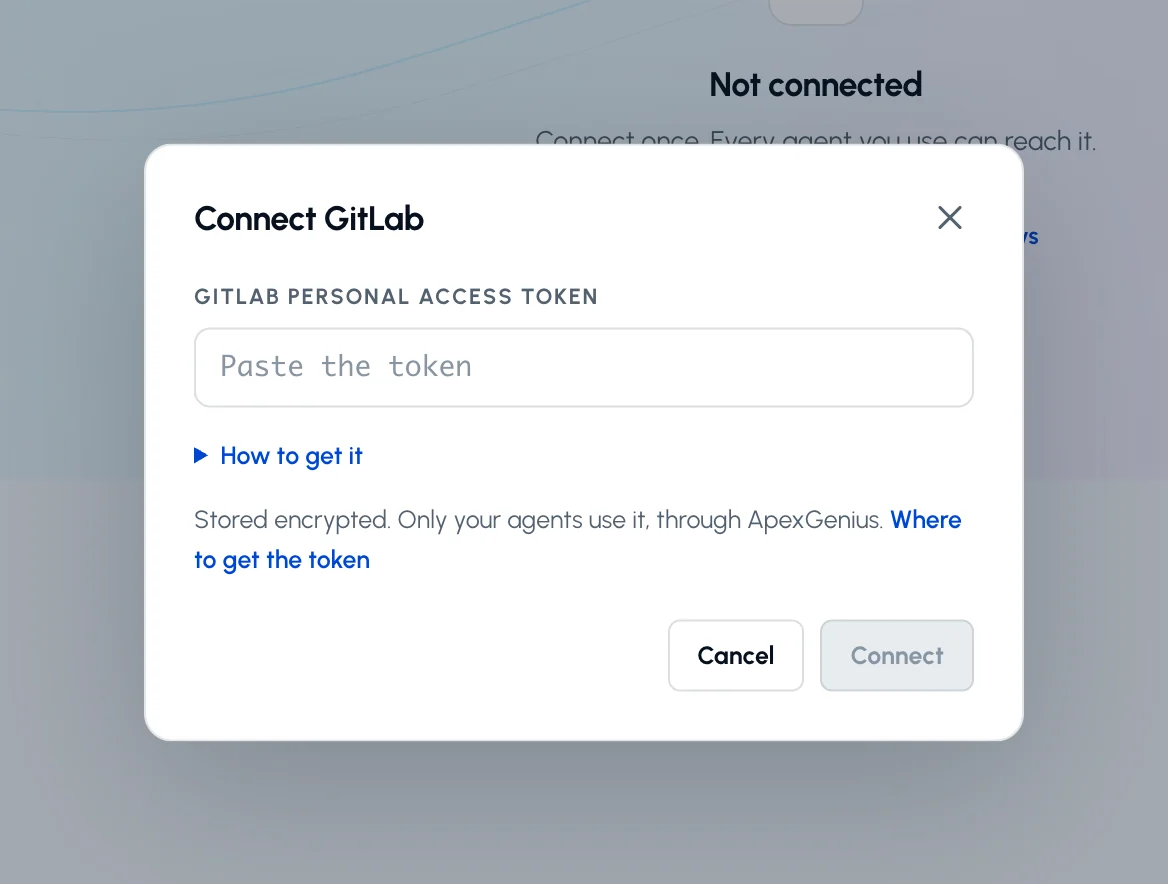
Paste the token into the connection form. ApexGenius supplies the gitlab.com address, checks the token’s scopes and your GitLab user, and stores it encrypted. A token that can make changes is refused. Never paste the token into a chat.
Paste a GitLab.com personal access token with only the read_api scope and choose Connect. How to get it opens the token steps.
4
Check the connected user
Open Tools to see the GitLab reads, then ask your AI the question below. Compare the username with your GitLab.com account.
Try a first question with your AI agent
Using GitLab, tell me which GitLab user is connected, then list my five most recently updated open merge requests. Do not change anything.
Confirm the username matches your GitLab.com account and the merge requests match GitLab. The connection is read-only, so this check changes nothing.
Confirm the connected GitLab user, and list groups and their projects.
Find projects and read their labels and milestones.
List and read issues and their comments.
List and read merge requests, with their comments, diffs and commits.
Read the repository tree, a file, branches, commits, tags and releases.
List pipelines and read the jobs inside one.
Three ApexGenius tools reach these reads: gitlab_search_operations finds
them, gitlab_read_operation runs them, and gitlab_write_operation refuses
every call because GitLab has no write operations here. Reads use the read
route, so an AI agent set to Read only can use all of them.Use the numeric project or group id that GitLab shows on the project page. A
path such as group/project is refused.
{"docsConfig":{"theme":"maple","$schema":"https://mintlify.com/docs.json","name":"ApexGenius","description":"Connect one app to a supported AI client, then keep the account, available operations, and observed Activity clear.","colors":{"primary":"#0055FF","light":"#4C7FE5","dark":"#4C7FE5"},"logo":{"light":"https://mintcdn.com/apexgenius/PL1VOuYeZtypECmH/logo/apexgenius.svg?fit=max\u0026auto=format\u0026n=PL1VOuYeZtypECmH\u0026q=85\u0026s=ef6a088897a39f3ddbf23122743577fe","dark":"https://mintcdn.com/apexgenius/PL1VOuYeZtypECmH/logo/apexgenius-dark.svg?fit=max\u0026auto=format\u0026n=PL1VOuYeZtypECmH\u0026q=85\u0026s=90a72ff0da22baa182d13aa1ab8398d9","href":"https://www.apexgenius.ai"},"favicon":{"light":"https://mintcdn.com/apexgenius/PL1VOuYeZtypECmH/logo/apexgenius.svg?fit=max\u0026auto=format\u0026n=PL1VOuYeZtypECmH\u0026q=85\u0026s=ef6a088897a39f3ddbf23122743577fe","dark":"https://mintcdn.com/apexgenius/PL1VOuYeZtypECmH/logo/apexgenius-dark.svg?fit=max\u0026auto=format\u0026n=PL1VOuYeZtypECmH\u0026q=85\u0026s=90a72ff0da22baa182d13aa1ab8398d9"},"appearance":{"default":"system","strict":false},"background":{"color":{"light":"#FAF9F6","dark":"#15171B"}},"navbar":{"links":[{"icon":"blocks","href":"https://www.apexgenius.ai/connectors","label":"Connectors"},{"icon":"workflow","href":"https://www.gatechsolutionsllc.com/services/agentforce-consulting","label":"Implementation help"}],"primary":{"type":"button","label":"Connect it free","href":"https://www.apexgenius.ai/auth"}},"footer":{"socials":{"x":"https://x.com/ApexGeniusAI","linkedin":"https://www.linkedin.com/company/apexgenius","youtube":"https://www.youtube.com/@ApexGeniusAI"},"links":[{"header":"ApexGenius","items":[{"label":"Product","href":"https://www.apexgenius.ai/mcp"},{"label":"Connector catalog","href":"https://www.apexgenius.ai/connectors"},{"label":"Security","href":"https://www.apexgenius.ai/security"}]},{"header":"Implementation","items":[{"label":"GAT Solutions services","href":"https://www.gatechsolutionsllc.com/services"},{"label":"AI and Agentforce consulting","href":"https://www.gatechsolutionsllc.com/services/agentforce-consulting"},{"label":"Salesforce integrations","href":"https://www.gatechsolutionsllc.com/services/salesforce-integrations"}]},{"header":"Legal","items":[{"label":"Privacy","href":"https://www.apexgenius.ai/privacy"},{"label":"Terms","href":"https://www.apexgenius.ai/terms"}]}]},"fonts":{"family":"Urbanist"},"icons":{"library":"lucide"},"styling":{"eyebrows":"breadcrumbs","codeblocks":"system","latex":false},"integrations":{"ga4":{"measurementId":"G-7RKJ5X02QV"}},"errors":{"404":{"redirect":false,"title":"This route is not in the gateway docs","description":"Check the address or return to the [ApexGenius introduction](/getting-started/introduction)."}},"contextual":{"options":["copy","view","chatgpt","claude"],"display":"header"},"metadata":{"timestamp":true},"navigation":{"pages":[]}},"deployment":{"deploymentMetadataValue":{"subdomain":"apexgenius","hasAudioNarration":false,"actualSubdomain":"apexgenius","customDomains":["docs.apexgenius.ai"],"gitSource":{"type":"github","owner":"ezscore","repo":"apexai","deployBranch":"main","contentDirectory":"content/docs","isPrivate":true,"mountPath":"","label":""},"chroma":{"latestBuiltDeploymentHistoryId":"6adf8dda83c1646dca34052e","collectionId":"e0816f0f-0792-45be-b62b-e511c2f006d7","liveDeploymentHistoryId":"6adf8dda83c1646dca34052e","schemaVersion":"v3"},"entitlements":{},"buildId":"6adf8dda83c1646dca34052e","clientVersion":"0.0.3969","searchFilterCounts":[{"language":"default","tag":"Connect apps","count":43},{"language":"default","tag":"Additional connector guides","count":33},{"language":"default","tag":"Connect an AI client","count":6},{"language":"default","tag":"Salesforce","count":5},{"language":"default","tag":"Start here","count":5},{"language":"default","tag":"Reference and support","count":4},{"language":"default","tag":"Governance and concepts","count":3}]},"assistantConfig":{"enableAskAiButton":false,"enableStarterQuestions":false,"enableContextualStarterQuestions":false,"enableAskAiSearchBar":true},"basePath":"","hasChatPermissions":false,"hasWebMcpPermissions":false,"toggles":[{"name":"kill-isr","enabled":true,"variant":{"name":"disabled","enabled":false,"feature_enabled":true},"impressionData":false},{"name":"agent-mintlify-slack","enabled":true,"variant":{"name":"disabled","enabled":false,"feature_enabled":true},"impressionData":false},{"name":"editor-v7-file-tree","enabled":true,"variant":{"name":"disabled","enabled":false,"feature_enabled":true},"impressionData":false},{"name":"agent-integrations-settings","enabled":true,"variant":{"name":"disabled","enabled":false,"feature_enabled":true},"impressionData":false},{"name":"automations-pr-grouping","enabled":true,"variant":{"name":"disabled","enabled":false,"feature_enabled":true},"impressionData":false},{"name":"custom-prefix","enabled":true,"variant":{"name":"disabled","enabled":false,"feature_enabled":true},"impressionData":false},{"name":"analytics-v7","enabled":true,"variant":{"name":"disabled","enabled":false,"feature_enabled":true},"impressionData":false},{"name":"user-flows-analytics","enabled":true,"variant":{"name":"disabled","enabled":false,"feature_enabled":true},"impressionData":false},{"name":"no-publish-flow","enabled":true,"variant":{"name":"disabled","enabled":false,"feature_enabled":true},"impressionData":false},{"name":"workos-onboarding","enabled":true,"variant":{"name":"disabled","enabled":false,"feature_enabled":true},"impressionData":false},{"name":"llms-txt-v2","enabled":true,"variant":{"name":"disabled","enabled":false,"feature_enabled":true},"impressionData":false},{"name":"pause-universal-search-reconcile","enabled":true,"variant":{"name":"disabled","enabled":false,"feature_enabled":true},"impressionData":false},{"name":"snapshot-serving-live","enabled":true,"variant":{"name":"disabled","enabled":false,"feature_enabled":true},"impressionData":false},{"name":"stripTemperatureMiddleware","enabled":true,"variant":{"name":"disabled","enabled":false,"feature_enabled":true},"impressionData":false},{"name":"per-site-search-delta","enabled":true,"variant":{"name":"disabled","enabled":false,"feature_enabled":true},"impressionData":false},{"name":"support-platform-pylon-zendesk","enabled":true,"variant":{"name":"disabled","enabled":false,"feature_enabled":true},"impressionData":false},{"name":"snapshot-serving","enabled":true,"variant":{"name":"disabled","enabled":false,"feature_enabled":true},"impressionData":false},{"name":"instant-rollback","enabled":true,"variant":{"name":"disabled","enabled":false,"feature_enabled":true},"impressionData":false},{"name":"granular-notifications-server","enabled":true,"variant":{"name":"disabled","enabled":false,"feature_enabled":true},"impressionData":false},{"name":"granular-notifications","enabled":true,"variant":{"name":"disabled","enabled":false,"feature_enabled":true},"impressionData":false},{"name":"editor-private-page-search","enabled":true,"variant":{"name":"disabled","enabled":false,"feature_enabled":true},"impressionData":false},{"name":"automations-fable","enabled":true,"variant":{"name":"disabled","enabled":false,"feature_enabled":true},"impressionData":false},{"name":"fixed-ai-action-pricing","enabled":true,"variant":{"name":"disabled","enabled":false,"feature_enabled":true},"impressionData":false},{"name":"automation-resolve-merge-conflict","enabled":true,"variant":{"name":"disabled","enabled":false,"feature_enabled":true},"impressionData":false},{"name":"scoped-publishing","enabled":true,"variant":{"name":"disabled","enabled":false,"feature_enabled":true},"impressionData":false},{"name":"mintql","enabled":true,"variant":{"name":"disabled","enabled":false,"feature_enabled":true},"impressionData":false},{"name":"page-level-analytics","enabled":true,"variant":{"name":"disabled","enabled":false,"feature_enabled":true},"impressionData":false},{"name":"editor-version-history-v2","enabled":true,"variant":{"name":"disabled","enabled":false,"feature_enabled":true},"impressionData":false},{"name":"editor-nav-generations","enabled":true,"variant":{"name":"disabled","enabled":false,"feature_enabled":true},"impressionData":false},{"name":"billing-page-v2","enabled":true,"variant":{"name":"disabled","enabled":false,"feature_enabled":true},"impressionData":false},{"name":"workspace-projects","enabled":true,"variant":{"name":"disabled","enabled":false,"feature_enabled":true},"impressionData":false},{"name":"assistant-v5","enabled":true,"variant":{"name":"disabled","enabled":false,"feature_enabled":true},"impressionData":false},{"name":"byok-sep-25","enabled":true,"variant":{"name":"disabled","enabled":false,"feature_enabled":true},"impressionData":false},{"name":"fork-pr-previews","enabled":true,"variant":{"name":"disabled","enabled":false,"feature_enabled":true},"impressionData":false},{"name":"revalidation-jwt","enabled":true,"variant":{"name":"disabled","enabled":false,"feature_enabled":true},"impressionData":false},{"name":"vite-origin","enabled":true,"variant":{"name":"disabled","enabled":false,"feature_enabled":true},"impressionData":false},{"name":"editor-agent-model-picker","enabled":true,"variant":{"name":"disabled","enabled":false,"feature_enabled":true},"impressionData":false},{"name":"billing-updated-9-15","enabled":true,"variant":{"name":"disabled","enabled":false,"feature_enabled":true},"impressionData":false},{"name":"hobby-abuse-scan","enabled":true,"variant":{"name":"disabled","enabled":false,"feature_enabled":true},"impressionData":false},{"name":"dashboard-inbox","enabled":true,"variant":{"name":"disabled","enabled":false,"feature_enabled":true},"impressionData":false}],"isAtlas":false,"googleFontsInlined":true},"customCss":[{"filePath":"style.css","content":":root{--ag-canvas:#FAF9F6;--ag-surface:#FFFFFF;--ag-ink:#1A1A18;--ag-muted:#6B6B66;--ag-border:#E8E5DF;--ag-blue:#0055FF;--ag-blue-frame:rgb(0 85 255 / 18%);--ag-clay:#D97757}.dark{--ag-blue-frame:rgb(51 119 255 / 28%)}#navbar{border-bottom:1px solid var(--ag-blue-frame)}nav[aria-label=Pages]{border-right-color:var(--ag-blue-frame)}card,code-block{border-radius:14px}callout{border-radius:12px}@media (prefers-reduced-motion:reduce){*,::after,::before{scroll-behavior:auto!important;animation-duration:.01ms!important;animation-iteration-count:1!important;transition-duration:.01ms!important}}"}],"page":{"pagePath":"integrations/gitlab","slug":"/integrations/gitlab","pageMetadata":{"title":"GitLab MCP Setup","description":"Connect GitLab.com to ApexGenius with a read-only personal access token. Read projects, issues, merge requests, files and pipelines from your AI.","category":"integrations","order":106,"lastVerified":"2026-10-10","href":"/integrations/gitlab"},"description":{"compiledSource":"\"use strict\";\nconst {jsx: _jsx} = arguments[0];\nconst {useMDXComponents: _provideComponents} = arguments[0];\nfunction _createMdxContent(props) {\n const _components = {\n p: \"p\",\n ..._provideComponents(),\n ...props.components\n };\n return _jsx(_components.p, {\n children: \"Connect GitLab.com to ApexGenius with a read-only personal access token. Read projects, issues, merge requests, files and pipelines from your AI.\"\n });\n}\nfunction MDXContent(props = {}) {\n const {wrapper: MDXLayout} = {\n ..._provideComponents(),\n ...props.components\n };\n return MDXLayout ? _jsx(MDXLayout, {\n ...props,\n children: _jsx(_createMdxContent, {\n ...props\n })\n }) : _createMdxContent(props);\n}\nreturn {\n default: MDXContent\n};\n","frontmatter":{},"scope":{}},"pageType":"default","mdx":{"mdxSource":{"compiledSource":"\"use strict\";const{Fragment:_Fragment,jsx:_jsx,jsxs:_jsxs}=arguments[0];const{useMDXComponents:_provideComponents}=arguments[0];function _createMdxContent(props){const _components={a:`a`,code:`code`,li:`li`,ol:`ol`,p:`p`,pre:`pre`,span:`span`,strong:`strong`,ul:`ul`,..._provideComponents(),...props.components},{CodeBlock,Frame,Heading,OptimizedImage,Step,Steps}=_components;if(!CodeBlock)_missingMdxReference(`CodeBlock`,true);if(!Frame)_missingMdxReference(`Frame`,true);if(!Heading)_missingMdxReference(`Heading`,true);if(!OptimizedImage)_missingMdxReference(`OptimizedImage`,true);if(!Step)_missingMdxReference(`Step`,true);if(!Steps)_missingMdxReference(`Steps`,true);return _jsxs(_Fragment,{children:[_jsxs(_components.p,{children:[_jsx(_components.strong,{children:`Status: Available.`}),` GitLab connects with a GitLab.com personal access token\nthat has only the `,_jsx(_components.code,{children:`read_api`}),` scope. Every call is a read. Your AI can read\nprojects, groups, issues, merge requests, repository files, commits and CI/CD\npipelines, and it cannot change anything in GitLab.`]}),`\n`,_jsxs(_components.p,{children:[_jsx(_components.a,{href:`https://www.apexgenius.ai/connectors/gitlab`,children:`Explore the GitLab connector`}),`.`]}),`\n`,_jsx(Heading,{level:`2`,id:`which-token-to-create`,children:`Which token to create`}),`\n`,_jsxs(_components.p,{children:[`Create a `,_jsx(_components.strong,{children:`legacy personal access token`}),` on GitLab.com:`]}),`\n`,_jsxs(_components.ol,{children:[`\n`,_jsxs(_components.li,{children:[`Select your avatar, then `,_jsx(_components.strong,{children:`Edit profile`}),`.`]}),`\n`,_jsxs(_components.li,{children:[`In the left sidebar, open `,_jsx(_components.strong,{children:`Access`}),`, then `,_jsx(_components.strong,{children:`Personal access tokens`}),`.`]}),`\n`,_jsxs(_components.li,{children:[`From `,_jsx(_components.strong,{children:`Generate token`}),`, choose `,_jsx(_components.strong,{children:`Legacy token`}),`.`]}),`\n`,_jsx(_components.li,{children:`Name the token and set an expiry date.`}),`\n`,_jsxs(_components.li,{children:[`Pick only the `,_jsx(_components.strong,{children:`read_api`}),` scope.`]}),`\n`,_jsxs(_components.li,{children:[`Choose `,_jsx(_components.strong,{children:`Generate token`}),` and copy the token once.`]}),`\n`]}),`\n`,_jsxs(_components.p,{children:[`GitLab can pre-fill the form:\n`,_jsx(_components.a,{href:`https://gitlab.com/-/user_settings/personal_access_tokens?name=ApexGenius\u0026description=ApexGenius+GitLab+connection.+Read-only.\u0026scopes=read_api`,children:`Create a read_api token`}),`.`]}),`\n`,_jsxs(_components.p,{children:[`When you connect, ApexGenius reads the token’s own scopes from GitLab. It\nrefuses a token without `,_jsx(_components.code,{children:`read_api`}),`. It also refuses a token with any other\nscope except `,_jsx(_components.code,{children:`read_user`}),` and `,_jsx(_components.code,{children:`read_repository`}),`, so a token with `,_jsx(_components.code,{children:`api`}),` or\n`,_jsx(_components.code,{children:`write_repository`}),` cannot connect.`]}),`\n`,_jsx(_components.p,{children:`GitLab.com tokens expire within a year. When GitLab stops accepting the token,\ncreate a new one and paste it on the GitLab connection page.`}),`\n`,_jsx(Heading,{level:`2`,id:`connect-and-read-your-first-project`,children:`Connect and read your first project`}),`\n`,_jsx(_components.p,{children:_jsx(_components.strong,{children:`Before you start`})}),`\n`,_jsxs(_components.ul,{children:[`\n`,_jsx(_components.li,{children:`A GitLab.com account that can see the projects you want your AI to read. Self-managed GitLab is not supported yet.`}),`\n`,_jsx(_components.li,{children:`A personal access token with only the read_api scope.`}),`\n`]}),`\n`,_jsxs(Steps,{children:[_jsx(Step,{title:`Create a token on GitLab.com`,children:_jsx(_components.p,{children:`On GitLab.com open Edit profile, then Access, then Personal access tokens. Choose Generate token, then Legacy token. Name it, set an expiry date, pick only read_api, and choose Generate token. Copy the token once. The connect form links to a pre-filled token page.`})}),_jsx(Step,{title:`Open GitLab in Connections`,children:_jsx(_components.p,{children:`Sign in to ApexGenius, open Connections, choose GitLab, and select Connect.`})}),_jsxs(Step,{title:`Paste the token`,children:[_jsx(_components.p,{children:`Paste the token into the connection form. ApexGenius supplies the gitlab.com address, checks the token’s scopes and your GitLab user, and stores it encrypted. A token that can make changes is refused. Never paste the token into a chat.`}),_jsxs(Frame,{caption:`Paste a GitLab.com personal access token with only the read_api scope and choose Connect. How to get it opens the token steps.`,children:[_jsx(OptimizedImage,{src:`https://www.apexgenius.ai/images/integration-guides/gitlab/20261026-credentials.webp`,alt:`The Connect GitLab dialog in ApexGenius with the empty GitLab personal access token field, the How to get it link and the Connect button.`,className:`mint-hidden sm:mint-block`,width:`1168`,height:`884`,style:{width:`100%`,height:`auto`}}),_jsx(OptimizedImage,{src:`https://www.apexgenius.ai/images/integration-guides/gitlab/20261026-credentials-mobile.webp`,alt:`The Connect GitLab dialog in ApexGenius with the empty GitLab personal access token field, the How to get it link and the Connect button.`,className:`mint-block sm:mint-hidden`,width:`780`,height:`716`,style:{width:`100%`,height:`auto`}})]})]}),_jsx(Step,{title:`Check the connected user`,children:_jsx(_components.p,{children:`Open Tools to see the GitLab reads, then ask your AI the question below. Compare the username with your GitLab.com account.`})})]}),`\n`,_jsx(_components.p,{children:_jsx(_components.strong,{children:`Try a first question with your AI agent`})}),`\n`,_jsx(CodeBlock,{filename:``,numberOfLines:`2`,language:`text`,children:_jsx(_components.pre,{className:`shiki shiki-themes github-light-default dark-plus`,style:{backgroundColor:`#ffffff`,\"--shiki-dark-bg\":`#0B0C0E`,color:`#1f2328`,\"--shiki-dark\":`#D4D4D4`},language:`text`,children:_jsxs(_components.code,{language:`text`,numberOfLines:`2`,children:[_jsx(_components.span,{className:`line`,children:_jsx(_components.span,{children:`Using GitLab, tell me which GitLab user is connected, then list my five most recently updated open merge requests. Do not change anything.`})}),`\n`,_jsx(_components.span,{className:`line`,children:_jsx(_components.span,{})})]})})}),`\n`,_jsx(_components.p,{children:`Confirm the username matches your GitLab.com account and the merge requests match GitLab. The connection is read-only, so this check changes nothing.`}),`\n`,_jsx(Heading,{level:`2`,id:`what-your-ai-can-do`,children:`What your AI can do`}),`\n`,_jsxs(_components.ul,{children:[`\n`,_jsx(_components.li,{children:`Confirm the connected GitLab user, and list groups and their projects.`}),`\n`,_jsx(_components.li,{children:`Find projects and read their labels and milestones.`}),`\n`,_jsx(_components.li,{children:`List and read issues and their comments.`}),`\n`,_jsx(_components.li,{children:`List and read merge requests, with their comments, diffs and commits.`}),`\n`,_jsx(_components.li,{children:`Read the repository tree, a file, branches, commits, tags and releases.`}),`\n`,_jsx(_components.li,{children:`List pipelines and read the jobs inside one.`}),`\n`]}),`\n`,_jsxs(_components.p,{children:[`Three ApexGenius tools reach these reads: `,_jsx(_components.code,{children:`gitlab_search_operations`}),` finds\nthem, `,_jsx(_components.code,{children:`gitlab_read_operation`}),` runs them, and `,_jsx(_components.code,{children:`gitlab_write_operation`}),` refuses\nevery call because GitLab has no write operations here. Reads use the read\nroute, so an AI agent set to Read only can use all of them.`]}),`\n`,_jsxs(_components.p,{children:[`Use the numeric project or group id that GitLab shows on the project page. A\npath such as `,_jsx(_components.code,{children:`group/project`}),` is refused.`]}),`\n`,_jsx(Heading,{level:`2`,id:`limits`,children:`Limits`}),`\n`,_jsxs(_components.ul,{children:[`\n`,_jsx(_components.li,{children:`GitLab.com only. Self-managed GitLab and GitLab Dedicated are not supported\nyet.`}),`\n`,_jsx(_components.li,{children:`The token reads what your GitLab user can read. Private projects need a user\nwho is a member.`}),`\n`,_jsx(_components.li,{children:`GitLab.com limits how many API calls each user can make each minute.`}),`\n`,_jsx(_components.li,{children:`Nothing to undo: reads change nothing. If a check shows GitLab is partially\nready, check the connection health, the Tools tab, and the GitLab skill.`}),`\n`,_jsx(_components.li,{children:`Disconnecting removes the token from ApexGenius. Revoke it on GitLab.com to\nstop it everywhere.`}),`\n`]}),`\n`,_jsxs(_components.p,{children:[_jsx(_components.a,{href:`https://docs.gitlab.com/user/profile/personal_access_tokens/`,children:`Official GitLab personal access token instructions`}),`.`]})]})}function MDXContent(props={}){const{wrapper:MDXLayout}={..._provideComponents(),...props.components};return MDXLayout?_jsx(MDXLayout,{...props,children:_jsx(_createMdxContent,{...props})}):_createMdxContent(props)}return{default:MDXContent};function _missingMdxReference(id,component){throw new Error(`Expected `+(component?`component`:`object`)+\" `\"+id+\"` to be defined: you likely forgot to import, pass, or provide it.\")}","frontmatter":{},"scope":{"codeStyling":"system","config":{},"pageMetadata":{"title":"GitLab MCP Setup","description":"Connect GitLab.com to ApexGenius with a read-only personal access token. Read projects, issues, merge requests, files and pipelines from your AI.","category":"integrations","order":106,"lastVerified":"2026-10-10","href":"/integrations/gitlab"}}},"mdxSourceWithNoJs":null},"mdxExtracts":{"tableOfContents":[{"title":"Which token to create","slug":"which-token-to-create","depth":2,"children":[]},{"title":"Connect and read your first project","slug":"connect-and-read-your-first-project","depth":2,"children":[]},{"title":"What your AI can do","slug":"what-your-ai-can-do","depth":2,"children":[]},{"title":"Limits","slug":"limits","depth":2,"children":[]}],"codeExamples":{}},"jsLinks":[],"dynamicCss":".mint-block {\n display: block\n}\n.mint-hidden {\n display: none\n}\n@media (min-width: 640px) {\n .sm\\:mint-block {\n display: block\n }\n .sm\\:mint-hidden {\n display: none\n }\n}","subdomain":"apexgenius","siteName":"ApexGenius","title":"GitLab MCP Setup - ApexGenius","navMaps":{"firstHrefInVersion":{},"firstHrefInLanguage":{}},"lastModified":"2026-10-26T17:29:04.897Z","gitLastModified":"2026-10-26T17:00:33.000Z","originalFileLocation":"integrations/gitlab.mdx"},"headHtml":"\u003cscript data-mint-head>(function(){var d=document.documentElement,p=null;if(!p){try{p=localStorage.getItem(\"isDarkMode\")}catch(e){}if(p==='true')p='dark';else if(p==='false')p='light';if(p!=='light'\u0026\u0026p!=='dark'\u0026\u0026p!=='system')p=\"system\"}var r=p==='system'?(matchMedia(\"(prefers-color-scheme: dark)\").matches?'dark':'light'):p;d.classList.remove(r==='dark'?'light':'dark');d.classList.add(r);d.setAttribute(\"data-theme-preference\",p)})();\u003c/script>\u003cmeta data-mint-head name=\"description\" content=\"Connect GitLab.com to ApexGenius with a read-only personal access token. Read projects, issues, merge requests, files and pipelines from your AI.\">\u003cmeta data-mint-head name=\"application-name\" content=\"ApexGenius\">\u003cmeta data-mint-head name=\"generator\" content=\"Mintlify\">\u003clink data-mint-head rel=\"icon\" type=\"image/png\" sizes=\"192x192\" href=\"/mintlify-assets/_mintlify/favicons/apexgenius/of2iO4EQJQd_LzS2/_generated/favicon/android-chrome-192x192.png\" media=\"(prefers-color-scheme: light)\">\u003clink data-mint-head rel=\"apple-touch-icon\" type=\"image/png\" sizes=\"180x180\" href=\"/mintlify-assets/_mintlify/favicons/apexgenius/of2iO4EQJQd_LzS2/_generated/favicon/apple-touch-icon.png\">\u003clink data-mint-head rel=\"icon\" type=\"image/png\" sizes=\"16x16\" href=\"/mintlify-assets/_mintlify/favicons/apexgenius/of2iO4EQJQd_LzS2/_generated/favicon/favicon-16x16.png\" media=\"(prefers-color-scheme: light)\">\u003clink data-mint-head rel=\"icon\" type=\"image/png\" sizes=\"32x32\" href=\"/mintlify-assets/_mintlify/favicons/apexgenius/of2iO4EQJQd_LzS2/_generated/favicon/favicon-32x32.png\" media=\"(prefers-color-scheme: light)\">\u003clink data-mint-head rel=\"shortcut icon\" type=\"image/x-icon\" href=\"/mintlify-assets/_mintlify/favicons/apexgenius/of2iO4EQJQd_LzS2/_generated/favicon/favicon.ico\" media=\"(prefers-color-scheme: light)\">\u003clink data-mint-head rel=\"icon\" type=\"image/png\" sizes=\"192x192\" href=\"/mintlify-assets/_mintlify/favicons/apexgenius/of2iO4EQJQd_LzS2/_generated/favicon-dark/android-chrome-192x192.png\" media=\"(prefers-color-scheme: dark)\">\u003clink data-mint-head rel=\"icon\" type=\"image/png\" sizes=\"16x16\" href=\"/mintlify-assets/_mintlify/favicons/apexgenius/of2iO4EQJQd_LzS2/_generated/favicon-dark/favicon-16x16.png\" media=\"(prefers-color-scheme: dark)\">\u003clink data-mint-head rel=\"icon\" type=\"image/png\" sizes=\"32x32\" href=\"/mintlify-assets/_mintlify/favicons/apexgenius/of2iO4EQJQd_LzS2/_generated/favicon-dark/favicon-32x32.png\" media=\"(prefers-color-scheme: dark)\">\u003clink data-mint-head rel=\"shortcut icon\" type=\"image/x-icon\" href=\"/mintlify-assets/_mintlify/favicons/apexgenius/of2iO4EQJQd_LzS2/_generated/favicon-dark/favicon.ico\" media=\"(prefers-color-scheme: dark)\">\u003cmeta data-mint-head property=\"og:title\" content=\"GitLab MCP Setup - ApexGenius\">\u003cmeta data-mint-head property=\"og:description\" content=\"Connect GitLab.com to ApexGenius with a read-only personal access token. Read projects, issues, merge requests, files and pipelines from your AI.\">\u003cmeta data-mint-head property=\"og:site_name\" content=\"ApexGenius\">\u003cmeta data-mint-head property=\"og:url\" content=\"https://docs.apexgenius.ai/integrations/gitlab\">\u003cmeta data-mint-head property=\"og:type\" content=\"website\">\u003cmeta data-mint-head property=\"og:image\" content=\"https://apexgenius.mintlify.app/_mintlify/api/og/v2?division=Additional+connector+guides\u0026amp;title=GitLab+MCP+Setup\u0026amp;description=Connect+GitLab.com+to+ApexGenius+with+a+read-only+personal+access+token.+Read+projects%2C+issues%2C+merge+requests%2C+files+and+pipelines+from+your+AI.\u0026amp;theme=19ac6d0290a1eaf9945bbd0f\u0026amp;signature=9bbcd242fe8633b99ad2a7907133c8c5c77f9503314a2f7a69c1e17b1b28c42a\">\u003cmeta data-mint-head property=\"og:image:width\" content=\"1200\">\u003cmeta data-mint-head property=\"og:image:height\" content=\"630\">\u003cmeta data-mint-head name=\"twitter:card\" content=\"summary_large_image\">\u003cmeta data-mint-head name=\"twitter:title\" content=\"GitLab MCP Setup - ApexGenius\">\u003cmeta data-mint-head name=\"twitter:description\" content=\"Connect GitLab.com to ApexGenius with a read-only personal access token. Read projects, issues, merge requests, files and pipelines from your AI.\">\u003cmeta data-mint-head name=\"twitter:image\" content=\"https://apexgenius.mintlify.app/_mintlify/api/og/v2?division=Additional+connector+guides\u0026amp;title=GitLab+MCP+Setup\u0026amp;description=Connect+GitLab.com+to+ApexGenius+with+a+read-only+personal+access+token.+Read+projects%2C+issues%2C+merge+requests%2C+files+and+pipelines+from+your+AI.\u0026amp;theme=19ac6d0290a1eaf9945bbd0f\u0026amp;signature=9bbcd242fe8633b99ad2a7907133c8c5c77f9503314a2f7a69c1e17b1b28c42a\">\u003cmeta data-mint-head name=\"twitter:image:width\" content=\"1200\">\u003cmeta data-mint-head name=\"twitter:image:height\" content=\"630\">\u003cmeta data-mint-head name=\"msapplication-config\" content=\"/mintlify-assets/_mintlify/favicons/apexgenius/of2iO4EQJQd_LzS2/_generated/favicon/browserconfig.xml\">\u003cmeta data-mint-head name=\"apple-mobile-web-app-title\" content=\"ApexGenius\">\u003cmeta data-mint-head name=\"msapplication-TileColor\" content=\"#0055FF\">\u003clink data-mint-head rel=\"canonical\" href=\"https://docs.apexgenius.ai/integrations/gitlab\">\u003clink data-mint-head rel=\"alternate\" type=\"application/xml\" href=\"/sitemap.xml\">\u003clink data-mint-head rel=\"alternate\" type=\"text/markdown\" href=\"/integrations/gitlab.md\">\u003cscript data-mint-head type=\"application/ld+json\">{\"@context\":\"https://schema.org\",\"@graph\":[{\"@type\":\"Organization\",\"@id\":\"https://docs.apexgenius.ai/#organization\",\"name\":\"ApexGenius\",\"url\":\"https://docs.apexgenius.ai\",\"logo\":{\"@type\":\"ImageObject\",\"url\":\"https://mintcdn.com/apexgenius/PL1VOuYeZtypECmH/logo/apexgenius.svg?fit=max\u0026auto=format\u0026n=PL1VOuYeZtypECmH\u0026q=85\u0026s=ef6a088897a39f3ddbf23122743577fe\"}},{\"@type\":\"WebSite\",\"@id\":\"https://docs.apexgenius.ai#website\",\"name\":\"ApexGenius\",\"url\":\"https://docs.apexgenius.ai\",\"publisher\":{\"@id\":\"https://docs.apexgenius.ai/#organization\"}},{\"@type\":\"WebPage\",\"@id\":\"https://docs.apexgenius.ai/integrations/gitlab#webpage\",\"url\":\"https://docs.apexgenius.ai/integrations/gitlab\",\"name\":\"GitLab MCP Setup\",\"description\":\"Connect GitLab.com to ApexGenius with a read-only personal access token. Read projects, issues, merge requests, files and pipelines from your AI.\",\"dateModified\":\"2026-10-26T17:00:33.000Z\",\"isPartOf\":{\"@id\":\"https://docs.apexgenius.ai#website\"},\"breadcrumb\":{\"@id\":\"https://docs.apexgenius.ai/integrations/gitlab#breadcrumb\"}},{\"@type\":\"BreadcrumbList\",\"@id\":\"https://docs.apexgenius.ai/integrations/gitlab#breadcrumb\",\"itemListElement\":[{\"@type\":\"ListItem\",\"position\":1,\"name\":\"Connect apps\",\"item\":\"https://docs.apexgenius.ai/integrations/provider-connections\"},{\"@type\":\"ListItem\",\"position\":2,\"name\":\"Additional connector guides\",\"item\":\"https://docs.apexgenius.ai/integrations/hq-rental\"},{\"@type\":\"ListItem\",\"position\":3,\"name\":\"GitLab MCP Setup\",\"item\":\"https://docs.apexgenius.ai/integrations/gitlab\"}]},{\"@type\":[\"Article\",\"TechArticle\"],\"@id\":\"https://docs.apexgenius.ai/integrations/gitlab#article\",\"headline\":\"GitLab MCP Setup\",\"name\":\"GitLab MCP Setup\",\"description\":\"Connect GitLab.com to ApexGenius with a read-only personal access token. Read projects, issues, merge requests, files and pipelines from your AI.\",\"url\":\"https://docs.apexgenius.ai/integrations/gitlab\",\"mainEntityOfPage\":{\"@id\":\"https://docs.apexgenius.ai/integrations/gitlab#webpage\"},\"dateModified\":\"2026-10-26T17:00:33.000Z\",\"publisher\":{\"@id\":\"https://docs.apexgenius.ai/#organization\"},\"isPartOf\":{\"@id\":\"https://docs.apexgenius.ai#website\"}}]}\u003c/script>\u003cscript data-mint-head type=\"application/ld+json\">{\"@context\":\"https://schema.org\",\"@type\":\"WebSite\",\"name\":\"ApexGenius\",\"creator\":{\"@type\":\"Organization\",\"name\":\"Mintlify\",\"url\":\"https://mintlify.com\"}}\u003c/script>","siteName":"ApexGenius","nav":{"global":null,"groups":[{"group":"Start here","icon":"route","pages":[{"title":"Connect one app to the AI you already use","href":"/getting-started/introduction"},{"title":"Connect an AI client","href":"/guides/mcp-setup"},{"title":"Send the first safe request","href":"/guides/first-safe-request"},{"title":"Skills","href":"/guides/skills"},{"title":"Memory","href":"/guides/memory"}]},{"group":"Connect an AI client","icon":"message-square-code","pages":[{"title":"Connect Claude","href":"/guides/connect-claude"},{"title":"Connect ChatGPT","href":"/guides/connect-chatgpt"},{"title":"Connect Codex","href":"/guides/connect-codex"},{"title":"Connect Cursor","href":"/guides/connect-cursor"},{"title":"Connect VS Code","href":"/guides/connect-vscode"},{"title":"Connect Claude Code","href":"/guides/connect-claude-code"}]},{"group":"Salesforce","icon":"cloud","pages":[{"title":"Connect Salesforce","href":"/getting-started/connect-salesforce"},{"title":"Loading Metadata","href":"/getting-started/load-metadata"},{"title":"Using the Account App","href":"/getting-started/using-chat"},{"title":"Reports and Dashboards: Current Availability","href":"/guides/reports-and-dashboards"},{"title":"Salesforce connection model","href":"/integrations/salesforce-connection"}]},{"group":"Connect apps","icon":"plug-zap","pages":[{"title":"App connection guides","href":"/integrations/provider-connections"},{"title":"YouTube MCP Setup","href":"/integrations/youtube"},{"title":"YouTube Analytics MCP Setup","href":"/integrations/youtube-analytics"},{"title":"n8n MCP Setup","href":"/integrations/n8n"},{"title":"Confluence MCP Setup","href":"/integrations/confluence"},{"title":"Discord MCP Setup","href":"/integrations/discord"},{"title":"Jira MCP Setup","href":"/integrations/jira"},{"group":"Additional connector guides","icon":"flask-conical","pages":[{"title":"HQ Rental MCP Setup","href":"/integrations/hq-rental"},{"title":"Google Ads MCP Setup","href":"/integrations/google-ads"},{"title":"Google Search Console MCP Setup","href":"/integrations/google-search-console"},{"title":"Google Analytics MCP Setup","href":"/integrations/google-analytics"},{"title":"Google Workspace MCP Setup","href":"/integrations/google-workspace"},{"title":"Upwork MCP Setup","href":"/integrations/upwork"},{"title":"Apollo MCP Setup","href":"/integrations/apollo"},{"title":"Notion MCP Setup","href":"/integrations/notion"},{"title":"Connect Slack accounts","href":"/integrations/slack"},{"title":"ClickUp MCP Setup","href":"/integrations/clickup"},{"title":"Connect Blotato","href":"/integrations/blotato"},{"title":"Connect HighLevel","href":"/integrations/gohighlevel"},{"title":"ChatGPT Ads MCP Setup","href":"/integrations/chatgpt-ads"},{"title":"Semrush MCP Setup","href":"/integrations/semrush"},{"title":"Bing Webmaster MCP Setup","href":"/integrations/bing-webmaster"},{"title":"Apify MCP Setup","href":"/integrations/apify"},{"title":"Linear MCP Setup","href":"/integrations/linear"},{"title":"Attio MCP Setup","href":"/integrations/attio"},{"title":"Calendly MCP Setup","href":"/integrations/calendly"},{"title":"Connect Cal.com to your AI","href":"/integrations/cal-com"},{"title":"Mobbin MCP Setup","href":"/integrations/mobbin"},{"title":"Supabase MCP Setup","href":"/integrations/supabase"},{"title":"Context.dev MCP Setup","href":"/integrations/context-dev"},{"title":"Stripe MCP Setup","href":"/integrations/stripe"},{"title":"GitHub MCP Setup","href":"/integrations/github"},{"title":"monday.com MCP Setup","href":"/integrations/monday"},{"title":"Atlassian Rovo MCP Setup","href":"/integrations/atlassian-rovo"},{"title":"ElevenLabs MCP Setup","href":"/integrations/elevenlabs"},{"title":"FreshBooks MCP Setup","href":"/integrations/freshbooks"},{"title":"Trello MCP Setup","description":"Connect Trello with an API key and token. Read boards, lists, cards, checklists and comments, and create, move or comment on cards from your AI.","href":"/integrations/trello"},{"title":"GitLab MCP Setup","href":"/integrations/gitlab"},{"title":"TypeSafe MCP Setup","description":"Connect TypeSafe with an API key. Ask Jev typed yes/no, score and choice questions about search terms, ads and leads from your AI agent.","href":"/integrations/typesafe"},{"title":"HubSpot MCP Setup","href":"/integrations/hubspot"}]},{"title":"Connect Speedrun Alpha","href":"/integrations/speedrun"},{"title":"Connect OP.GG to your AI","href":"/integrations/opgg"},{"title":"Read Polymarket information with your AI","href":"/integrations/polymarket"}]},{"group":"Governance and concepts","icon":"shield-check","pages":[{"title":"How the MCP Connection Works","href":"/concepts/how-mcp-works"},{"title":"Orgs, Projects \u0026 Workspaces","href":"/concepts/orgs-and-projects"},{"title":"The Soul Doc","href":"/concepts/soul-doc"}]},{"group":"Reference and support","icon":"book-open-check","pages":[{"title":"MCP Tool Reference","href":"/reference/mcp-tools"},{"title":"Pricing and Account Limits","href":"/reference/plans-and-limits"},{"title":"Common Issues","href":"/troubleshooting/common-issues"},{"title":"How we record your signup source","href":"/reference/signup-source"}]}]},"title":"GitLab MCP Setup - ApexGenius","buildId":"dpl_G8u2B2Ji9qJYF9umedjv293TxycS","deploymentId":"dpl_G8u2B2Ji9qJYF9umedjv293TxycS","dynamics":["07c022d89b","a74be98ba7","a9bb46feb3"],"chunks":["Frame-CKfAdMi0.js","DynamicMarkdown-DpsHMHVL.js","zoom-image-lightbox-Io6GMTYV.js","lightbox-handle-r17bVUz3.js","Markdown-DZ-stgDu.js","clsx-Dfme4k4V.js","lib--scc4DXi.js","lib-B8HbPgcC.js","html-void-elements-mCSPHezU.js","dist-CPNs0ebX.js","katex-YMM-FMeD.js","marked.esm-CZWythHk.js","AssistantPageLink-3JVAA-i3.js"]}