Connect monday.com to ApexGenius with your personal API token. Find boards, read items, updates and docs, and create or update work from your AI.
Status: Available. monday.com uses monday’s official hosted MCP server and
your personal API token. The token has the same access you have in monday.com,
so your AI can reach every workspace and board you can open, and nothing more.
Every tool call counts toward your account’s daily monday API limit.Explore the monday.com connector.
In monday.com, click your profile picture at the top right.
Choose Developers.
Open My access tokens (called API token in some accounts), choose
Show, and copy the token.
Account admins can also copy it under Administration > Connections >
Personal API token. The token does not expire on its own. Choosing
Regenerate in monday stops the old token at once, so paste the new one into
ApexGenius after you regenerate it. monday’s own guide is
Connect with an API token.Use a monday user with only the access your AI needs. A token from an admin
reaches everything that admin can open.
A monday.com account that can use the API and open the boards you want your AI to use.
Your personal API token from monday.com. It has the same access you have in monday.
1
Copy your API token in monday.com
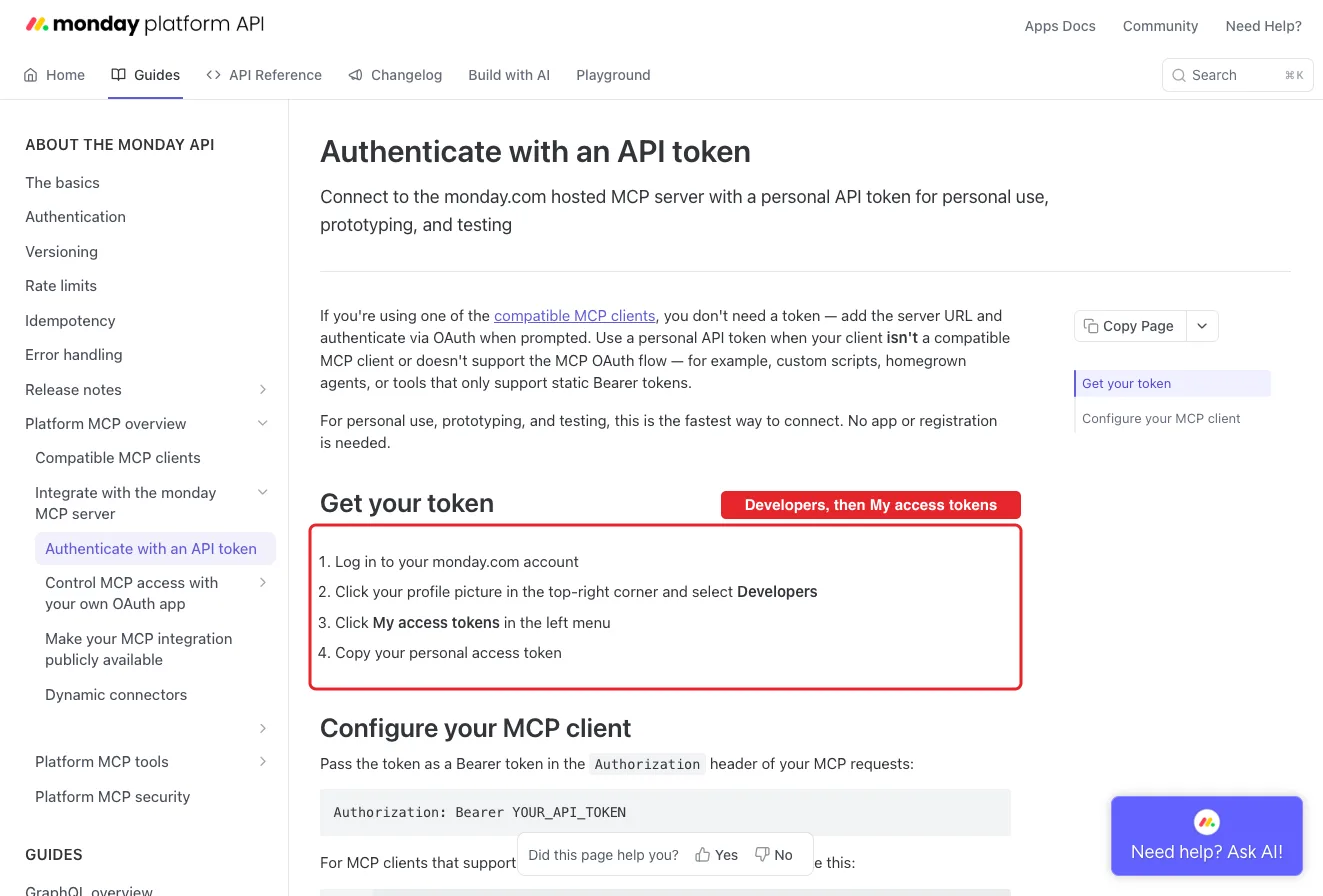
In monday.com, click your profile picture at the top right and choose Developers. Open My access tokens (called API token in some accounts), choose Show, and copy the token. Admins can also find it under Administration, Connections, Personal API token.
monday's own guide: profile picture, Developers, then My access tokens. This is monday's public guide page, so no account appears in it.
2
Open monday.com in Connections
Sign in to ApexGenius, open Connections, choose monday.com, and select Connect.
3
Paste the token
Paste the token into the connection form. ApexGenius supplies the mcp.monday.com address, checks the token with monday’s MCP, and stores it encrypted. Never paste the token into a chat.
4
Check the connected user
Open Tools to review the board, item, doc and update tools, then ask your AI the question below. Compare the user and workspaces with monday.com and check Tool Activity.
Try a first question with your AI agent
Using monday.com, tell me which user and account are connected and list the workspaces I can open. Do not change anything.
Confirm the user and workspaces match what you see in monday.com. This read changes nothing, but every call counts toward your account’s daily monday API limit: 1,000 calls on Free, Basic and Standard, 10,000 on Pro and 25,000 on Enterprise.
Open Skills on the connection to read MondayCom, or read that MCP
prompt in a compatible AI client. It explains how to find a board, read its
items a page at a time, and show the old and new values before a change.Three ApexGenius tools route monday’s live MCP catalog:
ApexGenius tool
monday.com tools
Access
monday_search_tools
Lists the tools monday’s MCP publishes today
Read
monday_call_read_tool
get_user_context, list_workspaces, workspace_info, search, get_board_info, get_board_items_page, get_board_activity, board_insights, get_updates, read_docs, get_form, get_assets, sprint and meeting reads, and the other tools monday marks read-only
Read, when monday marks the tool read-only
monday_call_tool
Every other tool: items, columns, groups, boards, docs, views, dashboards, forms, updates, notifications, automations, workflows, agents and all_monday_api
Write; enabled writes run when called
monday documents 64 tools. The public connector page lists the 60 your AI can
call: 24 reads, 30 writes and 6 destructive tools. The other four are display
tools monday’s server calls on its own.
monday’s MCP sign-in needs an app with a client secret, and each monday
account admin has to approve that app before anyone can connect. The personal
token works today without that step. ApexGenius sends it only to
mcp.monday.com and stores it encrypted.
The token was rejected. Copy it again from monday. If you regenerated it,
the old token stopped working.
A board is missing. The token sees only what your monday user can open.
Check that you can open the board in monday.com.
monday says a limit is reached. Wait for the daily reset at midnight UTC
or ask for fewer, smaller reads.
Disconnecting monday.com in ApexGenius stops ApexGenius access. It does not
revoke the token in monday. Regenerate the token in monday to stop it
everywhere.
Last modified on October 16, 2026
⌘I
{"docsConfig":{"theme":"maple","$schema":"https://mintlify.com/docs.json","name":"ApexGenius","description":"Connect one app to a supported AI client, then keep the account, available operations, and observed Activity clear.","colors":{"primary":"#0055FF","light":"#4C7FE5","dark":"#4C7FE5"},"logo":{"light":"https://mintcdn.com/apexgenius/PL1VOuYeZtypECmH/logo/apexgenius.svg?fit=max\u0026auto=format\u0026n=PL1VOuYeZtypECmH\u0026q=85\u0026s=ef6a088897a39f3ddbf23122743577fe","dark":"https://mintcdn.com/apexgenius/PL1VOuYeZtypECmH/logo/apexgenius-dark.svg?fit=max\u0026auto=format\u0026n=PL1VOuYeZtypECmH\u0026q=85\u0026s=90a72ff0da22baa182d13aa1ab8398d9","href":"https://www.apexgenius.ai"},"favicon":{"light":"https://mintcdn.com/apexgenius/PL1VOuYeZtypECmH/logo/apexgenius.svg?fit=max\u0026auto=format\u0026n=PL1VOuYeZtypECmH\u0026q=85\u0026s=ef6a088897a39f3ddbf23122743577fe","dark":"https://mintcdn.com/apexgenius/PL1VOuYeZtypECmH/logo/apexgenius-dark.svg?fit=max\u0026auto=format\u0026n=PL1VOuYeZtypECmH\u0026q=85\u0026s=90a72ff0da22baa182d13aa1ab8398d9"},"appearance":{"default":"system","strict":false},"background":{"color":{"light":"#FAF9F6","dark":"#15171B"}},"navbar":{"links":[{"icon":"blocks","href":"https://www.apexgenius.ai/connectors","label":"Connectors"},{"icon":"workflow","href":"https://www.gatechsolutionsllc.com/services/agentforce-consulting","label":"Implementation help"}],"primary":{"type":"button","label":"Connect it free","href":"https://www.apexgenius.ai/auth"}},"footer":{"socials":{"x":"https://x.com/ApexGeniusAI","linkedin":"https://www.linkedin.com/company/apexgenius","youtube":"https://www.youtube.com/@ApexGeniusAI"},"links":[{"header":"ApexGenius","items":[{"label":"Product","href":"https://www.apexgenius.ai/mcp"},{"label":"Connector catalog","href":"https://www.apexgenius.ai/connectors"},{"label":"Security","href":"https://www.apexgenius.ai/security"}]},{"header":"Implementation","items":[{"label":"GAT Solutions services","href":"https://www.gatechsolutionsllc.com/services"},{"label":"AI and Agentforce consulting","href":"https://www.gatechsolutionsllc.com/services/agentforce-consulting"},{"label":"Salesforce integrations","href":"https://www.gatechsolutionsllc.com/services/salesforce-integrations"}]},{"header":"Legal","items":[{"label":"Privacy","href":"https://www.apexgenius.ai/privacy"},{"label":"Terms","href":"https://www.apexgenius.ai/terms"}]}]},"fonts":{"family":"Urbanist"},"icons":{"library":"lucide"},"styling":{"eyebrows":"breadcrumbs","codeblocks":"system","latex":false},"errors":{"404":{"redirect":false,"title":"This route is not in the gateway docs","description":"Check the address or return to the [ApexGenius introduction](/getting-started/introduction)."}},"contextual":{"options":["copy","view","chatgpt","claude"],"display":"header"},"metadata":{"timestamp":true},"navigation":{"pages":[]}},"deployment":{"deploymentMetadataValue":{"subdomain":"apexgenius","hasAudioNarration":false,"actualSubdomain":"apexgenius","customDomains":["docs.apexgenius.ai"],"gitSource":{"type":"github","owner":"ezscore","repo":"apexai","deployBranch":"main","contentDirectory":"content/docs","isPrivate":true,"mountPath":"","label":""},"chroma":{"latestBuiltDeploymentHistoryId":"6ad28a227e9410de86678ac0","collectionId":"97be3301-c32c-43ba-bece-625ab0bdc906","liveDeploymentHistoryId":"6ad28a227e9410de86678ac0","schemaVersion":"v3"},"entitlements":{},"buildId":"6ad294b385c6c5f877fd7f3b","clientVersion":"0.0.3869","searchFilterCounts":[{"language":"default","tag":"Connect apps","count":34},{"language":"default","tag":"Additional connector guides","count":26},{"language":"default","tag":"Salesforce","count":5},{"language":"default","tag":"Connect an AI client","count":5},{"language":"default","tag":"Reference and support","count":4},{"language":"default","tag":"Governance and concepts","count":3},{"language":"default","tag":"Start here","count":3}]},"assistantConfig":{"enableAskAiButton":false,"enableStarterQuestions":false,"enableContextualStarterQuestions":false,"enableAskAiSearchBar":true},"hasChatPermissions":false,"hasWebMcpPermissions":false,"toggles":[{"name":"kill-isr","enabled":true,"variant":{"name":"disabled","enabled":false,"feature_enabled":true},"impressionData":false},{"name":"agent-mintlify-slack","enabled":true,"variant":{"name":"disabled","enabled":false,"feature_enabled":true},"impressionData":false},{"name":"editor-v7-file-tree","enabled":true,"variant":{"name":"disabled","enabled":false,"feature_enabled":true},"impressionData":false},{"name":"agent-integrations-settings","enabled":true,"variant":{"name":"disabled","enabled":false,"feature_enabled":true},"impressionData":false},{"name":"automations-pr-grouping","enabled":true,"variant":{"name":"disabled","enabled":false,"feature_enabled":true},"impressionData":false},{"name":"custom-prefix","enabled":true,"variant":{"name":"disabled","enabled":false,"feature_enabled":true},"impressionData":false},{"name":"analytics-v7","enabled":true,"variant":{"name":"disabled","enabled":false,"feature_enabled":true},"impressionData":false},{"name":"user-flows-analytics","enabled":true,"variant":{"name":"disabled","enabled":false,"feature_enabled":true},"impressionData":false},{"name":"no-publish-flow","enabled":true,"variant":{"name":"disabled","enabled":false,"feature_enabled":true},"impressionData":false},{"name":"llms-txt-v2","enabled":true,"variant":{"name":"disabled","enabled":false,"feature_enabled":true},"impressionData":false},{"name":"pause-universal-search-reconcile","enabled":true,"variant":{"name":"disabled","enabled":false,"feature_enabled":true},"impressionData":false},{"name":"snapshot-serving-live","enabled":true,"variant":{"name":"disabled","enabled":false,"feature_enabled":true},"impressionData":false},{"name":"stripTemperatureMiddleware","enabled":true,"variant":{"name":"disabled","enabled":false,"feature_enabled":true},"impressionData":false},{"name":"per-site-search-delta","enabled":true,"variant":{"name":"disabled","enabled":false,"feature_enabled":true},"impressionData":false},{"name":"support-platform-pylon-zendesk","enabled":true,"variant":{"name":"disabled","enabled":false,"feature_enabled":true},"impressionData":false},{"name":"editor-branches-v2-autocommit","enabled":true,"variant":{"name":"disabled","enabled":false,"feature_enabled":true},"impressionData":false},{"name":"editor-branches-v2","enabled":true,"variant":{"name":"disabled","enabled":false,"feature_enabled":true},"impressionData":false},{"name":"snapshot-serving","enabled":true,"variant":{"name":"disabled","enabled":false,"feature_enabled":true},"impressionData":false},{"name":"instant-rollback","enabled":true,"variant":{"name":"disabled","enabled":false,"feature_enabled":true},"impressionData":false},{"name":"granular-notifications-server","enabled":true,"variant":{"name":"disabled","enabled":false,"feature_enabled":true},"impressionData":false},{"name":"granular-notifications","enabled":true,"variant":{"name":"disabled","enabled":false,"feature_enabled":true},"impressionData":false},{"name":"editor-private-page-search","enabled":true,"variant":{"name":"disabled","enabled":false,"feature_enabled":true},"impressionData":false},{"name":"automations-fable","enabled":true,"variant":{"name":"disabled","enabled":false,"feature_enabled":true},"impressionData":false},{"name":"fixed-ai-action-pricing","enabled":true,"variant":{"name":"disabled","enabled":false,"feature_enabled":true},"impressionData":false},{"name":"automation-resolve-merge-conflict","enabled":true,"variant":{"name":"disabled","enabled":false,"feature_enabled":true},"impressionData":false},{"name":"scoped-publishing","enabled":true,"variant":{"name":"disabled","enabled":false,"feature_enabled":true},"impressionData":false},{"name":"mintql","enabled":true,"variant":{"name":"disabled","enabled":false,"feature_enabled":true},"impressionData":false},{"name":"page-level-analytics","enabled":true,"variant":{"name":"disabled","enabled":false,"feature_enabled":true},"impressionData":false},{"name":"teamspace","enabled":true,"variant":{"name":"disabled","enabled":false,"feature_enabled":true},"impressionData":false},{"name":"editor-version-history-v2","enabled":true,"variant":{"name":"disabled","enabled":false,"feature_enabled":true},"impressionData":false},{"name":"vite-origin","enabled":true,"variant":{"name":"disabled","enabled":false,"feature_enabled":true},"impressionData":false},{"name":"editor-nav-generations","enabled":true,"variant":{"name":"disabled","enabled":false,"feature_enabled":true},"impressionData":false},{"name":"workspace-projects","enabled":true,"variant":{"name":"disabled","enabled":false,"feature_enabled":true},"impressionData":false},{"name":"assistant-v5","enabled":true,"variant":{"name":"disabled","enabled":false,"feature_enabled":true},"impressionData":false},{"name":"byok-sep-25","enabled":true,"variant":{"name":"disabled","enabled":false,"feature_enabled":true},"impressionData":false},{"name":"revalidation-jwt","enabled":true,"variant":{"name":"disabled","enabled":false,"feature_enabled":true},"impressionData":false},{"name":"editor-agent-model-picker","enabled":true,"variant":{"name":"disabled","enabled":false,"feature_enabled":true},"impressionData":false},{"name":"client-snapshot-docs-config","enabled":true,"variant":{"name":"disabled","enabled":false,"feature_enabled":true},"impressionData":false},{"name":"hobby-abuse-scan","enabled":true,"variant":{"name":"disabled","enabled":false,"feature_enabled":true},"impressionData":false}],"isAtlas":false,"googleFontsInlined":false},"customCss":[{"filePath":"style.css","content":":root{--ag-canvas:#FAF9F6;--ag-surface:#FFFFFF;--ag-ink:#1A1A18;--ag-muted:#6B6B66;--ag-border:#E8E5DF;--ag-blue:#0055FF;--ag-blue-frame:rgb(0 85 255 / 18%);--ag-clay:#D97757}.dark{--ag-blue-frame:rgb(51 119 255 / 28%)}#navbar{border-bottom:1px solid var(--ag-blue-frame)}nav[aria-label=Pages]{border-right-color:var(--ag-blue-frame)}card,code-block{border-radius:14px}callout{border-radius:12px}@media (prefers-reduced-motion:reduce){*,::after,::before{scroll-behavior:auto!important;animation-duration:.01ms!important;animation-iteration-count:1!important;transition-duration:.01ms!important}}"}],"page":{"pagePath":"integrations/monday","slug":"/integrations/monday","pageMetadata":{"title":"monday.com MCP Setup","description":"Connect monday.com to ApexGenius with your personal API token. Find boards, read items, updates and docs, and create or update work from your AI.","category":"integrations","order":106,"lastVerified":"2026-10-10","href":"/integrations/monday"},"description":{"compiledSource":"\"use strict\";\nconst {jsx: _jsx} = arguments[0];\nconst {useMDXComponents: _provideComponents} = arguments[0];\nfunction _createMdxContent(props) {\n const _components = {\n p: \"p\",\n ..._provideComponents(),\n ...props.components\n };\n return _jsx(_components.p, {\n children: \"Connect monday.com to ApexGenius with your personal API token. Find boards, read items, updates and docs, and create or update work from your AI.\"\n });\n}\nfunction MDXContent(props = {}) {\n const {wrapper: MDXLayout} = {\n ..._provideComponents(),\n ...props.components\n };\n return MDXLayout ? _jsx(MDXLayout, {\n ...props,\n children: _jsx(_createMdxContent, {\n ...props\n })\n }) : _createMdxContent(props);\n}\nreturn {\n default: MDXContent\n};\n","frontmatter":{},"scope":{}},"pageType":"default","mdx":{"mdxSource":{"compiledSource":"\"use strict\";const{Fragment:_Fragment,jsx:_jsx,jsxs:_jsxs}=arguments[0];const{useMDXComponents:_provideComponents}=arguments[0];function _createMdxContent(props){const _components={a:`a`,code:`code`,li:`li`,ol:`ol`,p:`p`,pre:`pre`,span:`span`,strong:`strong`,tbody:`tbody`,td:`td`,th:`th`,thead:`thead`,tr:`tr`,ul:`ul`,..._provideComponents(),...props.components},{CodeBlock,Frame,Heading,OptimizedImage,Step,Steps,Table}=_components;if(!CodeBlock)_missingMdxReference(`CodeBlock`,true);if(!Frame)_missingMdxReference(`Frame`,true);if(!Heading)_missingMdxReference(`Heading`,true);if(!OptimizedImage)_missingMdxReference(`OptimizedImage`,true);if(!Step)_missingMdxReference(`Step`,true);if(!Steps)_missingMdxReference(`Steps`,true);if(!Table)_missingMdxReference(`Table`,true);return _jsxs(_Fragment,{children:[_jsxs(_components.p,{children:[_jsx(_components.strong,{children:`Status: Available.`}),` monday.com uses monday’s official hosted MCP server and\nyour personal API token. The token has the same access you have in monday.com,\nso your AI can reach every workspace and board you can open, and nothing more.\nEvery tool call counts toward your account’s daily monday API limit.`]}),`\n`,_jsxs(_components.p,{children:[_jsx(_components.a,{href:`https://www.apexgenius.ai/connectors/monday`,children:`Explore the monday.com connector`}),`.`]}),`\n`,_jsx(Heading,{level:`2`,id:`where-the-token-lives`,children:`Where the token lives`}),`\n`,_jsxs(_components.ol,{children:[`\n`,_jsx(_components.li,{children:`In monday.com, click your profile picture at the top right.`}),`\n`,_jsxs(_components.li,{children:[`Choose `,_jsx(_components.strong,{children:`Developers`}),`.`]}),`\n`,_jsxs(_components.li,{children:[`Open `,_jsx(_components.strong,{children:`My access tokens`}),` (called `,_jsx(_components.strong,{children:`API token`}),` in some accounts), choose\n`,_jsx(_components.strong,{children:`Show`}),`, and copy the token.`]}),`\n`]}),`\n`,_jsxs(_components.p,{children:[`Account admins can also copy it under `,_jsx(_components.strong,{children:`Administration > Connections >\nPersonal API token`}),`. The token does not expire on its own. Choosing\n`,_jsx(_components.strong,{children:`Regenerate`}),` in monday stops the old token at once, so paste the new one into\nApexGenius after you regenerate it. monday’s own guide is\n`,_jsx(_components.a,{href:`https://developer.monday.com/api-reference/docs/mcp-api-token`,children:`Connect with an API token`}),`.`]}),`\n`,_jsx(_components.p,{children:`Use a monday user with only the access your AI needs. A token from an admin\nreaches everything that admin can open.`}),`\n`,_jsx(Heading,{level:`2`,id:`connect-and-read-your-first-board`,children:`Connect and read your first board`}),`\n`,_jsx(_components.p,{children:_jsx(_components.strong,{children:`Before you start`})}),`\n`,_jsxs(_components.ul,{children:[`\n`,_jsx(_components.li,{children:`A monday.com account that can use the API and open the boards you want your AI to use.`}),`\n`,_jsx(_components.li,{children:`Your personal API token from monday.com. It has the same access you have in monday.`}),`\n`]}),`\n`,_jsxs(Steps,{children:[_jsxs(Step,{title:`Copy your API token in monday.com`,children:[_jsx(_components.p,{children:`In monday.com, click your profile picture at the top right and choose Developers. Open My access tokens (called API token in some accounts), choose Show, and copy the token. Admins can also find it under Administration, Connections, Personal API token.`}),_jsx(Frame,{caption:`monday's own guide: profile picture, Developers, then My access tokens. This is monday's public guide page, so no account appears in it.`,children:_jsx(OptimizedImage,{src:`https://www.apexgenius.ai/images/integration-guides/monday/20261010-api-token.webp`,alt:`The full monday.com developer guide Authenticate with an API token, with a red box around the four Get your token steps.`,width:`1323`,height:`896`,style:{width:`100%`,height:`auto`}})})]}),_jsx(Step,{title:`Open monday.com in Connections`,children:_jsx(_components.p,{children:`Sign in to ApexGenius, open Connections, choose monday.com, and select Connect.`})}),_jsx(Step,{title:`Paste the token`,children:_jsx(_components.p,{children:`Paste the token into the connection form. ApexGenius supplies the mcp.monday.com address, checks the token with monday’s MCP, and stores it encrypted. Never paste the token into a chat.`})}),_jsx(Step,{title:`Check the connected user`,children:_jsx(_components.p,{children:`Open Tools to review the board, item, doc and update tools, then ask your AI the question below. Compare the user and workspaces with monday.com and check Tool Activity.`})})]}),`\n`,_jsx(_components.p,{children:_jsx(_components.strong,{children:`Try a first question with your AI agent`})}),`\n`,_jsx(CodeBlock,{filename:``,numberOfLines:`2`,language:`text`,children:_jsx(_components.pre,{className:`shiki shiki-themes github-light-default dark-plus`,style:{backgroundColor:`#ffffff`,\"--shiki-dark-bg\":`#0B0C0E`,color:`#1f2328`,\"--shiki-dark\":`#D4D4D4`},language:`text`,children:_jsxs(_components.code,{language:`text`,numberOfLines:`2`,children:[_jsx(_components.span,{className:`line`,children:_jsx(_components.span,{children:`Using monday.com, tell me which user and account are connected and list the workspaces I can open. Do not change anything.`})}),`\n`,_jsx(_components.span,{className:`line`,children:_jsx(_components.span,{})})]})})}),`\n`,_jsx(_components.p,{children:`Confirm the user and workspaces match what you see in monday.com. This read changes nothing, but every call counts toward your account’s daily monday API limit: 1,000 calls on Free, Basic and Standard, 10,000 on Pro and 25,000 on Enterprise.`}),`\n`,_jsx(Heading,{level:`2`,id:`tools-and-the-monday-com-skill`,children:`Tools and the monday.com skill`}),`\n`,_jsxs(_components.p,{children:[`Open `,_jsx(_components.strong,{children:`Skills`}),` on the connection to read `,_jsx(_components.strong,{children:`MondayCom`}),`, or read that MCP\nprompt in a compatible AI client. It explains how to find a board, read its\nitems a page at a time, and show the old and new values before a change.`]}),`\n`,_jsx(_components.p,{children:`Three ApexGenius tools route monday’s live MCP catalog:`}),`\n`,_jsxs(Table,{children:[_jsx(_components.thead,{children:_jsxs(_components.tr,{children:[_jsx(_components.th,{children:`ApexGenius tool`}),_jsx(_components.th,{children:`monday.com tools`}),_jsx(_components.th,{children:`Access`})]})}),_jsxs(_components.tbody,{children:[_jsxs(_components.tr,{children:[_jsx(_components.td,{children:_jsx(_components.code,{children:`monday_search_tools`})}),_jsx(_components.td,{children:`Lists the tools monday’s MCP publishes today`}),_jsx(_components.td,{children:`Read`})]}),_jsxs(_components.tr,{children:[_jsx(_components.td,{children:_jsx(_components.code,{children:`monday_call_read_tool`})}),_jsxs(_components.td,{children:[_jsx(_components.code,{children:`get_user_context`}),`, `,_jsx(_components.code,{children:`list_workspaces`}),`, `,_jsx(_components.code,{children:`workspace_info`}),`, `,_jsx(_components.code,{children:`search`}),`, `,_jsx(_components.code,{children:`get_board_info`}),`, `,_jsx(_components.code,{children:`get_board_items_page`}),`, `,_jsx(_components.code,{children:`get_board_activity`}),`, `,_jsx(_components.code,{children:`board_insights`}),`, `,_jsx(_components.code,{children:`get_updates`}),`, `,_jsx(_components.code,{children:`read_docs`}),`, `,_jsx(_components.code,{children:`get_form`}),`, `,_jsx(_components.code,{children:`get_assets`}),`, sprint and meeting reads, and the other tools monday marks read-only`]}),_jsx(_components.td,{children:`Read, when monday marks the tool read-only`})]}),_jsxs(_components.tr,{children:[_jsx(_components.td,{children:_jsx(_components.code,{children:`monday_call_tool`})}),_jsxs(_components.td,{children:[`Every other tool: items, columns, groups, boards, docs, views, dashboards, forms, updates, notifications, automations, workflows, agents and `,_jsx(_components.code,{children:`all_monday_api`})]}),_jsx(_components.td,{children:`Write; enabled writes run when called`})]})]})]}),`\n`,_jsx(_components.p,{children:`monday documents 64 tools. The public connector page lists the 60 your AI can\ncall: 24 reads, 30 writes and 6 destructive tools. The other four are display\ntools monday’s server calls on its own.`}),`\n`,_jsx(Heading,{level:`2`,id:`destructive-tools`,children:`Destructive tools`}),`\n`,_jsx(_components.p,{children:`These can delete or replace data. They are labelled Destructive in Tools:`}),`\n`,_jsxs(_components.ul,{children:[`\n`,_jsxs(_components.li,{children:[_jsx(_components.code,{children:`all_monday_api`}),` runs any GraphQL query or mutation, including deletes.`]}),`\n`,_jsxs(_components.li,{children:[_jsx(_components.code,{children:`manage_automations`}),` can turn off or delete an automation.`]}),`\n`,_jsxs(_components.li,{children:[_jsx(_components.code,{children:`manage_agent`}),` can run or delete a monday.com agent.`]}),`\n`,_jsxs(_components.li,{children:[_jsx(_components.code,{children:`publish_workflow`}),` replaces the live version of a workflow.`]}),`\n`,_jsxs(_components.li,{children:[_jsx(_components.code,{children:`update_doc`}),` rewrites a doc’s content.`]}),`\n`,_jsxs(_components.li,{children:[_jsx(_components.code,{children:`form_questions_editor`}),` can delete form questions.`]}),`\n`]}),`\n`,_jsx(_components.p,{children:`Turn off any tool you do not want your AI to use. Anything deleted has to be\nrestored in monday.com itself.`}),`\n`,_jsx(Heading,{level:`2`,id:`api-limits`,children:`API limits`}),`\n`,_jsx(_components.p,{children:`Every tool call is a monday API call. The daily limit resets at midnight UTC:`}),`\n`,_jsxs(Table,{children:[_jsx(_components.thead,{children:_jsxs(_components.tr,{children:[_jsx(_components.th,{children:`monday plan`}),_jsx(_components.th,{children:`Calls per day`})]})}),_jsxs(_components.tbody,{children:[_jsxs(_components.tr,{children:[_jsx(_components.td,{children:`Free, Basic, Standard`}),_jsx(_components.td,{\"data-numeric\":`true`,children:`1,000`})]}),_jsxs(_components.tr,{children:[_jsx(_components.td,{children:`Pro`}),_jsx(_components.td,{\"data-numeric\":`true`,children:`10,000`})]}),_jsxs(_components.tr,{children:[_jsx(_components.td,{children:`Enterprise`}),_jsx(_components.td,{\"data-numeric\":`true`,children:`25,000`})]})]})]}),`\n`,_jsxs(_components.p,{children:[`monday also limits query complexity per minute. Read in small pages. See\n`,_jsx(_components.a,{href:`https://developer.monday.com/api-reference/docs/rate-limits`,children:`monday’s rate limits`}),`.`]}),`\n`,_jsx(Heading,{level:`2`,id:`why-a-token-and-not-monday-sign-in`,children:`Why a token and not monday sign-in`}),`\n`,_jsxs(_components.p,{children:[`monday’s MCP sign-in needs an app with a client secret, and each monday\naccount admin has to approve that app before anyone can connect. The personal\ntoken works today without that step. ApexGenius sends it only to\n`,_jsx(_components.code,{children:`mcp.monday.com`}),` and stores it encrypted.`]}),`\n`,_jsx(Heading,{level:`2`,id:`troubleshooting`,children:`Troubleshooting`}),`\n`,_jsxs(_components.ul,{children:[`\n`,_jsxs(_components.li,{children:[_jsx(_components.strong,{children:`The token was rejected.`}),` Copy it again from monday. If you regenerated it,\nthe old token stopped working.`]}),`\n`,_jsxs(_components.li,{children:[_jsx(_components.strong,{children:`A board is missing.`}),` The token sees only what your monday user can open.\nCheck that you can open the board in monday.com.`]}),`\n`,_jsxs(_components.li,{children:[_jsx(_components.strong,{children:`monday says a limit is reached.`}),` Wait for the daily reset at midnight UTC\nor ask for fewer, smaller reads.`]}),`\n`]}),`\n`,_jsx(_components.p,{children:`Disconnecting monday.com in ApexGenius stops ApexGenius access. It does not\nrevoke the token in monday. Regenerate the token in monday to stop it\neverywhere.`})]})}function MDXContent(props={}){const{wrapper:MDXLayout}={..._provideComponents(),...props.components};return MDXLayout?_jsx(MDXLayout,{...props,children:_jsx(_createMdxContent,{...props})}):_createMdxContent(props)}return{default:MDXContent};function _missingMdxReference(id,component){throw new Error(`Expected `+(component?`component`:`object`)+\" `\"+id+\"` to be defined: you likely forgot to import, pass, or provide it.\")}","frontmatter":{},"scope":{"codeStyling":"system","config":{},"pageMetadata":{"title":"monday.com MCP Setup","description":"Connect monday.com to ApexGenius with your personal API token. Find boards, read items, updates and docs, and create or update work from your AI.","category":"integrations","order":106,"lastVerified":"2026-10-10","href":"/integrations/monday"}}},"mdxSourceWithNoJs":null},"mdxExtracts":{"tableOfContents":[{"title":"Where the token lives","slug":"where-the-token-lives","depth":2,"children":[]},{"title":"Connect and read your first board","slug":"connect-and-read-your-first-board","depth":2,"children":[]},{"title":"Tools and the monday.com skill","slug":"tools-and-the-monday-com-skill","depth":2,"children":[]},{"title":"Destructive tools","slug":"destructive-tools","depth":2,"children":[]},{"title":"API limits","slug":"api-limits","depth":2,"children":[]},{"title":"Why a token and not monday sign-in","slug":"why-a-token-and-not-monday-sign-in","depth":2,"children":[]},{"title":"Troubleshooting","slug":"troubleshooting","depth":2,"children":[]}],"codeExamples":{}},"jsLinks":[],"subdomain":"apexgenius","siteName":"ApexGenius","title":"monday.com MCP Setup - ApexGenius","navMaps":{"firstHrefInVersion":{},"firstHrefInLanguage":{}},"lastModified":"2026-10-16T20:33:42.987Z","gitLastModified":"2026-10-16T20:24:46.000Z","originalFileLocation":"integrations/monday.mdx"},"headHtml":"\u003cmeta data-mint-head name=\"description\" content=\"Connect monday.com to ApexGenius with your personal API token. Find boards, read items, updates and docs, and create or update work from your AI.\">\u003cmeta data-mint-head name=\"application-name\" content=\"ApexGenius\">\u003cmeta data-mint-head name=\"generator\" content=\"Mintlify\">\u003clink data-mint-head rel=\"icon\" type=\"image/png\" sizes=\"192x192\" href=\"/mintlify-assets/_mintlify/favicons/apexgenius/of2iO4EQJQd_LzS2/_generated/favicon/android-chrome-192x192.png\" media=\"(prefers-color-scheme: light)\">\u003clink data-mint-head rel=\"apple-touch-icon\" type=\"image/png\" sizes=\"180x180\" href=\"/mintlify-assets/_mintlify/favicons/apexgenius/of2iO4EQJQd_LzS2/_generated/favicon/apple-touch-icon.png\">\u003clink data-mint-head rel=\"icon\" type=\"image/png\" sizes=\"16x16\" href=\"/mintlify-assets/_mintlify/favicons/apexgenius/of2iO4EQJQd_LzS2/_generated/favicon/favicon-16x16.png\" media=\"(prefers-color-scheme: light)\">\u003clink data-mint-head rel=\"icon\" type=\"image/png\" sizes=\"32x32\" href=\"/mintlify-assets/_mintlify/favicons/apexgenius/of2iO4EQJQd_LzS2/_generated/favicon/favicon-32x32.png\" media=\"(prefers-color-scheme: light)\">\u003clink data-mint-head rel=\"shortcut icon\" type=\"image/x-icon\" href=\"/mintlify-assets/_mintlify/favicons/apexgenius/of2iO4EQJQd_LzS2/_generated/favicon/favicon.ico\" media=\"(prefers-color-scheme: light)\">\u003clink data-mint-head rel=\"icon\" type=\"image/png\" sizes=\"192x192\" href=\"/mintlify-assets/_mintlify/favicons/apexgenius/of2iO4EQJQd_LzS2/_generated/favicon-dark/android-chrome-192x192.png\" media=\"(prefers-color-scheme: dark)\">\u003clink data-mint-head rel=\"icon\" type=\"image/png\" sizes=\"16x16\" href=\"/mintlify-assets/_mintlify/favicons/apexgenius/of2iO4EQJQd_LzS2/_generated/favicon-dark/favicon-16x16.png\" media=\"(prefers-color-scheme: dark)\">\u003clink data-mint-head rel=\"icon\" type=\"image/png\" sizes=\"32x32\" href=\"/mintlify-assets/_mintlify/favicons/apexgenius/of2iO4EQJQd_LzS2/_generated/favicon-dark/favicon-32x32.png\" media=\"(prefers-color-scheme: dark)\">\u003clink data-mint-head rel=\"shortcut icon\" type=\"image/x-icon\" href=\"/mintlify-assets/_mintlify/favicons/apexgenius/of2iO4EQJQd_LzS2/_generated/favicon-dark/favicon.ico\" media=\"(prefers-color-scheme: dark)\">\u003cmeta data-mint-head property=\"og:title\" content=\"monday.com MCP Setup - ApexGenius\">\u003cmeta data-mint-head property=\"og:description\" content=\"Connect monday.com to ApexGenius with your personal API token. Find boards, read items, updates and docs, and create or update work from your AI.\">\u003cmeta data-mint-head property=\"og:site_name\" content=\"ApexGenius\">\u003cmeta data-mint-head property=\"og:url\" content=\"https://docs.apexgenius.ai/integrations/monday\">\u003cmeta data-mint-head property=\"og:type\" content=\"website\">\u003cmeta data-mint-head name=\"twitter:card\" content=\"summary_large_image\">\u003cmeta data-mint-head name=\"twitter:title\" content=\"monday.com MCP Setup - ApexGenius\">\u003cmeta data-mint-head name=\"twitter:description\" content=\"Connect monday.com to ApexGenius with your personal API token. Find boards, read items, updates and docs, and create or update work from your AI.\">\u003cmeta data-mint-head name=\"msapplication-config\" content=\"/mintlify-assets/_mintlify/favicons/apexgenius/of2iO4EQJQd_LzS2/_generated/favicon/browserconfig.xml\">\u003cmeta data-mint-head name=\"apple-mobile-web-app-title\" content=\"ApexGenius\">\u003cmeta data-mint-head name=\"msapplication-TileColor\" content=\"#0055FF\">\u003clink data-mint-head rel=\"canonical\" href=\"https://docs.apexgenius.ai/integrations/monday\">\u003clink data-mint-head rel=\"alternate\" type=\"application/xml\" href=\"/sitemap.xml\">\u003clink data-mint-head rel=\"alternate\" type=\"text/markdown\" href=\"/integrations/monday.md\">\u003cscript data-mint-head type=\"application/ld+json\">{\"@context\":\"https://schema.org\",\"@graph\":[{\"@type\":\"Organization\",\"@id\":\"https://docs.apexgenius.ai/#organization\",\"name\":\"ApexGenius\",\"url\":\"https://docs.apexgenius.ai\",\"logo\":{\"@type\":\"ImageObject\",\"url\":\"https://mintcdn.com/apexgenius/PL1VOuYeZtypECmH/logo/apexgenius.svg?fit=max\u0026auto=format\u0026n=PL1VOuYeZtypECmH\u0026q=85\u0026s=ef6a088897a39f3ddbf23122743577fe\"}},{\"@type\":\"WebSite\",\"@id\":\"https://docs.apexgenius.ai#website\",\"name\":\"ApexGenius\",\"url\":\"https://docs.apexgenius.ai\",\"publisher\":{\"@id\":\"https://docs.apexgenius.ai/#organization\"}},{\"@type\":\"WebPage\",\"@id\":\"https://docs.apexgenius.ai/integrations/monday#webpage\",\"url\":\"https://docs.apexgenius.ai/integrations/monday\",\"name\":\"monday.com MCP Setup\",\"description\":\"Connect monday.com to ApexGenius with your personal API token. Find boards, read items, updates and docs, and create or update work from your AI.\",\"dateModified\":\"2026-10-16T20:24:46.000Z\",\"isPartOf\":{\"@id\":\"https://docs.apexgenius.ai#website\"},\"breadcrumb\":{\"@id\":\"https://docs.apexgenius.ai/integrations/monday#breadcrumb\"}},{\"@type\":\"BreadcrumbList\",\"@id\":\"https://docs.apexgenius.ai/integrations/monday#breadcrumb\",\"itemListElement\":[{\"@type\":\"ListItem\",\"position\":1,\"name\":\"Connect apps\",\"item\":\"https://docs.apexgenius.ai/integrations/provider-connections\"},{\"@type\":\"ListItem\",\"position\":2,\"name\":\"Additional connector guides\",\"item\":\"https://docs.apexgenius.ai/integrations/hq-rental\"},{\"@type\":\"ListItem\",\"position\":3,\"name\":\"monday.com MCP Setup\",\"item\":\"https://docs.apexgenius.ai/integrations/monday\"}]},{\"@type\":[\"Article\",\"TechArticle\"],\"@id\":\"https://docs.apexgenius.ai/integrations/monday#article\",\"headline\":\"monday.com MCP Setup\",\"name\":\"monday.com MCP Setup\",\"description\":\"Connect monday.com to ApexGenius with your personal API token. Find boards, read items, updates and docs, and create or update work from your AI.\",\"url\":\"https://docs.apexgenius.ai/integrations/monday\",\"mainEntityOfPage\":{\"@id\":\"https://docs.apexgenius.ai/integrations/monday#webpage\"},\"dateModified\":\"2026-10-16T20:24:46.000Z\",\"publisher\":{\"@id\":\"https://docs.apexgenius.ai/#organization\"},\"isPartOf\":{\"@id\":\"https://docs.apexgenius.ai#website\"}}]}\u003c/script>\u003cscript data-mint-head type=\"application/ld+json\">{\"@context\":\"https://schema.org\",\"@type\":\"WebSite\",\"name\":\"ApexGenius\",\"creator\":{\"@type\":\"Organization\",\"name\":\"Mintlify\",\"url\":\"https://mintlify.com\"}}\u003c/script>","siteName":"ApexGenius","nav":{"global":null,"groups":[{"group":"Start here","icon":"route","pages":[{"title":"Connect one app to the AI you already use","description":"Get started with ApexGenius: choose the AI client you already use, authorize one app account, and prove the route with a safe read before any write.","category":"getting-started","order":10,"status":"stable","lastVerified":"2026-08-28","href":"/getting-started/introduction"},{"title":"Connect an AI client","description":"Connect a compatible AI agent to ApexGenius with OAuth or a scoped API key, then verify a real read. Guides for Claude, ChatGPT, Codex, Cursor and VS Code.","category":"guides","order":10,"status":"stable","lastVerified":"2026-09-19","href":"/guides/mcp-setup"},{"title":"Send the first safe request","description":"Send a first request that changes nothing: prove the AI client, ApexGenius account, Salesforce project and read path work before you attempt a write.","category":"guides","order":20,"status":"stable","lastVerified":"2026-08-28","href":"/guides/first-safe-request"}]},{"group":"Connect an AI client","icon":"message-square-code","pages":[{"title":"Connect Claude","description":"Add ApexGenius to Claude as a custom connector with one hosted MCP URL, authorize it in your browser, and verify a safe read. Team and Enterprise steps too.","category":"guides","order":11,"status":"stable","lastVerified":"2026-08-28","href":"/guides/connect-claude"},{"title":"Connect ChatGPT","description":"Open Plugins in ChatGPT, add ApexGenius, connect when prompted and authorize the apps it may use. Then verify one safe read in Chat or Work.","category":"guides","order":12,"status":"stable","lastVerified":"2026-09-07","href":"/guides/connect-chatgpt"},{"title":"Connect Codex","description":"Add ApexGenius through Plugins in the ChatGPT desktop app, authorize the apps Codex may use, and ask from a Codex task. Desktop settings work if no plugin.","category":"guides","order":13,"status":"stable","lastVerified":"2026-09-07","href":"/guides/connect-codex"},{"title":"Connect Cursor","description":"How to add an MCP server to Cursor: put ApexGenius in ~/.cursor/mcp.json or .cursor/mcp.json, authorize your account, and verify one safe read.","category":"guides","order":14,"status":"stable","lastVerified":"2026-08-28","href":"/guides/connect-cursor"},{"title":"Connect VS Code","description":"Add ApexGenius to VS Code as an HTTP MCP server from the Command Palette or mcp.json, authorize it, and verify a safe request in Chat.","category":"guides","order":15,"status":"stable","lastVerified":"2026-08-28","href":"/guides/connect-vscode"}]},{"group":"Salesforce","icon":"cloud","pages":[{"title":"Connect Salesforce","description":"Connect a Salesforce org to ApexGenius: choose Production or Sandbox, sign in with Salesforce OAuth and check the connected org, with real screenshots.","category":"getting-started","order":20,"status":"stable","href":"/getting-started/connect-salesforce"},{"title":"Loading Metadata","description":"Sync your Salesforce org's metadata into ApexGenius: open Metadata, choose Sync with Salesforce, pick the types to load, and let the sync finish.","category":"getting-started","order":30,"status":"stable","href":"/getting-started/load-metadata"},{"title":"Using the Account App","description":"The ApexGenius account app manages connections, projects, metadata, staged files and activity. You ask questions and run tasks from your own AI client.","category":"getting-started","order":40,"status":"stable","lastVerified":"2026-08-29","href":"/getting-started/using-chat"},{"title":"Reports and Dashboards: Current Availability","description":"Your AI agent can create and update Salesforce reports and dashboards through the ApexGenius MCP metadata path. Here is what works today and how to run it.","category":"guides","order":20,"status":"new","lastVerified":"2026-08-29","href":"/guides/reports-and-dashboards"},{"title":"Salesforce connection model","description":"How ApexGenius connects to Salesforce for MCP: OAuth on Salesforce's own screen, your user permissions as the boundary, sandboxes, and revoking access.","category":"integrations","order":15,"status":"stable","lastVerified":"2026-08-26","href":"/integrations/salesforce-connection"}]},{"group":"Connect apps","icon":"plug-zap","pages":[{"title":"App connection guides","description":"See what each ApexGenius connection requires, where it is scoped, and which vendor documentation remains authoritative.","category":"integrations","order":10,"status":"stable","lastVerified":"2026-08-31","href":"/integrations/provider-connections"},{"title":"YouTube MCP Setup","description":"Connect the intended YouTube channel, choose access, enable its resource and verify a first read from your AI. Use it from Claude, ChatGPT, Codex or Muse.","href":"/integrations/youtube"},{"title":"YouTube Analytics MCP Setup","description":"Set up read-only channel performance queries and access existing daily Reporting resources. Verify the enabled channel and a first read.","href":"/integrations/youtube-analytics"},{"title":"n8n MCP Setup","description":"Connect one n8n Cloud or reachable self-hosted instance with its URL and public API key.","category":"integrations","order":20,"status":"stable","lastVerified":"2026-08-27","href":"/integrations/n8n"},{"title":"Confluence MCP Setup","description":"Authorize an Atlassian account and keep Confluence spaces separate from Salesforce project context.","category":"integrations","order":50,"status":"stable","lastVerified":"2026-08-26","href":"/integrations/confluence"},{"title":"Discord MCP Setup","description":"Connect your Discord servers to ApexGenius, pick the channels your AI can use, then use them from Claude, ChatGPT, Codex or Muse.","category":"integrations","order":110,"lastVerified":"2026-10-10","href":"/integrations/discord"},{"title":"Jira MCP Setup","description":"Authorize an Atlassian account and understand how Jira projects remain provider-native gateway resources.","category":"integrations","order":40,"lastVerified":"2026-08-26","href":"/integrations/jira"},{"group":"Additional connector guides","icon":"flask-conical","pages":[{"title":"HQ Rental MCP Setup","description":"Gather the HQ tenant details, verify the credential pair, and connect an enabled HQ Rental tenant to ApexGenius. Use it from Claude, ChatGPT, Codex or Muse.","category":"integrations","order":30,"lastVerified":"2026-08-26","href":"/integrations/hq-rental"},{"title":"Google Ads MCP Setup","description":"Authorize a Google account and enable the specific Google Ads customer accounts that the gateway can reach.","category":"integrations","order":60,"lastVerified":"2026-08-26","href":"/integrations/google-ads"},{"title":"Google Search Console MCP Setup","description":"Connect Google Search Console to ChatGPT through ApexGenius. Follow the Google authorization steps, enable your property, and verify a read with real setup screenshots.","category":"integrations","order":70,"lastVerified":"2026-09-04","href":"/integrations/google-search-console"},{"title":"Google Analytics MCP Setup","description":"Authorize read-only GA4 access, choose properties, and query standard or realtime reports through the ApexGenius gateway. Use it from Claude, ChatGPT or Codex.","category":"integrations","order":71,"lastVerified":"2026-08-27","href":"/integrations/google-analytics"},{"title":"Google Workspace MCP Setup","description":"Connect the everyday Google suite through official hosted MCP servers and Google REST APIs. Each product is its own connection with its own scopes.","category":"integrations","order":72,"lastVerified":"2026-08-30","href":"/integrations/google-workspace"},{"title":"Upwork MCP Setup","description":"Authorize Upwork's official hosted MCP server through the ApexGenius gateway.","category":"integrations","order":80,"lastVerified":"2026-08-26","href":"/integrations/upwork"},{"title":"Apollo MCP Setup","description":"Authorize an Apollo workspace through Apollo's official MCP server and understand its credit and scope boundary.","category":"integrations","order":90,"lastVerified":"2026-08-26","href":"/integrations/apollo"},{"title":"Notion MCP Setup","description":"Authorize a Notion workspace through Notion's official hosted MCP and understand its broad workspace permission boundary. Use it from Claude, ChatGPT or Codex.","category":"integrations","order":100,"lastVerified":"2026-09-19","href":"/integrations/notion"},{"title":"Connect Slack accounts","description":"Connect separate Slack users and workspaces, choose an account for each task, and control the tools your AI can use.","href":"/integrations/slack"},{"title":"ClickUp MCP Setup","description":"Authorize a ClickUp workspace through ClickUp's official hosted MCP, read tasks, lists, comments and docs from your AI, and update work.","category":"integrations","order":105,"lastVerified":"2026-09-23","href":"/integrations/clickup"},{"title":"Connect Blotato","description":"Connect your Blotato account to ApexGenius with an API key, then publish, schedule and read analytics from your AI.","category":"integrations","order":110,"lastVerified":"2026-09-30","href":"/integrations/blotato"},{"title":"Connect HighLevel","description":"Connect HighLevel to your AI agent over MCP: choose a location, approve HighLevel's permissions, and use its read and write tools through ApexGenius.","category":"integrations","order":102,"lastVerified":"2026-09-04","href":"/integrations/gohighlevel"},{"title":"ChatGPT Ads MCP Setup","description":"Connect a ChatGPT Ads account to ApexGenius with an Ads API key, read spend and delivery from your AI, and pause or resume campaigns.","href":"/integrations/chatgpt-ads"},{"title":"Semrush MCP Setup","description":"Connect Semrush to ApexGenius with an API key and read domain, keyword, backlink, traffic and project reports from your AI. Each report spends API units.","href":"/integrations/semrush"},{"title":"Bing Webmaster MCP Setup","description":"Connect Bing Webmaster Tools with an API key. Read search, crawl and backlink data for your verified sites, and submit URLs for indexing from your AI.","href":"/integrations/bing-webmaster"},{"title":"Apify MCP Setup","description":"Connect your Apify account through Apify's official hosted MCP, find and run Actors from your AI, read results, and stop runs.","category":"integrations","order":104,"lastVerified":"2026-09-23","href":"/integrations/apify"},{"title":"Linear MCP Setup","description":"Authorize a Linear workspace through Linear's official hosted MCP, then read issues, projects and cycles and create or update work from your AI.","category":"integrations","order":105,"lastVerified":"2026-09-23","href":"/integrations/linear"},{"title":"Attio MCP Setup","description":"Connect an Attio workspace to ApexGenius through Attio's official hosted MCP, read your CRM from your AI, and create or update records, notes and tasks.","href":"/integrations/attio"},{"title":"Calendly MCP Setup","description":"Connect Calendly to ApexGenius through Calendly's hosted MCP, read meetings, invitees and open times from your AI, and book or cancel meetings.","href":"/integrations/calendly"},{"title":"Connect Cal.com to your AI","description":"Connect your Cal.com account to ApexGenius, read bookings and open slots, and choose which booking tools your AI can use.","href":"/integrations/cal-com"},{"title":"Mobbin MCP Setup","description":"Authorize your paid Mobbin account through Mobbin's official hosted MCP, then search real screens, user flows and website sections from your AI.","category":"integrations","order":106,"lastVerified":"2026-10-05","href":"/integrations/mobbin"},{"title":"Supabase MCP Setup","description":"How to connect Supabase's hosted MCP to ApexGenius: sign in, turn on one project, review the 20 tools and test with a read-only question.","category":"integrations","order":107,"lastVerified":"2026-10-16","href":"/integrations/supabase"},{"title":"Context.dev MCP Setup","description":"Connect Context.dev to ApexGenius with browser sign-in, then search the web, read pages as Markdown, extract JSON and watch pages for changes from your AI.","href":"/integrations/context-dev"},{"title":"Stripe MCP Setup","description":"Connect a Stripe account or sandbox through Stripe's official hosted MCP. Read payments and invoices from your AI, and handle refunds with care.","href":"/integrations/stripe"},{"title":"GitHub MCP Setup","description":"Connect GitHub to ApexGenius by signing in with GitHub. Read code, issues and pull requests from your AI, and turn on writes for repositories you pick.","category":"integrations","order":105,"lastVerified":"2026-10-12","href":"/integrations/github"},{"title":"monday.com MCP Setup","description":"Connect monday.com to ApexGenius with your personal API token. Find boards, read items, updates and docs, and create or update work from your AI.","category":"integrations","order":106,"lastVerified":"2026-10-10","href":"/integrations/monday"},{"title":"Atlassian Rovo MCP Setup","description":"Connect Atlassian's Rovo MCP server to ApexGenius, read only: search Jira, Confluence and connected apps, read issues and pages and follow Teamwork Graph links.","category":"integrations","order":108,"lastVerified":"2026-10-16","href":"/integrations/atlassian-rovo"}]},{"title":"Connect Speedrun Alpha","description":"Read current Speedrun Alpha requirements and prepare a reviewed application with your AI. Applicant access is enabled separately.","href":"/integrations/speedrun"}]},{"group":"Governance and concepts","icon":"shield-check","pages":[{"title":"How the MCP Connection Works","description":"What happens when your AI agent calls ApexGenius over MCP: the request path, what the agent can access, provider permissions, and what the gateway stores.","category":"concepts","order":30,"status":"new","lastVerified":"2026-09-01","href":"/concepts/how-mcp-works"},{"title":"Orgs, Projects \u0026 Workspaces","description":"How ApexGenius organizes your work, what an Organization is, what a Project is, and how they map to Salesforce orgs.","category":"concepts","order":10,"status":"new","href":"/concepts/orgs-and-projects"},{"title":"The Soul Doc","description":"A managed-workspace profile that can summarize a Salesforce org's business context, automation, data model, and risk areas.","category":"concepts","order":20,"status":"new","href":"/concepts/soul-doc"}]},{"group":"Reference and support","icon":"book-open-check","pages":[{"title":"MCP Tool Reference","description":"How ApexGenius MCP discovers and runs operations for Salesforce, Jira, Confluence, n8n and your other apps without loading every tool into context.","category":"reference","order":10,"status":"new","lastVerified":"2026-09-01","href":"/reference/mcp-tools"},{"title":"Pricing and Account Limits","description":"ApexGenius MCP starts with 1,000 free credits and no card, then $25 per user a month for 20,000 credits. See how credits work and check your access.","category":"reference","order":20,"status":"new","lastVerified":"2026-10-07","href":"/reference/plans-and-limits"},{"title":"Common Issues","description":"Troubleshoot ApexGenius: reconnect Salesforce, fix a failed or empty metadata sync, and solve AI client and MCP connection issues step by step.","category":"troubleshooting","order":10,"status":"stable","href":"/troubleshooting/common-issues"},{"title":"How we record your signup source","description":"How ApexGenius records where a signup came from: which facts are saved in your browser, how long the first visit is kept, and why we use them.","href":"/reference/signup-source"}]}]},"title":"monday.com MCP Setup - ApexGenius","buildId":"dpl_DMQXxPZd444kjahHSuSB7FkJbKrX","deploymentId":"dpl_DMQXxPZd444kjahHSuSB7FkJbKrX","dynamics":["07c022d89b","a74be98ba7"],"chunks":["Frame-kgCYTC6T.js","DynamicMarkdown-CmHDwzkv.js","zoom-image-lightbox-CIAN8znE.js","PlusIcon-9MUXBxAV.js","lightbox-handle-r17bVUz3.js"]}