Status: Available. Connect with the API key from your Blotato account. Explore the Blotato connector.

Connect and list your accounts

Before you start
  • A paid Blotato subscription with API access. Blotato says creating an API key ends its free trial and starts the paid plan.
  • The social accounts you want to use already connected in Blotato.
1

Copy your API key in Blotato

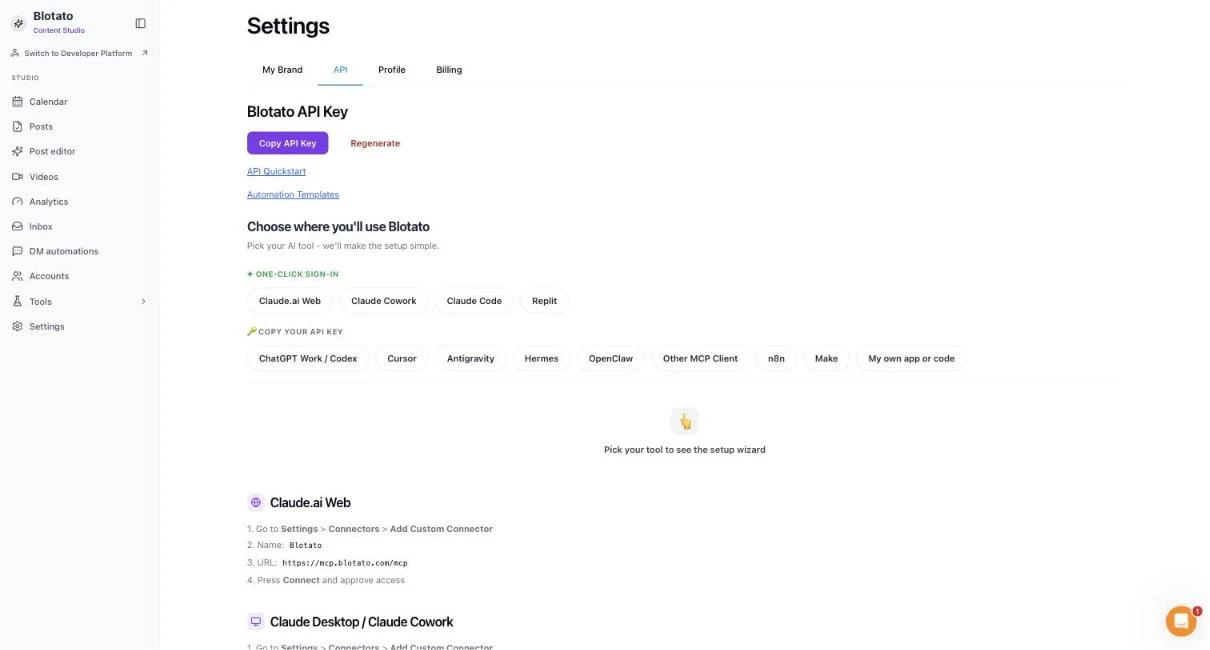
In Blotato open Settings, then API, and choose Copy API Key. Keep the key private.
The Blotato Settings page on the API tab, showing the Blotato API Key heading with the Copy API Key and Regenerate buttons. No key is shown.

Settings, then API. Copy API Key puts your key on the clipboard without showing it on screen.

2

Open Blotato in Connections

Choose Connect or Add connection.
3

Enter the API key

Paste the key from Blotato. ApexGenius supplies the server address and checks the key against your Blotato account.
4

Check the saved connection

Save after validation succeeds. Review the Tools tab. Publishing, messages, automations, deletes and credit actions run when called.
Try a first question with your AI agent
Compare the accounts with the Accounts page in Blotato. Listing accounts publishes nothing and spends no credits.

What your AI can do

Start with blotato_search_tools to see the tools Blotato offers for your account, then run one with blotato_call_tool. Blotato’s tools cover publishing, scheduling, comments, direct messages, analytics, automations, media and credit actions. One connection covers your whole Blotato account and every social account connected to it. ApexGenius treats every Blotato call as able to change something. Enabled calls run when called, and a published post or sent message cannot be recalled from ApexGenius. Review the account, the content and the time before you publish or schedule.

Official Blotato documentation

Blotato documentation is authoritative for subscription requirements, connected social accounts, tools, credits, and billing.
Last modified on October 10, 2026